11
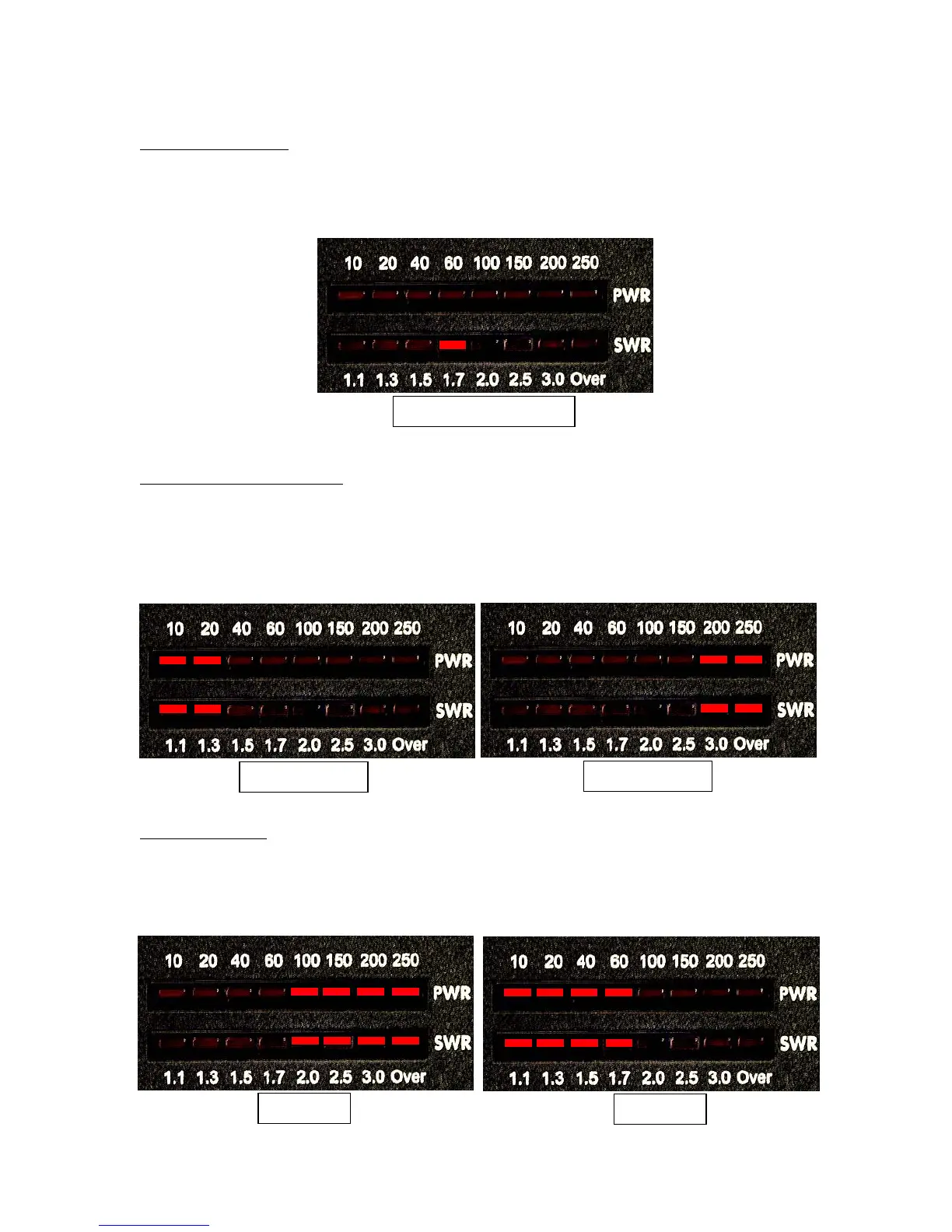
Auto Tune Threshold
: You can set the SWR at which an automatic tuning cycle will begin. press
and release the Func button. Then press and release the L Dn button. The SWR meter will show
the new setting. Repeat this sequence to cycle through the available values (1.1 - 3.5). The default
value is 2.0. The example below shows the threshold set to 1.7.
High/Low Impedance Toggle
: You can manually set your AT-200Pro for Hi-Z or Lo-Z antennas.
Press and release the Func button. While this function is rarely used, it is available for the more
advanced user to temporarily set the tuner to an LC or CL configuration. To toggle the Hi/Lo-Z
setting, press and release the Ant button. The LEDs will show the following patterns to indicate
low and high impedance. This setting is relevant only when you are manually adjusting the match
using the C and L buttons. It is automatically set when you run any automatic tuning cycle.
Antenna Selection
: Press the Ant button to toggle between Ant 1 and Ant 2; the default is Ant 1.
The LED display points toward the selected antenna connector (as viewed from the front of the
unit). You cannot change antennas while transmitting; the antenna selection function is disabled
when RF is present. When you change antennas, the tuner references the last frequency used on
that antenna, and recalls tuning settings for that frequency, if any.
Low Impedance
High Impedance
Antenna 1
Antenna 2
Auto Threshold Display



 To Next Page