DM442 Digital Stepping Drive Manual V1.0
Tel: +000 0000-00000000 20
and try again. Open the tuning software ProTuner and check drive status by clicking Err_check. If
it’s Phase Error, check the motor, motor wirings and try again.
If the RED LED is OFF and the motor is normal, then you can start to tune the servo with ProTuner.
However, we recommend you see the following contents before starting tuning.
Software Introduction
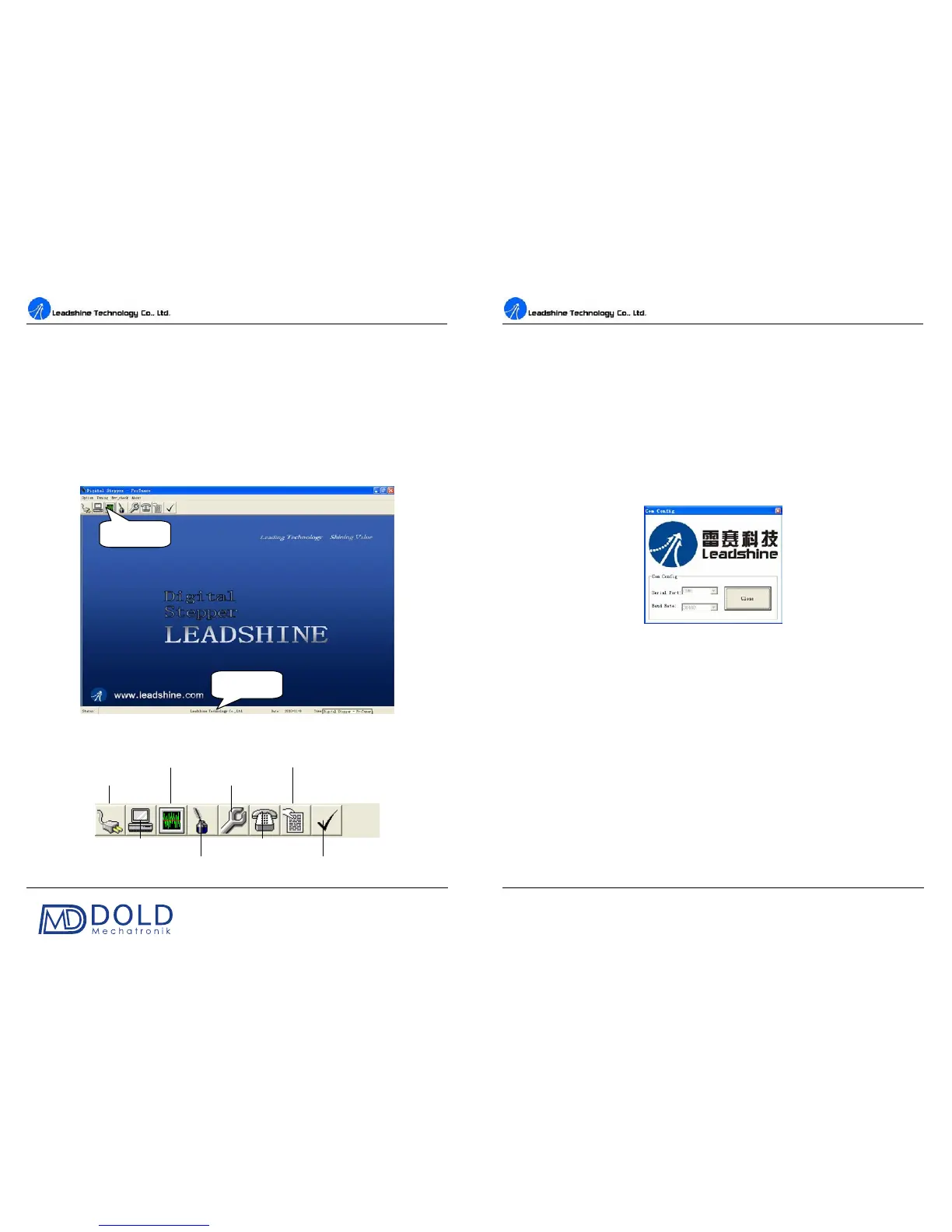
ProTuner Main Window
Figure 20: ProTuner
ProTuner Toolbar
Menu Bar
Status Bar
Com Configuration
Exit
DM442 Digital Stepping Drive Manual V1.0
Tel: +000 0000-00000000 21
Option
The user can choose three drop-down menus by clicking “Option”, including Com Configuration,
Parameters Configuration, and Exit.
Com Configuration: Configure Com communication interface.
Parameteres Configuration: Read/write parameters between the drive and the ProTuner, or
save configuration as a file and load configuration from a file.
Exit: Exit the ProTuner.
Com Config Window
Figure 21: RS232 communication configuration window
Serial Port: Select the serial communication port to which the drive is connected. The factory default
setting is COM1.
Baud Rate: Select the communication baud rate. The factory default setting is 38400.
Click Open button to establish a connection with the specified settings. When connecting, you can
read stored parameter setting from the drive to the ProTuner, or write new parameter s
etting from the
ProTuner to the drive settings in the parameters configuration window.
Parameters Configuration Window
Recommend to always keep this window active. In this window, the user can read the parameter
setting from the drive, or write parameters setting to the drive after finishing to configure all the
settings. In addition, the user can also save the configuration to a file for later use or load a


 To Next Page