DM442 Digital Stepping Drive Manual V1.0
Tel: +000 0000-00000000 22
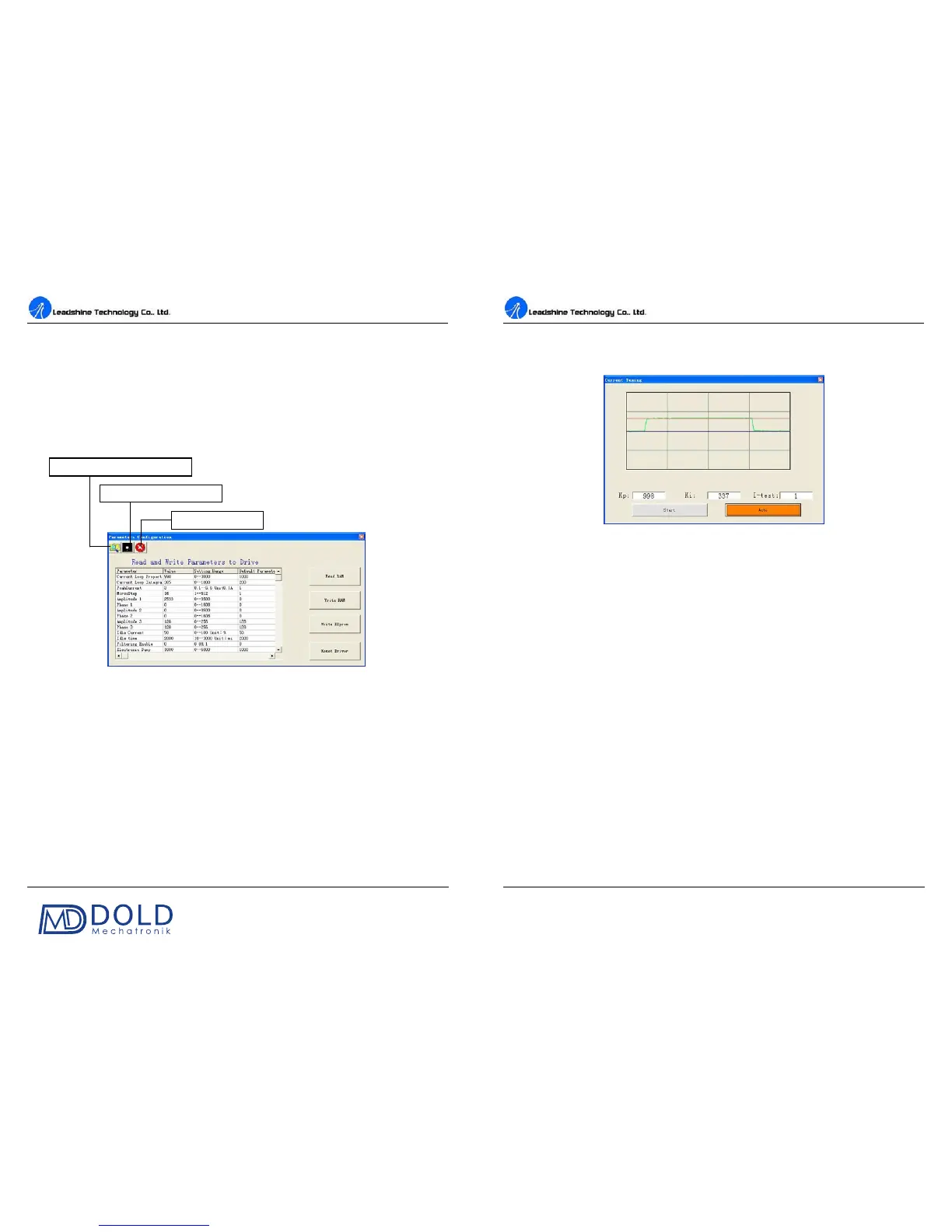
configuration from a stored file. See figure 22.
Read RAM: Read parameter settings from the drive’s RAM to the ProTuner.
Write RAM: Write parameter settings from the ProTuenr to the drive’s RAM.
Write EEprom: Write parameter settings from the ProTuenr to the drive’s EEprom.
Reset Drive: Reset all parameter to default value.
Figure 22: Parameters configuration window
Tuning
The user can choose one or two drop-down menu(s) by clicking Tuning, including CurrentLoop and
SystemConfig.
CurrentLoop: In Current Tuning window, the user can tune the Kp (Proportional Gain) and
Ki (Integral Gain) of drive’s current loop to optimize responses with different motors.
Start/Restart a Step Response test to get an optimum response.
Kp: Proportional Gain. Proportional Gain det
ermines the response of the drive to current setting
command. Low Proportional Gain provides a stable system (doesn’t oscillate), has low stiffness, and
Load configurations from a file
Save configuration to a file
DM442 Digital Stepping Drive Manual V1.0
Tel: +000 0000-00000000 23
large current error, causing poor performances in tracking current setting command in each step like
Figure 23. Too large Proportional Gain values will cause oscillations and unstable systems.
Figure 23: Current Tuning window
Ki: Integral Gain. Integral Gain helps the drive to overcome static current errors. A low or zero value
for the Integral Gain may have current errors at rest. Increasing the Integral Gain can reduce the error.
If the Integral Gain is too large, the systems may “hunt” (oscillate) about the desired position.
Start button: The user can start a Step Response test by clicking this button. Start/Restart
a Step
Response test to get an optimum response like Figure 23, and remember to save the settings to the
drive by clicking Write EEprom in parameters configuration window when finish tuning .
Auto button: Click this button to auto-configure Kp and Ki for the connected motor. It has the same
effect as changing SW4 two times in one second.
info@dold-mechatronik.de
www.dold-mechatronik.de
DOLD Mechatronik
Sarach 10 – D-77790 Steinach
Telefon: +49 7832 / 9744670


 To Next Page