4PSXXIVXIWXW
%% %P]WQEMRXIRERGIQERYEP
8IWXEGXYEXSVWWIRWSVW
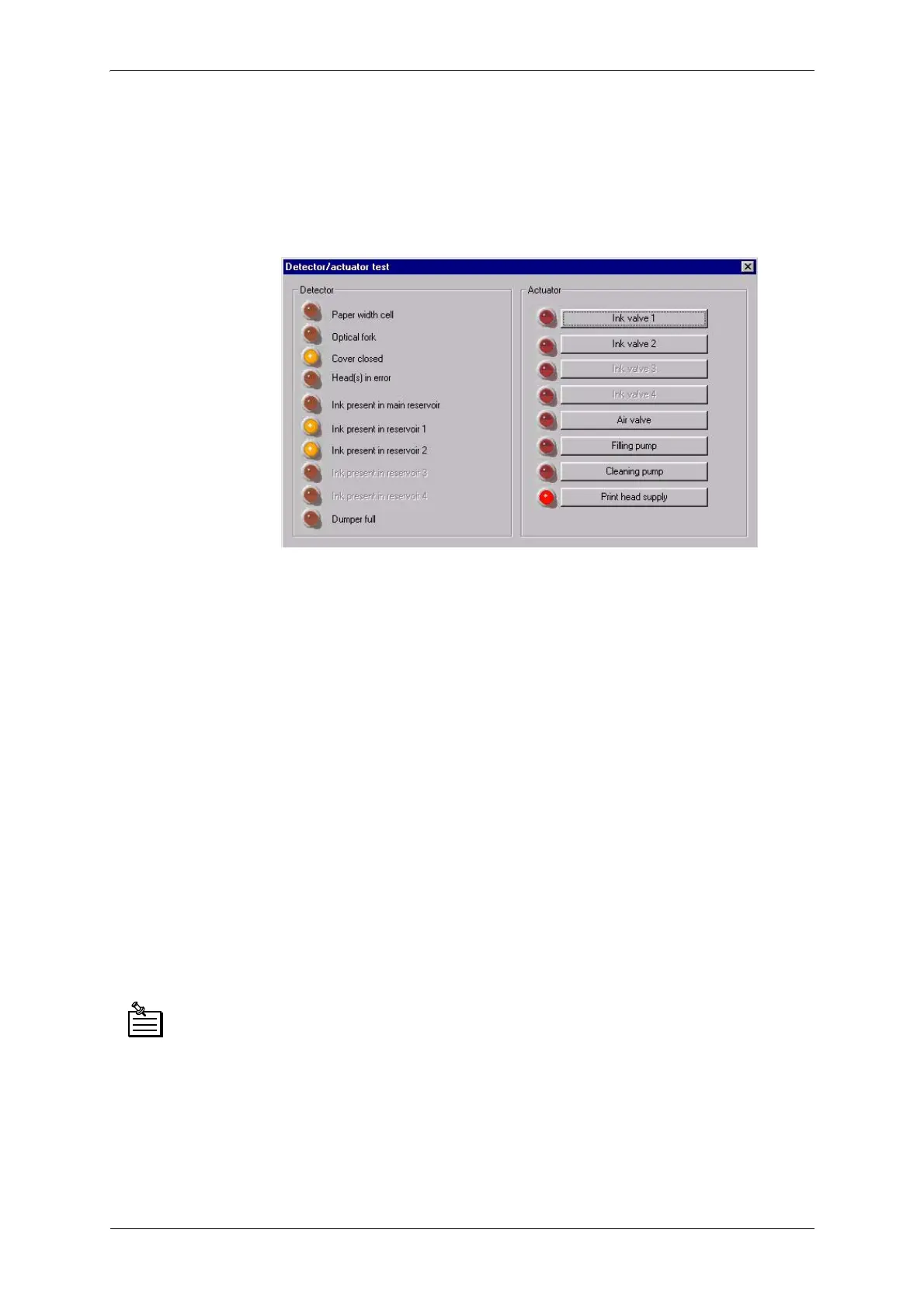
Click the “Test actuators/sensors” button in the “Advanced functions”
window. The following window appears:
Several different tests will be performed through this interface:
- test of all plotter sensors and cover detection switch adjustment
- test of all solenoid valves,
- test of all fill pumps and purge pumps of the ink circuit (only if “Activate
commands reserved for experts” was checked in the previous “Advanced
functions” window).
)RUVRPHWHVWVWKHSURWHFWLYHFRYHUXVHGIRUWKHSULQWKHDGVZLOOQHHGWREH
UHPRYHG
Follow the instructions given in the chapter 0HFKDQLFDOPDLQWHQDQFH §
'LVPDQWOLQJWKHSULQWLQJKHDG5HPRYLQJWKHSURWHFWLYHKHDGFRYHU
Sensor LEDs activated:
$O\V$O\V/: Ink reservoir 1
$O\V$O\V/: Ink reservoir 1 and ink reservoir 2 (as seen in
above image)
$O\V$O\V/: Ink reservoir 1, Ink reservoir 2, Ink
reservoir 3 and Ink reservoir 4



 To Next Page