LECTROSONICS, INC.10
Using SmartTune
TM
SmartTune is the easiest and fastest way to scan the local RF spectrum
and find clear operating frequencies.
SETUP
SMARTUNE
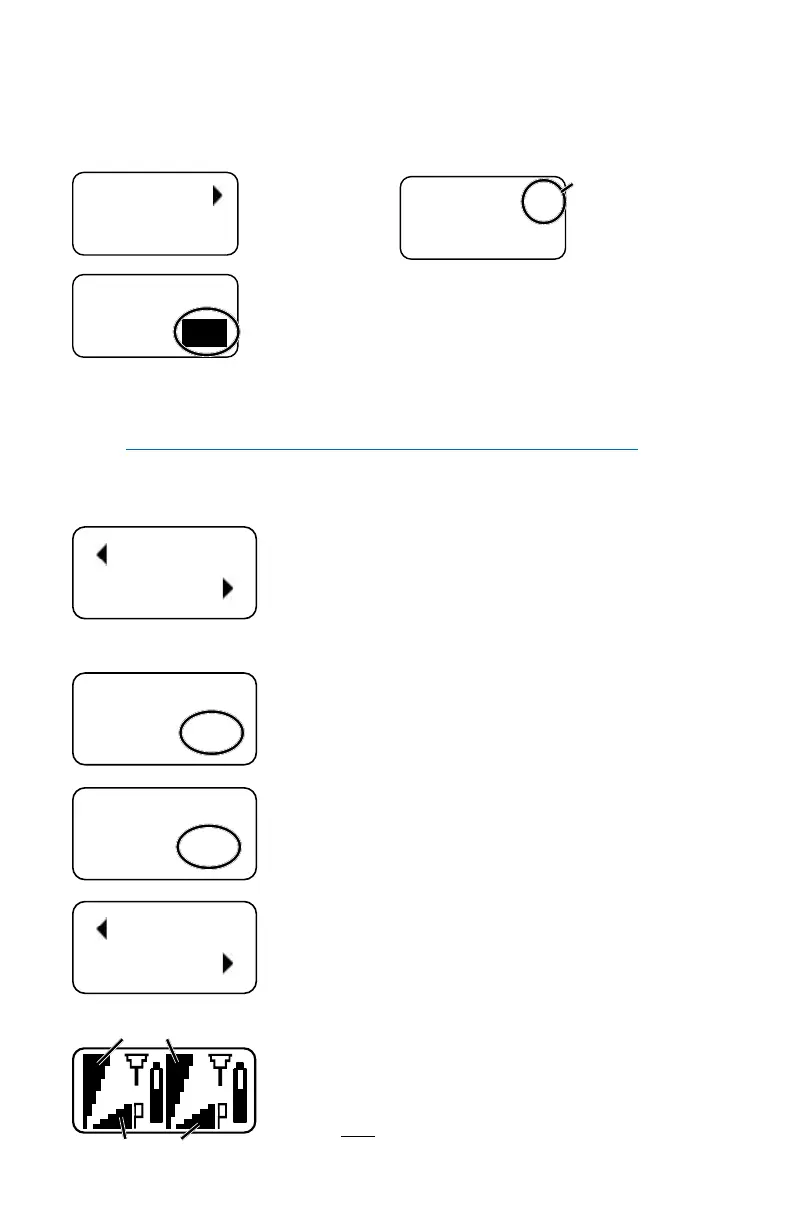
Navigate to the
SMARTUNE screen
and press MENU/
SEL.
SMART
TUNE
1
Use the UP and
DOWN arrows to
select receiver 1
or 2, and press
MENU/SEL.
TX 1
BAND
B1
The scan can cover all three blocks in the band, or only one
of the three. Use the UP and DOWN arrows to select the
tuning range to be scanned:
B1 - the entire Band B1
21 - block 21 only
22 - block 22 only
23 - block 23 including TV37
23N - block 23 bypassing TV37*
B1N - Band B1 bypassing TV37*
*NOTE: 23N and B1N (“N” refers to North America) scans skip
past TV Channel 37 (608 to 614 MHz) since it is reserved for radio
astronomy in North America.
OK
SYNC
1
After the scanning is complete, the
newly discovered frequency will be set
automatically. The LCD will then prompt
to SYNC the frequency to the matching
transmitter via the IR port (DOWN
ARROW), or to continue by pressing OK
(MENU/SEL).
TUNE RX2
NOW? YES
After leaving the SYNC screen, the
LCD will ask about setting up the other
receiver. Use the UP and DOWN arrows
to select YES to tune the other receiver,
then press MENU/SEL to continue.
IS TX1
ON? YES
Turn on the transmitter that matches the
rst receiver that was tuned. Use the
UP and DOWN arrows to select YES and
press MENU/SEL.
OK
SYNC
2
After the scanning is complete, the
newly discovered frequency will be set
automatically. The LCD will then prompt
to SYNC the frequency to the matching
transmitter via the IR port (DOWN
ARROW), or to continue by pressing OK
(MENU/SEL).
Press the BACK button several times
to return to the Main Screen and verify
that both transmitters show a strong RF
signal strength and that the Pilot Tone
icons are NOT blinking.
Pilot Tone icons (P)
RF signal strength



 To Next Page