www.lectrosonics.com 11
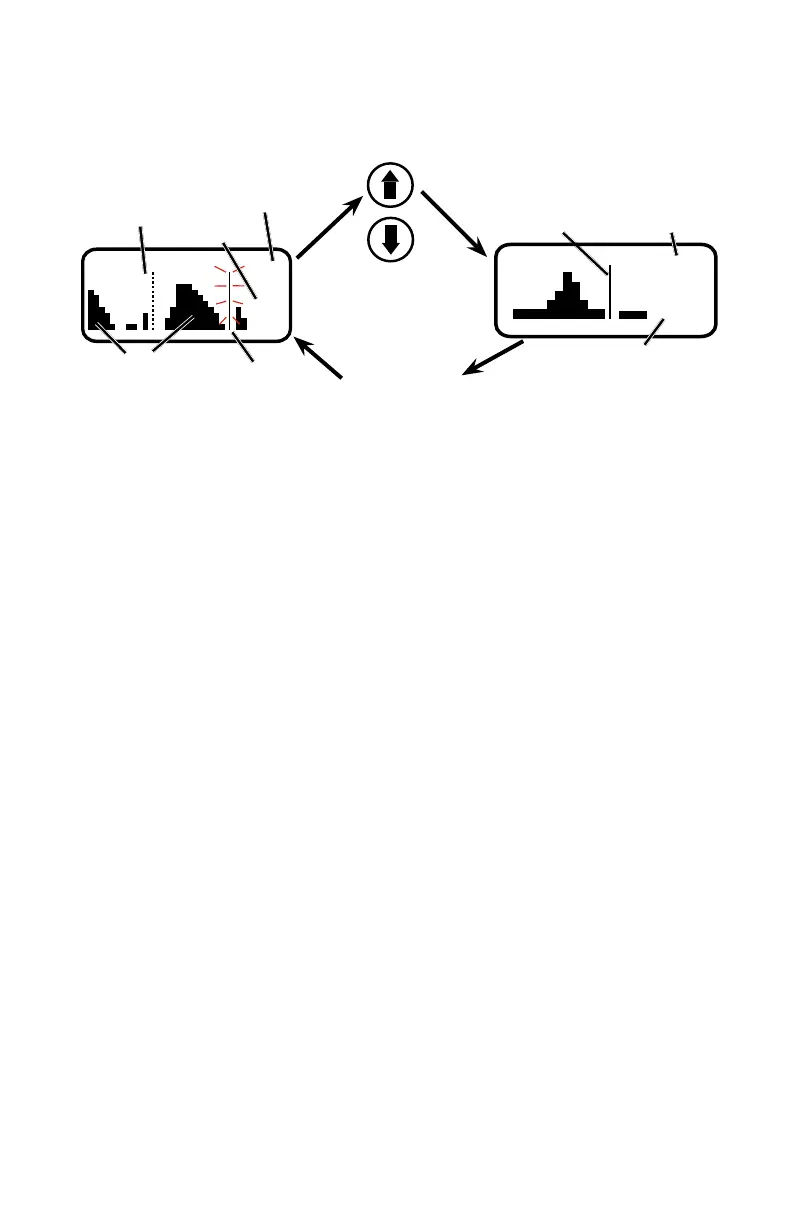
Manual Scanning
Scan Window
Zoom View Window
Press both UP and DOWN
arrows on control panel to
switch to the Zoom View
Press the BACK
button to return
to the Scan View
Window
Block
Dashed line (cursor)
shows the currently
selected receiver
RF activity
level
Previously tuned
frequency
Freq
in hex
Cursor (center bar)
Freq in
hex
Block
First, turn o all of the transmitters you intend to use with the receiver.
Navigate to the SETUP/SCAN screen and press the MENU/SEL button to
start the scanner. The display will switch to the Scan Window (see illustra-
tion above) and start scanning immediately. Allow the receiver to scan
across the entire tuning range at least once, then press the MENU/SEL
button to stop the scanning.
Scroll through the screen with the UP and DOWN buttons and find a
frequency where no (or very weak) RF signals are present. Press the PWR/
BACK button to set the receiver to this new frequency.
Press both the UP and DOWN buttons at the same time to switch to the
Zoom View Window (see illustration above). In this view, the cursor re-
mains fixed in the center of the screen and the background scrolls behind
it. The frequency can be stepped up and down in 100 kHz increments us-
ing the UP and DOWN arrow buttons.
When the receiver is configured for SWITCHED diversity (dual chan-
nel mode), two cursors will appear when the scanning is stopped. Press
MENU/SEL to toggle between the two receivers. The cursor for the se-
lected receiver will be a dashed rather than solid line. Select each receiver
and use the UP and DOWN buttons to locate a frequency with no (or very
weak) RF activity.
Keep the frequencies of the two receivers at least 700 kHz apart to mini-
mize de-sensing (short range) issues. This spacing is a “worst case” ap-
proximation assuming the transmitters are about 25 feet from the receiver
antennas.
Data gathered during a scan is stored until it is intentionally erased or the
power is turned off. Previous data will remain and subsequent scans can
be made to search for additional signals or to accumulate higher peaks.
To clear the scan memory and screens, press the back button several
times to return to the Main Window, then press and hold the PWR/BACK
button briefly. As soon as Powering o... appears on the display, release
the button. The receiver will remain turned on, and the scan data will be
erased.



 To Next Page