10
2. Preparation / 2.1 Assemble and charge
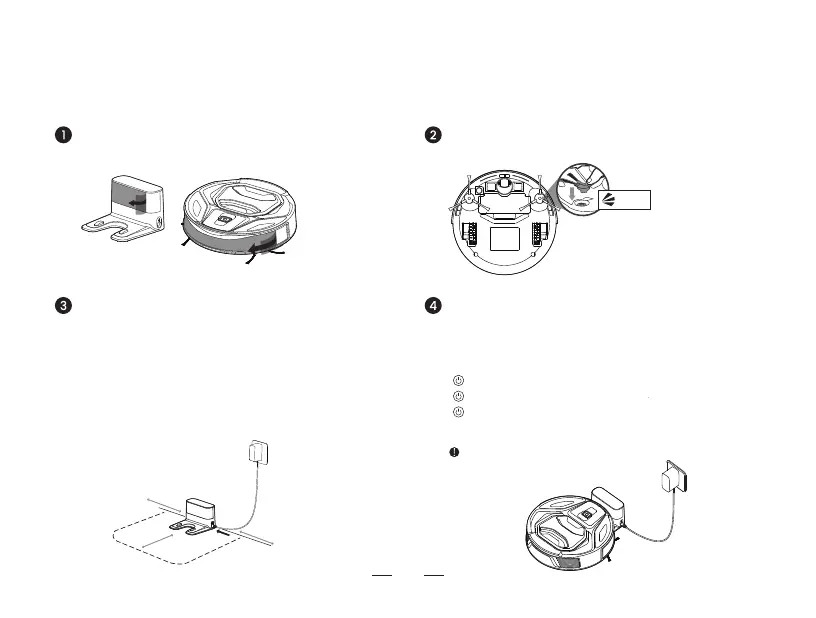
Remove the protective film on the robot and
docking station
Place the robot with its button side facing the
docking station. When the button light starts to blink,
it indicates correct placement. (As shown below)
A purple blinking light indicates the battery is below 50%.
A blue blinking light indicates the battery is above 50%.
No light means the battery is fully charged.
Charging time is approximately 4 hours.
Charging
5QFHJYMJITHPNSLXYFYNTSFLFNSXYYMJ\FQQTSFƵFY
surface. Ensure there are no items within 0.5m to
the left or right and 1.5m in front to avoid blocking
the charging signal.
&[TNIMF[NSLWJƵJHYN[JTGOJHYXXZHMFXƵTTW
mirrors, near the docking station to prevent signal
WJƵJHYNTS
Placement of the docking station
/ connection of power supply
Install the side brushes
The robot will turn on automatically if charging
while powered off.
>1.5m
(4.92’)
>0.5m
(1.64’)
>0.5m
(1.64’)
Click



 To Next Page