16
If the following problems occur in the application process of the product, users can resolve them independently by
comparison and inquiry.
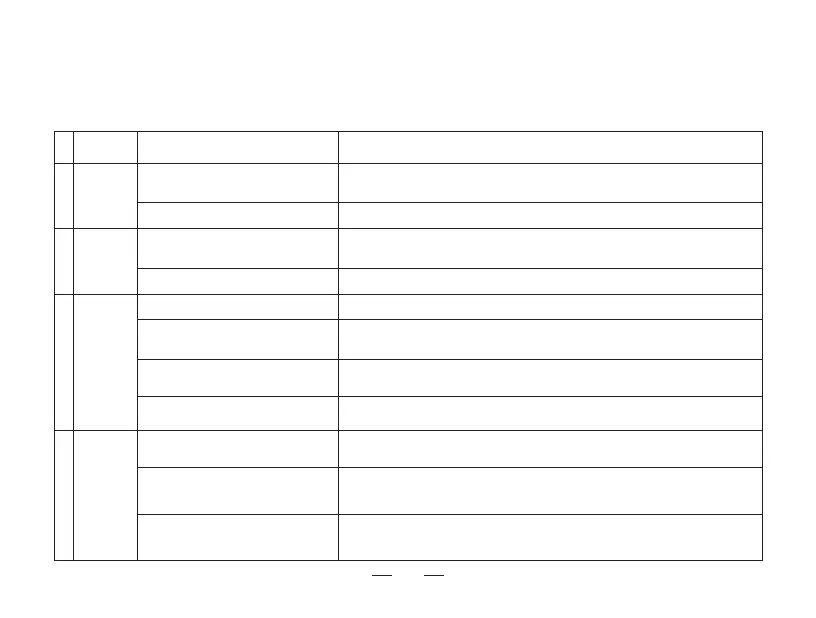
4. Abnormal symptoms / 4.2 Troubleshooting
* If the fault cannot be eliminated according to the operation in the table, contact our customer service representative.
Please refer to the manual's chapter [App download and configuration].
Abnormal
cleaning
.YNXWJHTRRJSIJIYTWJUQFHJHTSXZRFGQJXWJLZQFWQ^XZHMFXMNLMJKƴHNJSH^
ƴQYJWX-*5&UWJƴQYJWXNIJGWZXMJXJYH
Please refer to the chapter [Maintenance] of the manual to clean the robot.
Unable to
connect to
App
)NKƴHZQYYT
return and
charge
Unable to
charge
It's recommended to use this product regularly. If not used for an extended period,
charge fully, turn off the robot, and ensure it's charged once a month. If the
battery can't be charged, please contact after-sales service.
Ensure that the charging electrode of the robot and the charging base are fully
connected, and clean the charging electrode of the robot and the docking station
regularly.
Check if both ends of the power cord are connected and if the charging base
indicator light is on.
Please refer to the chapter [Using environment preparation] of the manual.
Please check whether the charging base is connected to the power supply. Do not
move the position of the charging base when the robot is working.
5QJFXJUQFHJYMJHMFWLNSLXYFSINSFSTUJSFSIƵFYFWJF
3TYJSYJWJI<N+NUFNWNSLRTIJ
2.4G Hz network isn't used.
Cleaning components blockage
Dust on sensors and other components
Incorrect placement of charging base
The charging stand is powered off or
moved manually
The home is too large, and the
environment is complex
Let the robot clean from the docking station.
The robot didn't clean from the
docking station
The power supply is not connected, or
the plug is loose
Poor contact between the robot and
the charging electrode of the docking
station
'FYYJW^IJYJWNTWFYNTSHFZXJIG^
non-long-term use
Possible causesFault SolutionsS/N
1
4
2
3
0JJUUWJXXNSLYMJ8YFWYUFZXJGZYYTSKTWXJHTSIX*SYJWNSL<N+NUFNWNSLRTIJ
Please refer to the manual's chapter [App download and configuration].



 To Next Page