8
1. Product introduction / 1.2 How to use buttons
Indicator Meaning
Indicator statusRobot status
Cleaning
Pause/standby
Charging
Low battery-automatic
return and charge
Cleaning complete-automatic
return and charge
Enter network pairing mode
Distribution Network Success
'QZJQNLMYTS
'QZJQNLMYTS
5ZWUQJ'QZJ'WJFYMNSL
Red light on
Purple light on
'QZJQNLMYƵFXM
Error
7JIQNLMYTSƵFXM
'QZJQNLMYTS
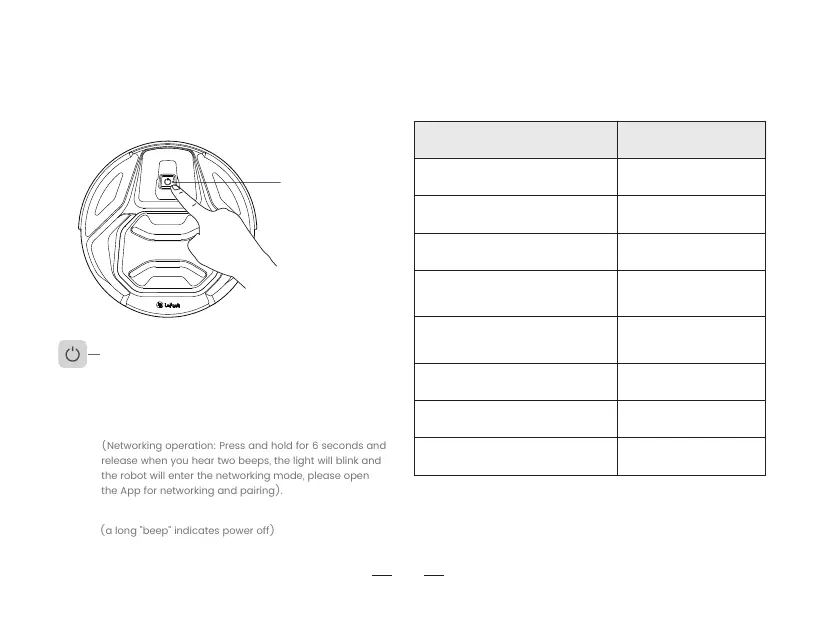
Start/pause button
How to use buttons
Hold for 3 seconds: Turn on
+FXYUWJXXStart/Pause (planned cleaning)
+FXYUWJXXY\NHJAuto-recharge
Hold for 6 seconds: Enter network pairing mode
(a long "beep" indicates power off)
(Networking operation: Press and hold for 6 seconds and
release when you hear two beeps, the light will blink and
the robot will enter the networking mode, please open
the App for networking and pairing).
Hold for 12 seconds: Turn off (a long "beep" indicates power off)



 To Next Page