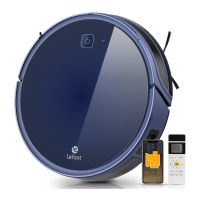
The Lefant F1 Intelligent Robot Vacuum Cleaner is designed to provide an efficient and convenient cleaning experience for your home. This robot vacuum is equipped with a range of features to ensure thorough cleaning while minimizing user intervention. Its primary function is to autonomously vacuum and mop floors, helping to maintain a high-quality living environment.
Function Description
The Lefant F1 operates as a dual-function cleaning device, capable of both vacuuming and mopping. It is designed for indoor use, navigating around furniture and obstacles to cover a wide cleaning area. The robot utilizes anti-falling sensors to prevent it from falling down steps or stairs, ensuring safe operation in multi-level homes. It also features anti-collision sensors to detect and avoid obstacles, protecting both the robot and your furniture. The device is powered by a rechargeable battery and automatically returns to its docking station for recharging when necessary.
Usage Features
The Lefant F1 offers several user-friendly features to enhance its functionality and ease of use:
- Preparation for Cleaning: Before operating the robot, it is recommended to arrange the room by moving chairs, floor fans, and weighing scales to maximize the cleaning area. Wires, cleaning pads, and slippers should be put away to prevent them from getting stuck in the robot. For carpets with tassels, it's advisable to place the tassels below the carpet to avoid entanglement. The floor-mopping function should not be used on carpets.
- Initial Setup: The robot requires minimal setup. Users need to remove protective films from both the docking station and the robot itself. The side brushes are easily installed by pushing them into their sockets until a click sound is heard.
- Charging: The docking station should be placed against a wall on flat ground, ensuring no objects are within 0.5m on both sides and 1.5m in front. The power supply is then connected, and the power line should be arranged to prevent entanglement. The robot is charged by placing it on the docking station, aligning the charging electrodes. A slow lighting and dimming ice blue light on the start/pause button indicates charging, while the light turning off signifies a full charge, which typically takes 4-5 hours.
- Power On/Off: The robot is turned on or off by pressing and holding the start/pause button for three seconds. It is recommended to keep the robot turned on and in its charging base after cleaning to prevent unnecessary battery loss.
- Control with Buttons: The robot can be controlled directly using its physical buttons:
- Start/Pause Button: A single press starts or pauses cleaning. Holding it for 3 seconds turns the robot on/off. Double-clicking initiates automatic recharge.
- Timer Button: A single press sets or refreshes a scheduled daily cleaning at the current time. Double-clicking turns off timing. Holding it for 3 seconds changes the suction level.
- WiFi Pairing: Simultaneously pressing the start/pause button and the timer button for 3 seconds enters WiFi pairing mode.
- App Control: The Lefant F1 can be controlled via a dedicated mobile application. The app can be downloaded by scanning a QR code or searching "Lefant" in app stores. The app allows users to register, log in, and pair the robot. It's important to ensure the mobile phone is connected to a 2.4-GHz WiFi network, as the robot only supports this frequency.
- Floor-Mopping Function: The manual illustrates a process for mopping, which involves attaching a mop support and re-usable mop, presumably after filling a water tank or wetting the mop. The maintenance section also shows how to detach and clean the mop components.
- Virtual Wall with Magnetic Strip: A magnetic strip is provided to define areas where the robot should not clean, such as bathrooms or places where it might get stuck. The strip is placed on the ground across the entrance to the restricted area. For best performance, the strip should be placed on dry ground. It can be cut to size with scissors if needed.
- Scheduled Cleaning: The robot supports scheduled cleaning, which can be set and removed via the timer button or the app.
- Suction Level Adjustment: The suction level can be adjusted by holding the timer button for 3 seconds, allowing users to customize cleaning intensity.
Maintenance Features
Regular maintenance is crucial for the optimal performance and longevity of the Lefant F1. The manual provides clear instructions for cleaning various components:
- Dust Bin and HEPA Filter:
- The dust bin is removed by lifting its handle.
- The dust is dumped by opening the dust bin lock latch.
- The dust filtering components, including the pre-filter and HEPA filter, are removed.
- The pre-filter is cleaned using the brush on the cleaning tool, ensuring both inner and outer surfaces are cleaned.
- The HEPA filter is cleaned with the brush of the cleaning tool.
- Important Note: Neither the dust bin nor the HEPA filter should be washed with water.
- Suction Inlet and Side Brushes:
- The suction inlet should be cleaned regularly.
- The side brushes are unplugged and wiped with a clean cloth.
- Driving Wheels and Mecanum Wheel:
- The driving wheels should be cleaned.
- The mecanum wheel should be cleaned, and any tangled hair removed to ensure smooth movement.
- Other Components:
- Anti-collision Sensor: This sensor should be cleaned to maintain its effectiveness in detecting obstacles.
- Anti-falling Sensors: These sensors need to be cleaned to guarantee their sensitivity and prevent the robot from falling.
- Charging Electrodes: The charging electrodes on both the robot and the docking station should be cleaned with a duster cloth to ensure proper charging contact.
By following these usage and maintenance guidelines, users can ensure their Lefant F1 Intelligent Robot Vacuum Cleaner operates effectively and provides a consistently clean home.

 Need help?
 General

 To Next Page