13
1
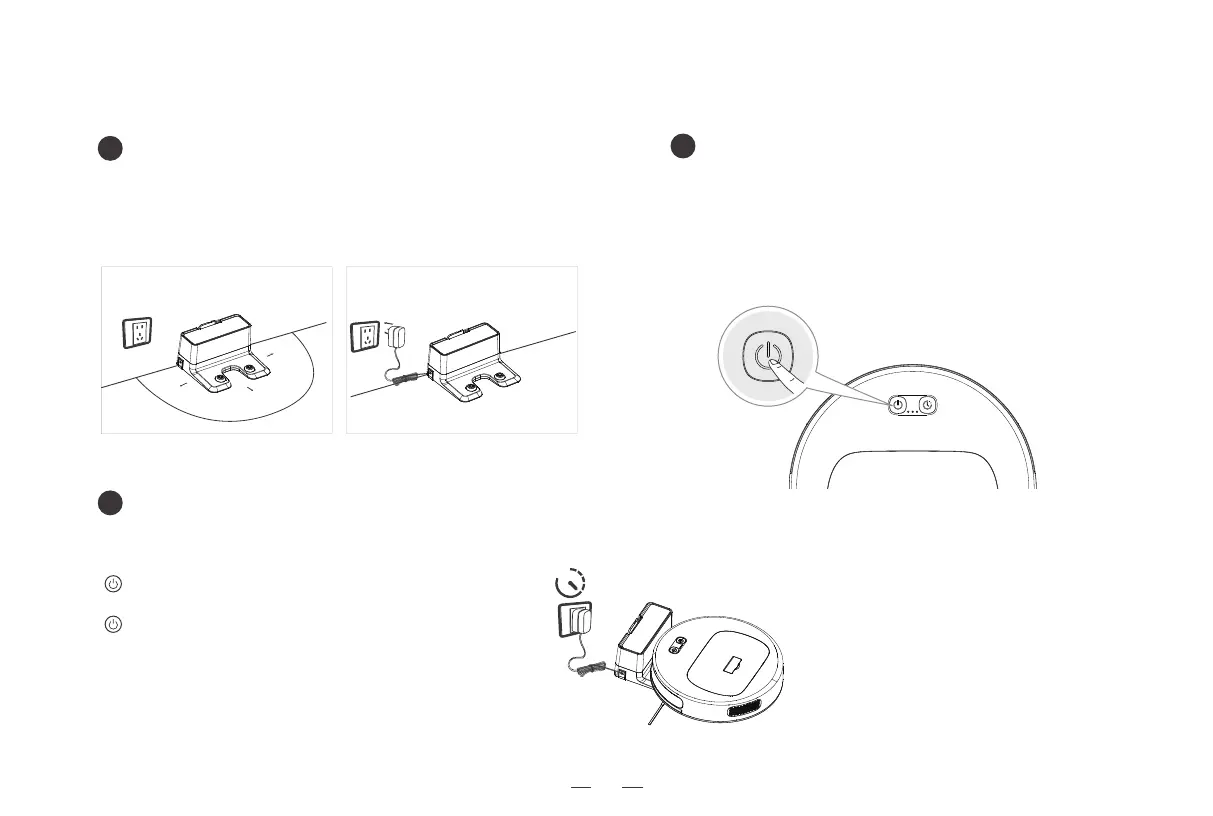
Placement of the charging base/
connection of power supply
2
Turning on the robot
3
Charging the robot
2. Using the product / 2.3 Charging the robot
≥
4-5h
Place the robot at Docking Station and make sure to align the charging electrodes
on the robot and the Docking Station.
[Start/pause button] Slow lighting and dimming
of the ice blue color indicates the product is charging;
[Start/pause button] After the robot is fully charged,
the Start/pause button will turn off.
A full charge takes 4 – 5 hours.
Keep pressing the [start/pause button] for three seconds to turn
on/off the robot.
To charge the robot, the robot must be turned on.
It is recommended not to turn off the robot after it finishes cleaning.
Keep the robot in its charging base to prevent unnecessary loss of
battery life.
* Place the charging base against the wall and on flat ground. Make sure that
no objects are placed within 0.5m on both sides and 1.5m in the front.
* Connect the power supply.
* Please arrange power line to avoid machine twining.
Placement of the Docking Station Connection of the AC adapter



 To Next Page