23
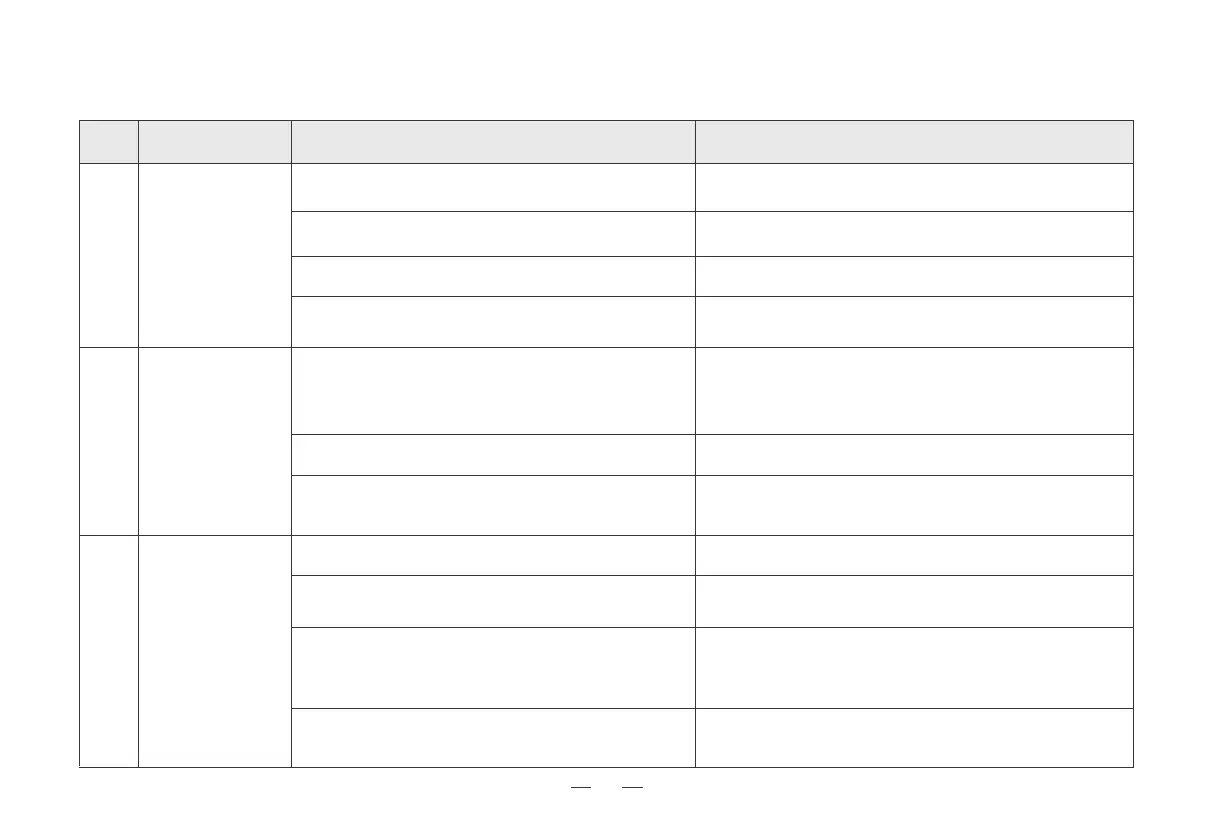
5. Troubleshooting / 5.1 Robot working
Ensure the sufficient connection of the robot and the charging
electrodes of charging base. Check whether the robot and the
charging electrodes of charging base are dirty, and clean by
reference of Chapter [Maintenance and Servicing ] in instruction
book.
The robot doesn't support the 5G network temporarily.
Please use the 2.4-GHz distribution network upon networking.
The user name and password of router are inaccurate.
The robot is beyond the coverage range of network
signal of router.
The robot is at the status to be configured or not.
2.4-GHz network isn't used.
Charging base is placed at inaccurate position.
Charging base powers down or is manually moved.
The robot gets stuck in the ground obstacles
(such as wire, electric fan base, etc.), which causes
it can't arrive at the position of charging base.
The robot doesn't start from charging base for cleaning.
The robot
can't
access to App
1
2
3
Please place charging base correctly in the method in
Chapter [Robot Charging] of instruction book.
Please check whether the charging base connects the power
supply. Do not manually move the charging base position in
the operation of the robot.
It is suggested to arrange the ground articles before use of robot
by reference of [Precautions] in the instruction book in order to
guarantee smooth robot running and avoid jamming, and keep
the change-back route smooth.
The router network is configured to ensure that the "user name"
and "password" of router are accurate.
The robot can't be
charged.
The robot change-
back is difficult.
The robot and the charging electrodes of
charging base have poor contact.
Charging base fails to connect power.
Ensure the charging base power has been connected and
the interface of charging base has been plugged.
S/N Fault Possible causes Solution
Ensure that the robot is within the coverage range of network
signal of router.
The network can be configured only when the robot is at the status
to be configured. Please refer to [distribution network mode].
Nonuse for a long time causes the battery function
attenuation.
It is suggested to use the product frequently. If the nonuse for a
long time causes the battery can't be charged, please contact the
after-sales service personnel.
It is suggested that the robot starts from charging base for
cleaning.
If the following problems occur in the application process of product, user can solve them independently by comparison and inquiry.



 To Next Page