55
DAKER DK Plus
1 kVA - 2 kVA - 3 kVA
Installation manual
4.7 Settings shortcuts
There are two settings shortcuts:
- Bypass Mode: while the UPS is in normal mode (on-line, double conversion) press the ON key
and the UP key simultaneously for approximately three seconds, until the buzzer
sounds twice. The UPS transfers from normal mode to bypass mode. During this functioning
mode, the bypass LED blinks and the buzzer sounds intermittently. Press again the ON
key and the UP key simultaneously until the buzzer sounds twice to return to nor-
mal mode.
- Eco Mode: while the UPS is in normal mode (on-line, double conversion) press the UP key
and the DOWN key simultaneously for approximately three seconds, until the buzzer
sounds twice. The UPS transfers from normal mode to eco mode. During this functioning mode,
the bypass LED is on. Press again the UP key and the DOWN key simultane-
ously until the buzzer sounds twice to return to normal mode.
4.8 Emergency Power Off (EPO)
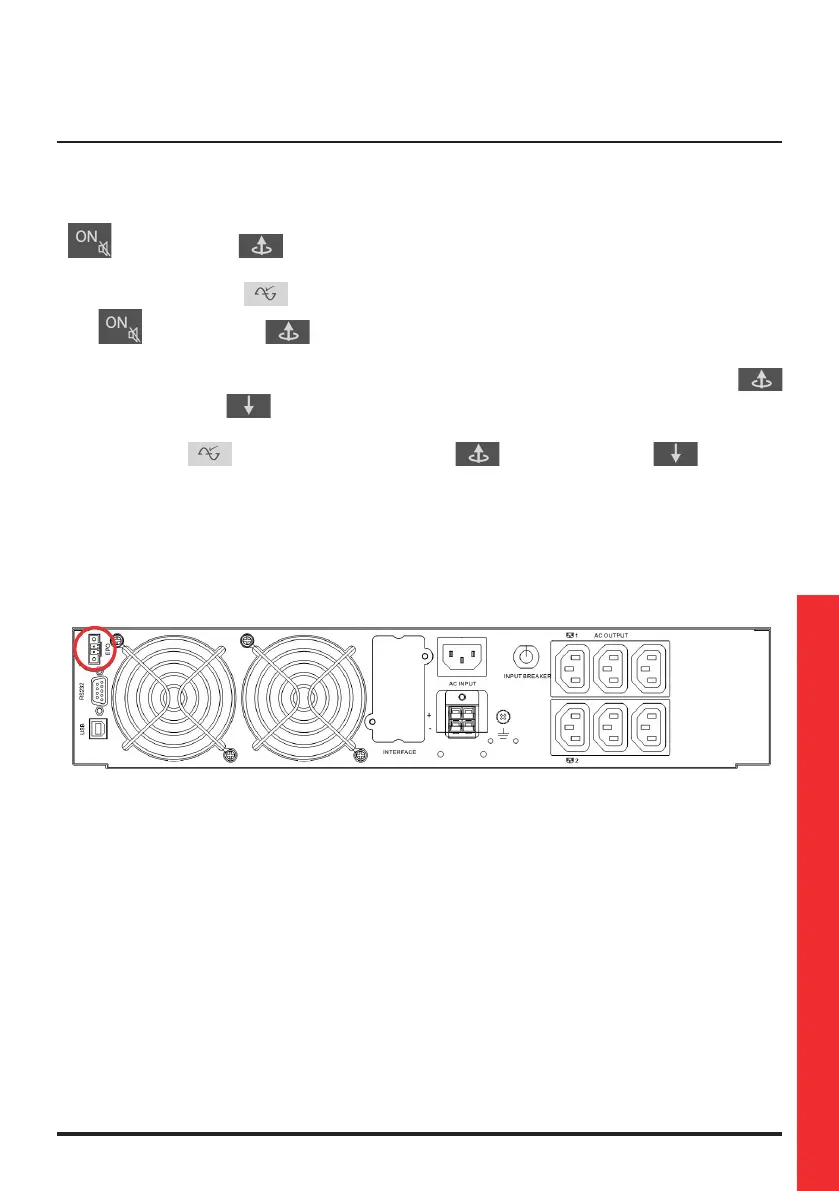
The UPS has an external normally closed contact that can be opened to activate the immediate
stop of the UPS.
The EPO terminal is at the back of the UPS and it is needed for the functioning of the UPS.










 To Next Page