16
Instruction manual V3.2 – 02/2002
7. Setting up the instrument
230
1
3
3
5
4
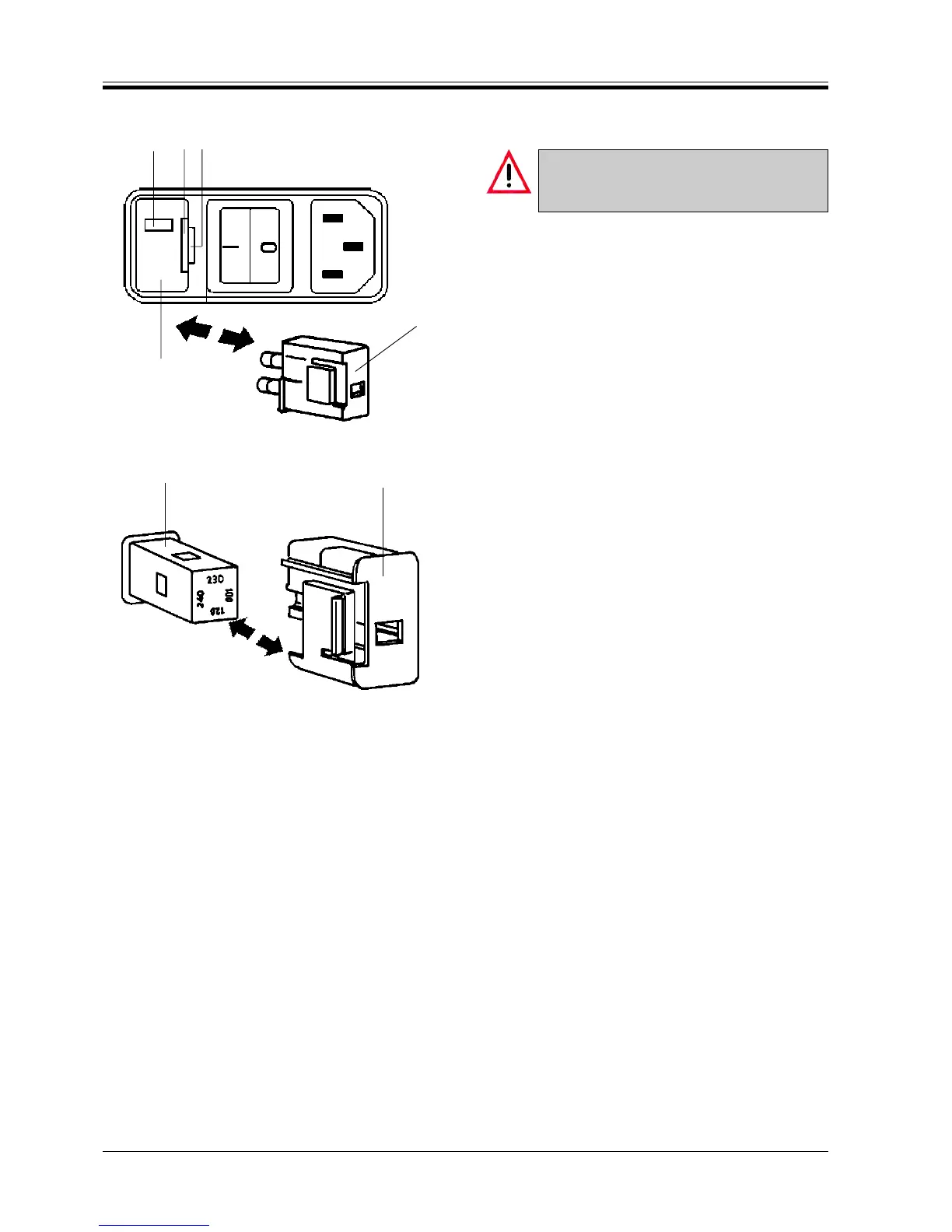
Fig. 16.1
3
6
Fig. 16.2
7.1.2 Changing the voltage selector setting
Do not change the voltage selector setting,
with the instrument being connected to the
mains.
• Place the tip of the smaller one of the two screw-
drivers into the small recess (4) of cover (5) and push
very carefully, using the screwdriver as a lever, to
remove the housing.
• Pull out the voltage selector housing (3).
• Remove the voltage selector (6) from the housing
and reinsert it so that the appropriate value shows
in the indication window (1).
• Reinsert the housing (3) together with the fuses into
the instrument, push lightly to lock it in place.
• Check again whether the correct voltage shows in
window (1).



 To Next Page