41
Leica RM 2145 – Rotary Microtome
11 Maintenance
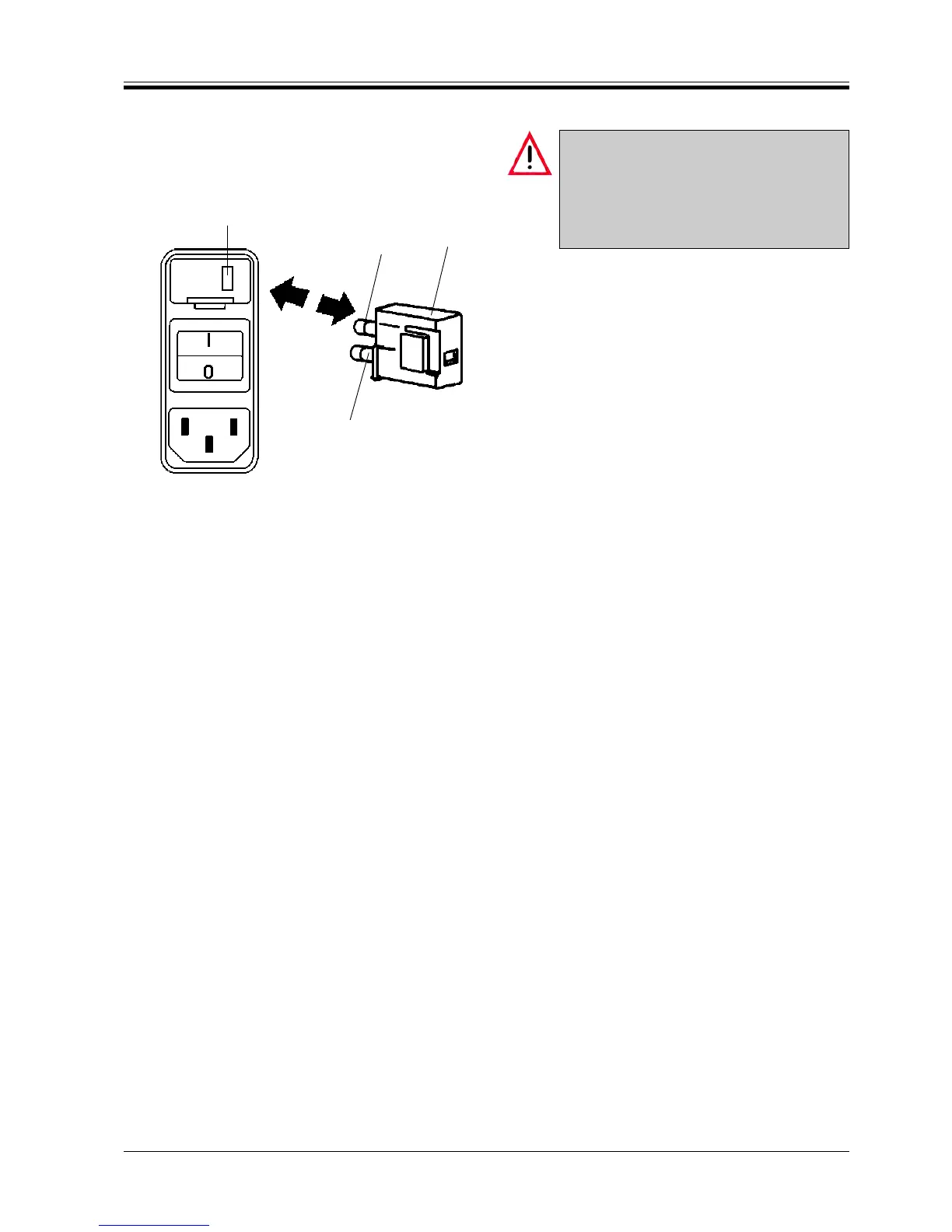
Fig. 41
5
4
3
4
11.3 Replacing the fuses
Before exchanging the fuses, switch the in-
strument off and pull the mains plug!
When exchanging fuses, only use replace-
ment fuses with the same specification as the
original ones. - Refer to chapter 4 ‘Technical
data’ for the correct specifications.
The mains fuses are located in the voltage selector
housing (3).
• Remove the voltage selector housing (3) (see chap-
ter 7.1.2 ‘Changing the voltage selector setting’.
• Remove the fuses (4).
• Insert new fuses of the same technical specifica-
tion.
The selected voltage setting shows in the small indi-
cation window (5) in the voltage selector housing.
• Reinsert the housing together with the fuses into
the instrument, push lightly to lock it in place.
• Check again whether the correct voltage shows in
window (5).



 To Next Page