30
Instruction manual V3.2 – 02/2002
8. Daily routine operation
1
4
2
3
5
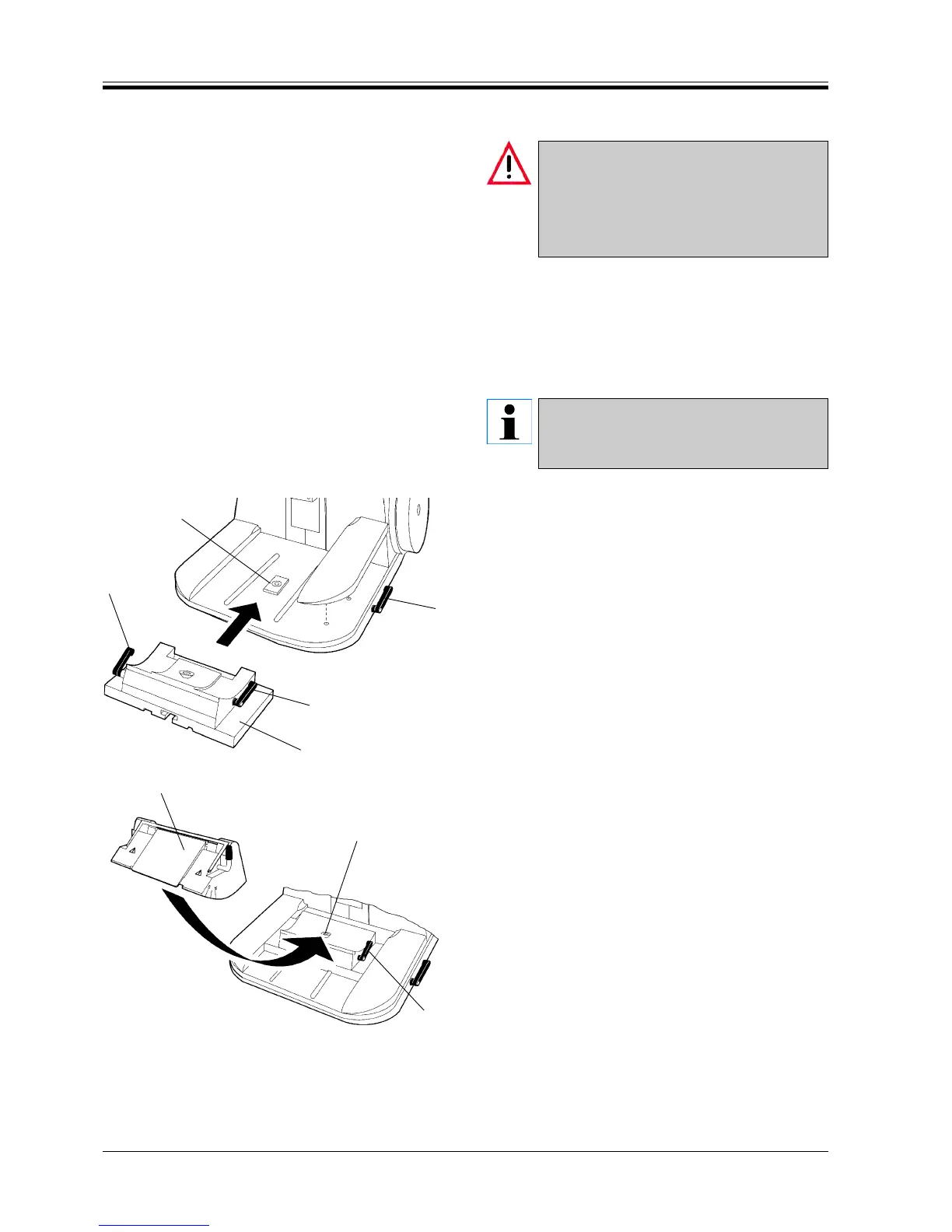
Fig. 30.1
Fig. 30.2
5
6
4
8.3 Clamping the specimen
Always clamp the specimen before clamping
the knife!
Before manipulating knife or specimen/before
changing specimens: always lock the
handwheel!
• Rotate the handwheel to move the specimen clamp
to the top of the cutting stroke.
• Lock the handwheel.
• Insert the specimen into the specimen clamp.
Please refer to chapter 11 ‘Optional accesso-
ries’ on how to clamp the specimens into the
individual specimen clamps.
8.4 Installing the knife holder base
• To release, turn the lever (1) counterclockwise.
• Place the universal knife holder base (2) with two
clamping levers (3) and (4) onto the ‘T’ piece (5) of
the microtome base plate.
• Turn lever (1) clockwise to tighten the knife holder
base.
8.5 Installing the knife holder
• To release lever (4) rotate counterclockwise.
• Install the knife holder (6) onto the ‘T’ piece (5) of
the knife holder base.
• Rotate lever (4) clockwise to clamp.



 To Next Page