52
Instruction manual V3.2 – 02/2002
12. Optional accessories
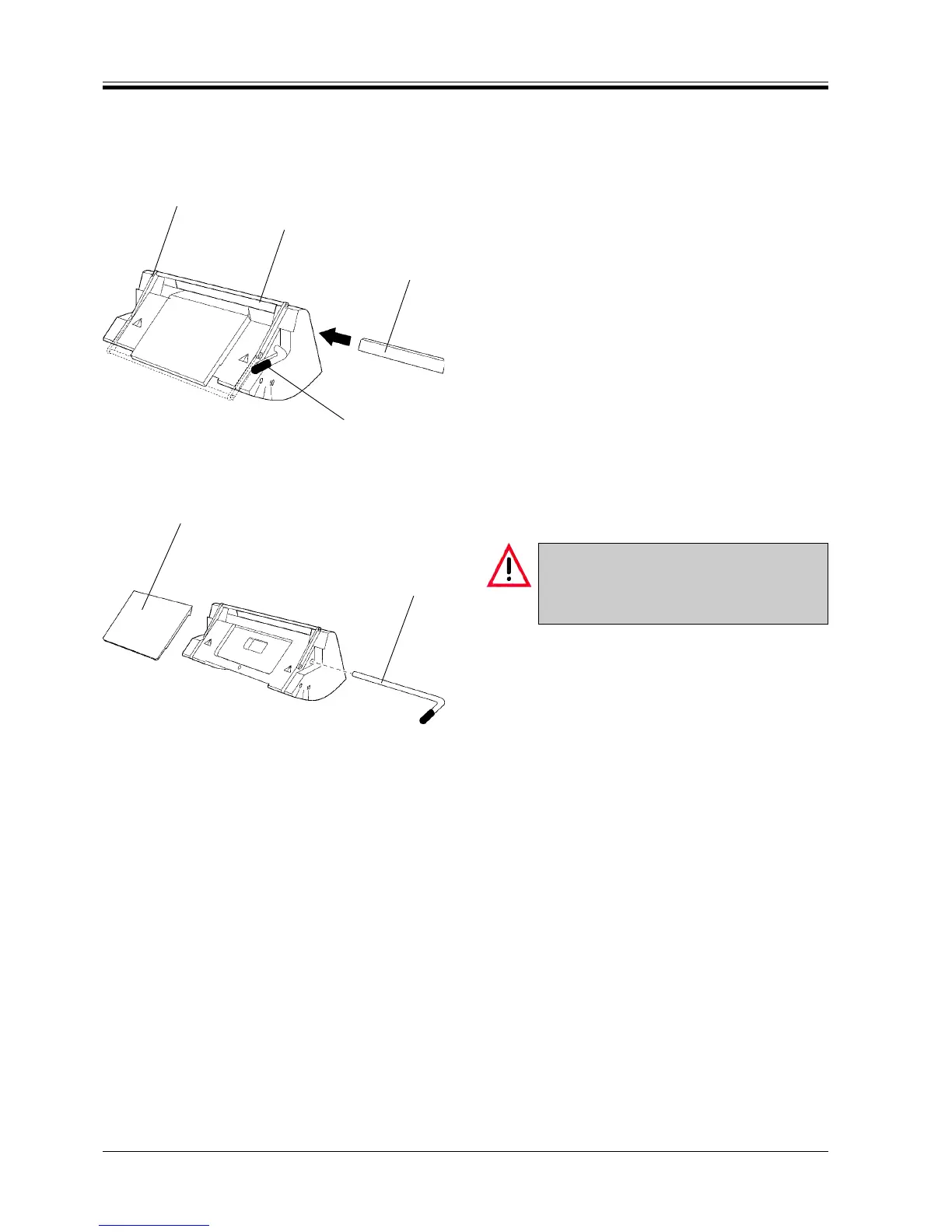
Fig. 52.1
3
2
1
1
12.3.4 Knife holder E-TC
The knife holder E-TC is designed for the Leica TC-65
tungsten carbide blades.
Inserting the blade
• Push the knife guard (1) to the middle.
• To insert the blade, relocate the clamping lever (2)
down.
• Carefully insert the tungsten carbide blade (3) from
the side with the shining facet to the front.
• To clamp the blade, relocate the clamping lever (2)
up.
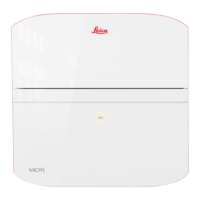
Cleaning
The clamping plate (7) can be removed for cleaning.
• To remove the blade, relocate the clamping lever
(2) down.
• Carefully remove the blade.
• Pull out the clamping lever (2).
• Remove the clamping plate (7).
Only use mild commercial detergents or soap
solution for cleaning!
Do not use solvents that contain acetone and
xylene!
• Clean all components with a damp not a wet cloth.
• Place the clamping plate (7) on the holder ensuring
that the upper edge of the clamping plate and of
the pressure plate (5) are parallel and at the same
height.
• Insert the clamping lever (2) in the hole and relo-
cate it up.
7
2
Fig. 52.2



 To Next Page