58
Instruction manual V3.2 – 02/2002
12. Optional accessories
9
12
17
Fig. 58.1
2
12
17
Fig. 58.2
18
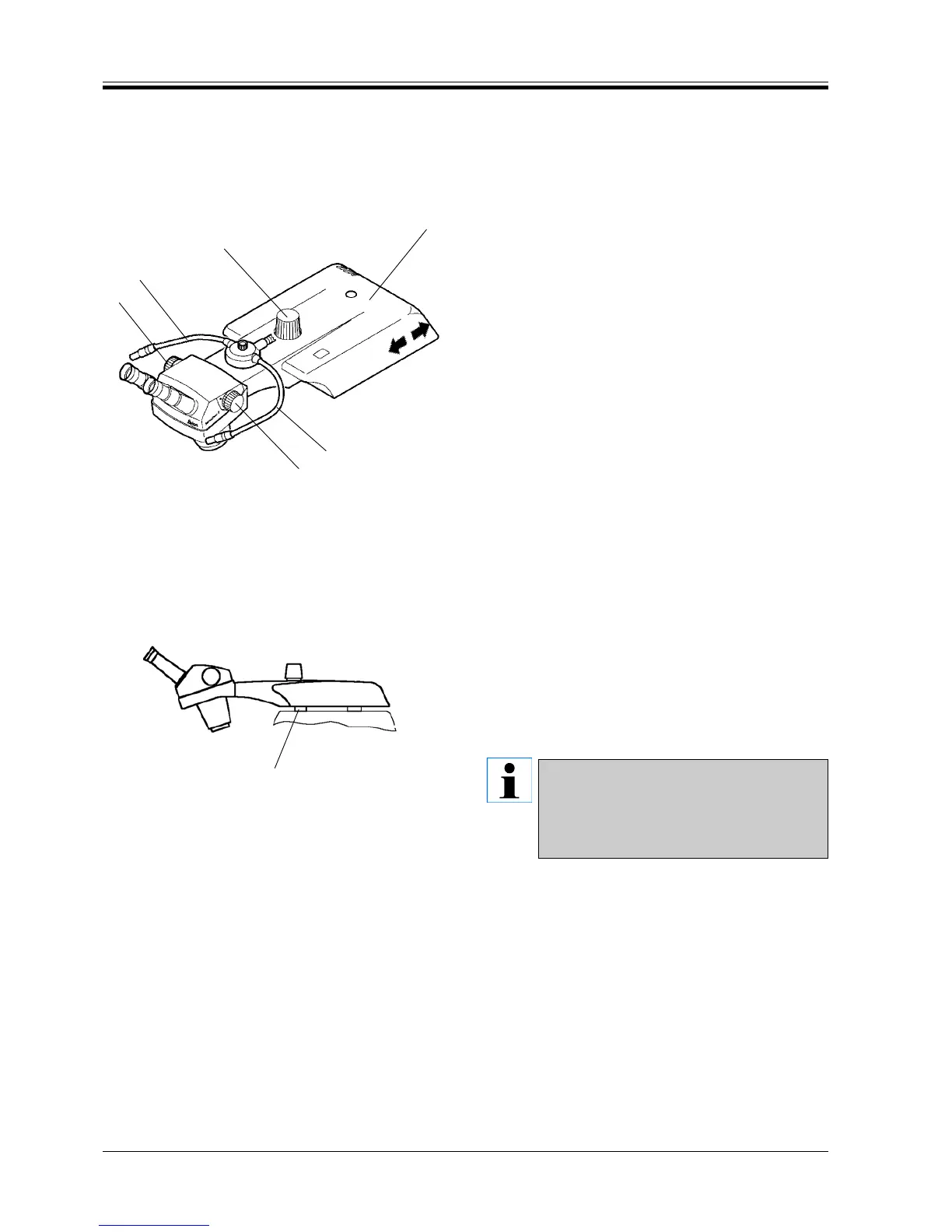
Carrier adjustments
• The carrier (2) can be repositioned back and forth
on the microtome housing.
• It also may be slewn to the side if required.
To do so, slightly lift the carrier at front and move
as desired.
• To focus the microscope, the carrier may be ad-
justed in height by means of the knob (9).
• The flexible arms of the light guide (12) can be
placed in the optimum position. One spot can be
directed on the sample, whilst the other may be di-
rected on the knife.
Sectioning with a microtome will inevitably cause vi-
brations, which might be disturbing when using the
microscope at great magnification factors.
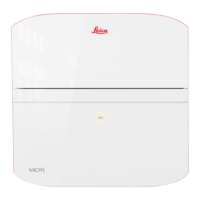
An adjustable plastic device (18) is located on the un-
derside of the carrier. To eliminate such disturbances,
readjust the plastic device.
• Slew the carrier (2) to the side.
• Screw the plastic device (18) further in our out as
required.
• Slew the carrier (2) back.
• Adjust the microscope zoom with the knurled knobs
(17).
A magnifier (optional accessory) may be used
as an alternative to the microscope.
Please refer to the combined carrier with
magnifier and illumination for mounting in-
structions.



 To Next Page