Locatingconnectors,controls,andindicatorsonthefrontofyour
computer
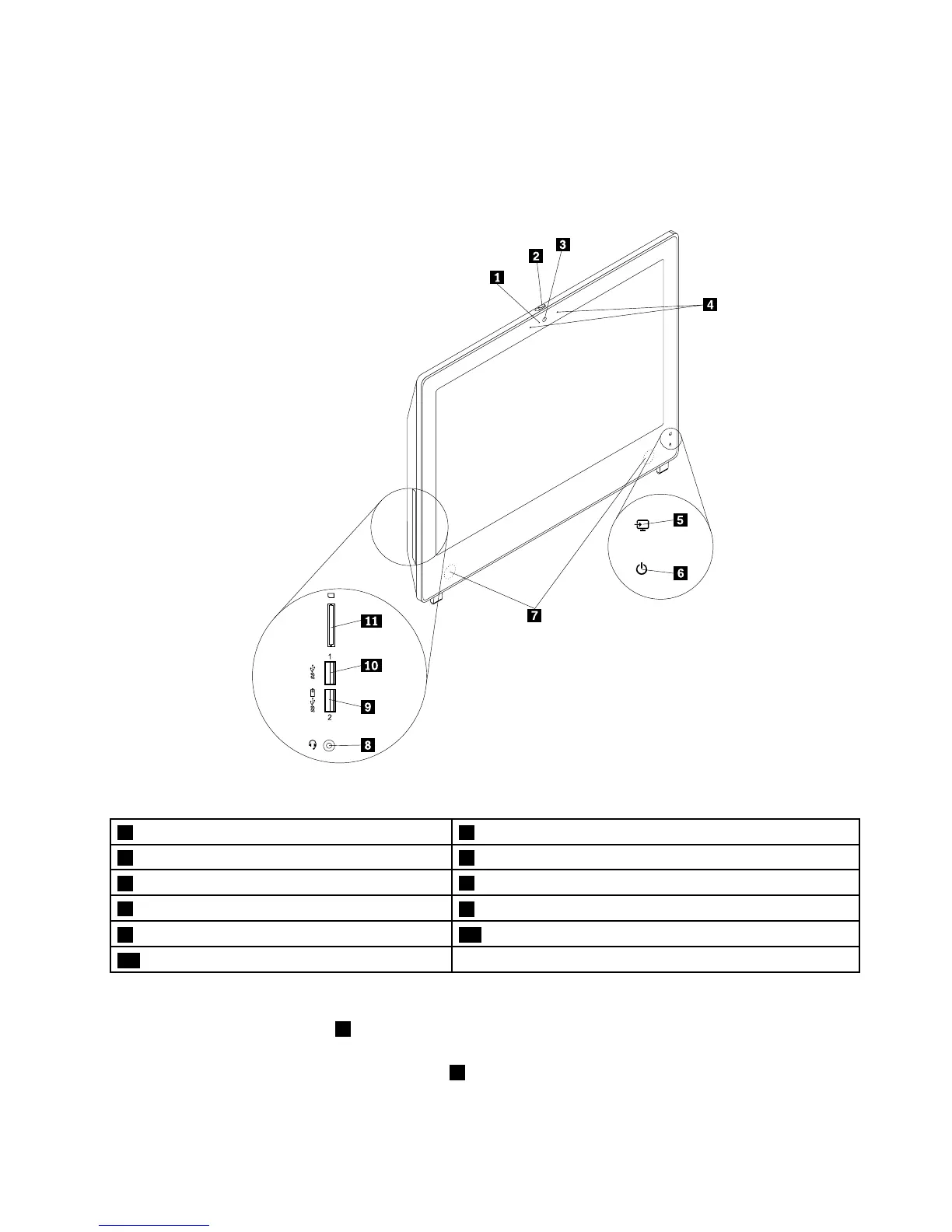
Figure1“Frontconnector,control,andindicatorlocations”onpage9showsthelocationsoftheconnectors,
controls,andindicatorsonthefrontofyourcomputer.
Figure1.Frontconnector,control,andindicatorlocations
1Integratedcameraactivityindicator2Integratedcamerashieldcontrolslider
3Integratedcamera4Integratedmicrophones
5Monitormode/computermodeindicator
6Power-onindicator
7Internalspeaker
8Comboaudioconnector(supportheadsetandmicrophone)
9AlwaysOnUSB3.0connector10USB3.0connector
11Cardreaderslot
Notes:
•TheComboaudioconnector8supportsamicrophone-integratedheadsetandaconventional
microphone.
•Bydefault,theAlwaysOnUSB3.0connector
9enablesyoutochargesomemobiledigitaldevicesand
smartphoneswhenyourcomputerisinsleepmode,inhibernationmode,orturnedoff.
Chapter1.Productoverview9











 To Next Page