Removingandreinstallingtheframestand
Attention:
Donotopenyourcomputerorattemptanyrepairbeforereadingandunderstandingthe“Importantsafetyinformation”
onpagev.
Thissectionprovidesinstructionsonhowtoremoveandreinstalltheframestand.
Note:Theframestandisavailableonlyinsomemodels.
Toremoveandreinstalltheframestand,dothefollowing:
1.Removeanymediafromthedrivesandturnoffallattacheddevicesandthecomputer.
2.Disconnectallpowercordsfromelectricaloutlets.
3.Disconnectthepowercord,Input/Outputcables,andanyothercablesthatareconnectedtothe
computer.
4.Placeasoft,cleantowelorclothonthedeskorflatsurface.Holdthesidesofyourcomputerandgently
layitdownsothatthescreenisagainstthesurfaceandthecoverisfacingup.
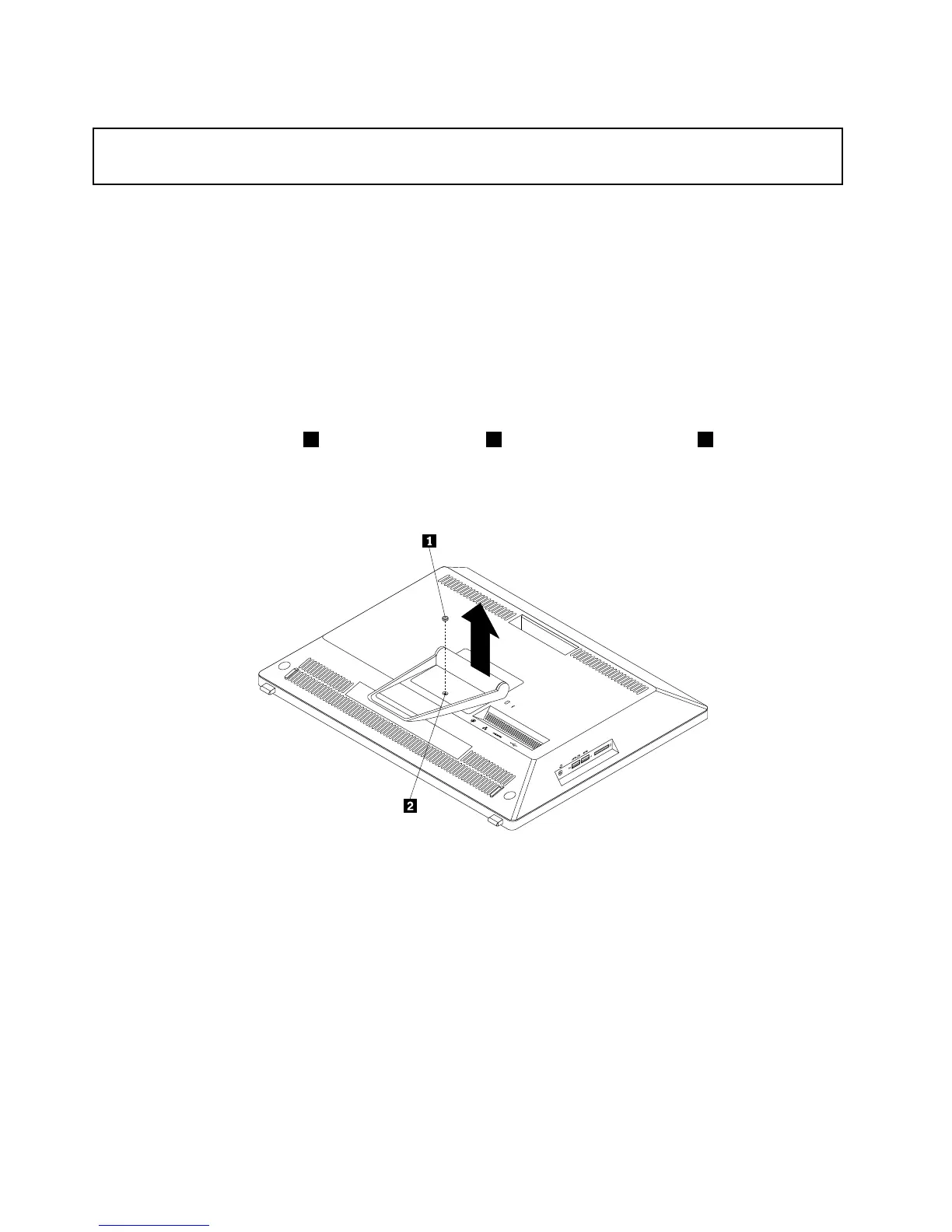
5.Removetherubberblock1thatprotectsthescrew2.Carefullyloosenthescrew2thatsecuresthe
framestand.Then,lifttheframestanduptoremoveitfromthecomputer.
Note:Thescrewcannotberemovedfromtheframestand.
Figure9.Removingtheframestand
40ThinkCentreE93zUserGuide











 To Next Page