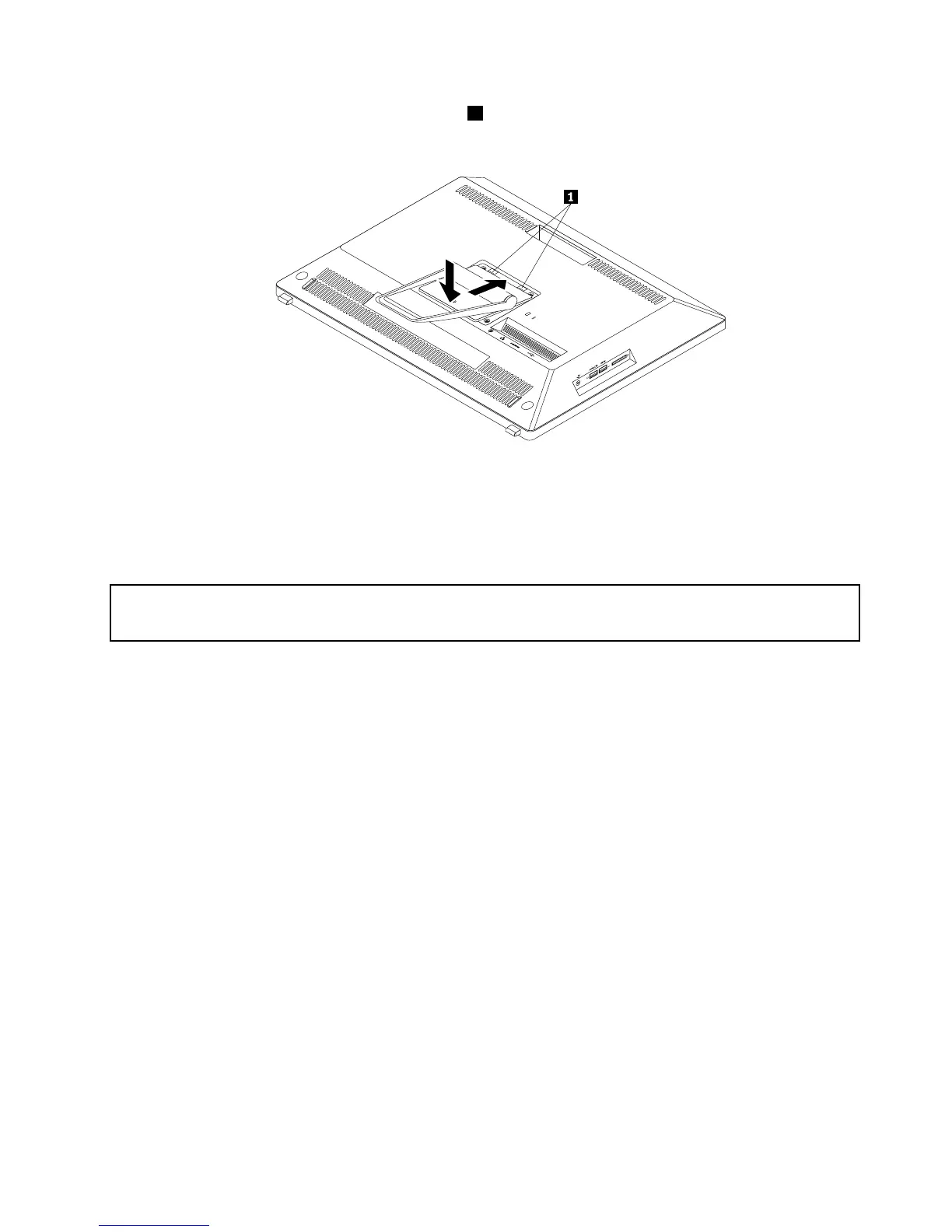
6.Toreinstalltheframestand,insertthetwotabs1ontheframestandintothecorrespondingholesinthe
chassisandlowerdowntheframestandasshown.
Figure10.Reinstallingtheframestand
7.Tightenthescrewtosecuretheframestandtothecomputer.Then,puttherubberblockintothehole
toprotectthescrew.
Removingandreinstallingthemonitorstand
Attention:
Donotopenyourcomputerorattemptanyrepairbeforereadingandunderstandingthe“Importantsafetyinformation”
onpagev.
Thissectionprovidesinstructionsonhowtoremoveandreinstallthemonitorstand.
Note:Themonitorstandisavailableonlyinsomemodels.
Toremoveandreinstallthemonitorstand,dothefollowing:
1.Removeanymediafromthedrivesandturnoffallattacheddevicesandthecomputer.
2.Disconnectallpowercordsfromelectricaloutlets.
3.Disconnectthepowercord,Input/Outputcables,andanyothercablesthatareconnectedtothe
computer.
4.Placeasoft,cleantowelorclothonthedeskorflatsurface.Holdthesidesofyourcomputerandgently
layitdownsothatthescreenisagainstthesurfaceandthecoverisfacingup.
Chapter5.Installingorreplacinghardware41











 To Next Page