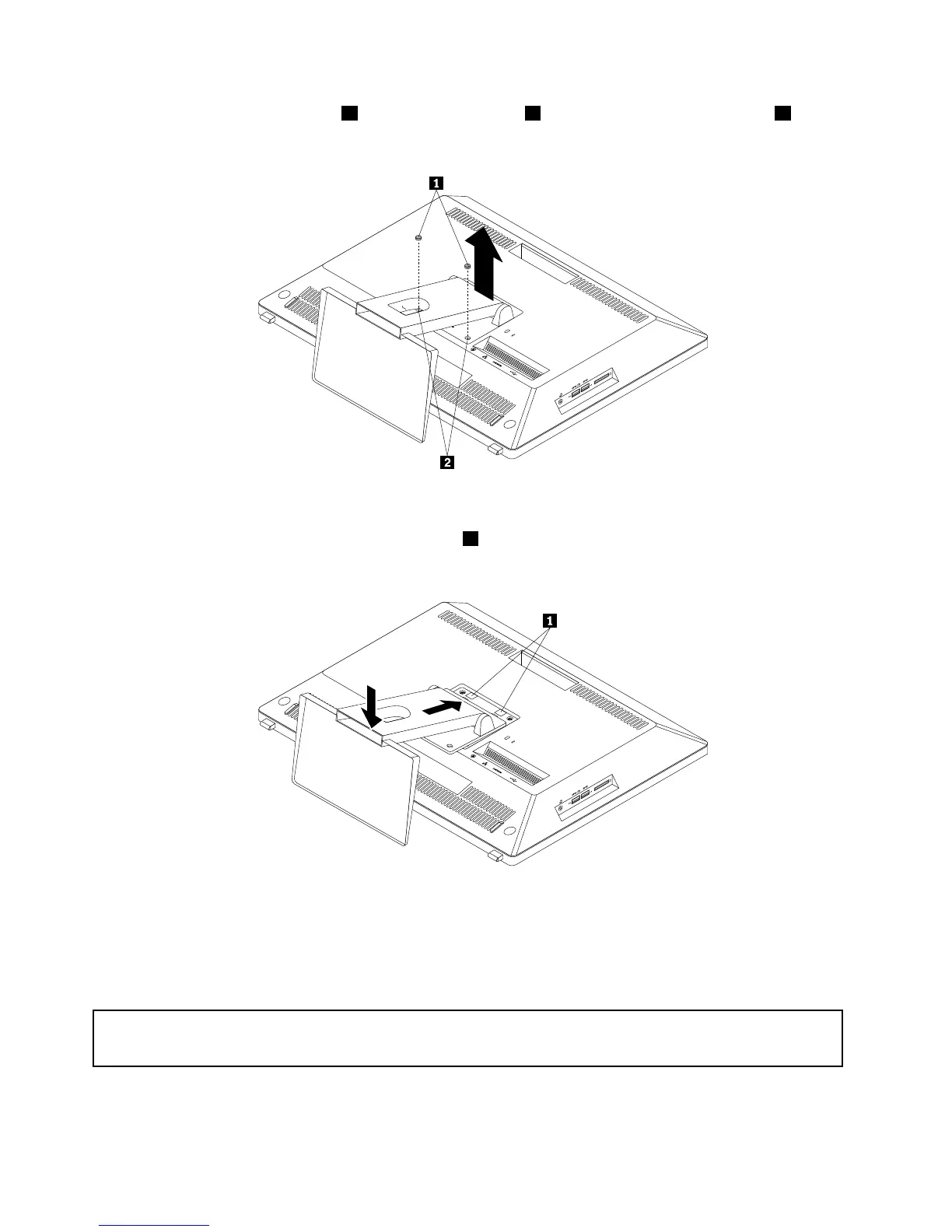
5.Removethetworubberblocks1thatprotectthescrews2.Carefullyloosenthetwoscrews2that
securethemonitorstand.Then,liftthemonitorstanduptoremoveitfromthecomputer.
Figure11.Removingthemonitorstand
6.Toreinstallthemonitorstand,insertthetwotabs1onthemonitorstandintothecorrespondingholesin
thechassisandlowerdownthemonitorstandasshown.
Figure12.Reinstallingthemonitorstand
7.Tightenthetwoscrewstosecurethemonitorstandtothecomputer.Then,puttherubberblocks
intotheholestoprotectthescrews.
Removingandreinstallingthetransformerstand
Attention:
Donotopenyourcomputerorattemptanyrepairbeforereadingandunderstandingthe“Importantsafetyinformation”
onpagev.
Thissectionprovidesinstructionsonhowtoremoveandreinstallthetransformerstand.
42ThinkCentreE93zUserGuide











 To Next Page