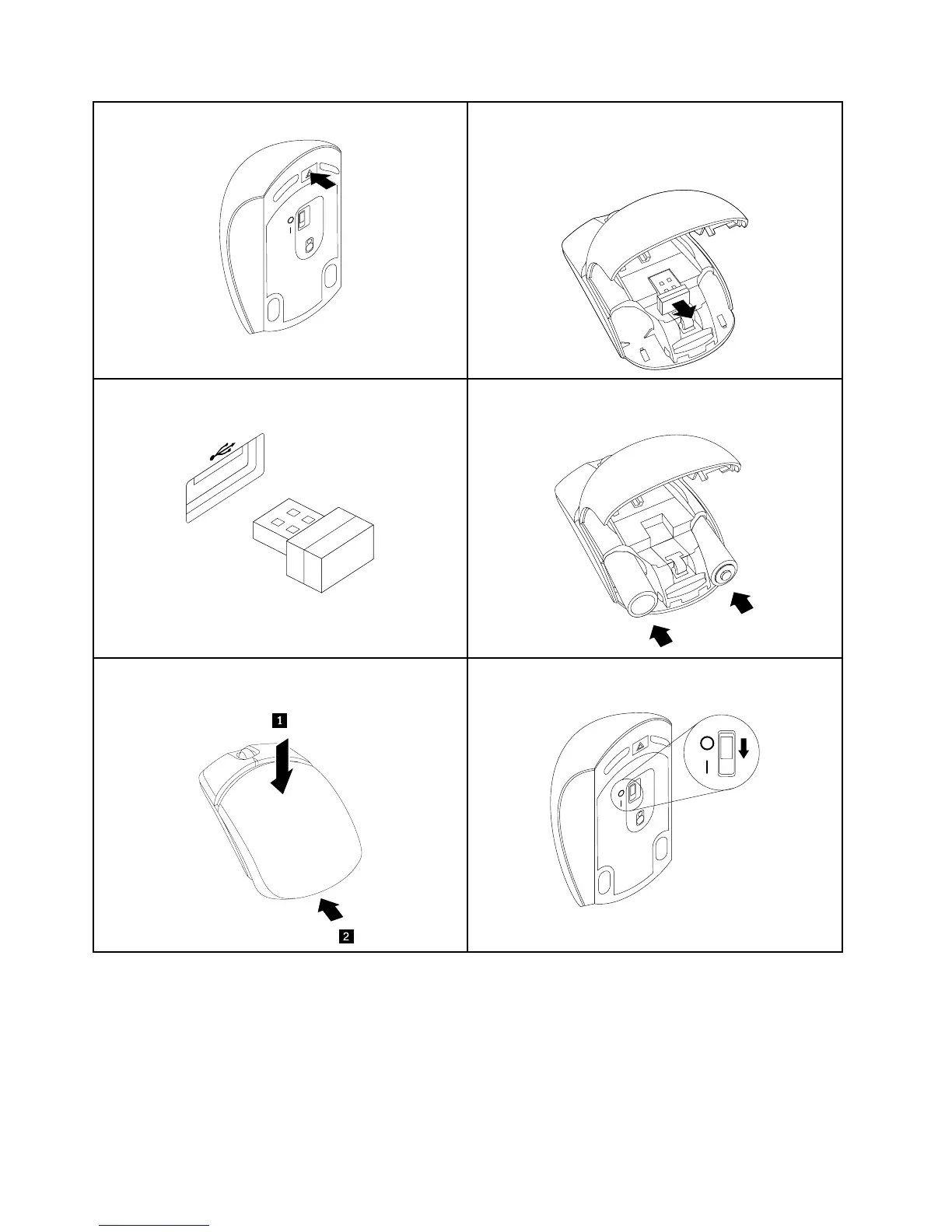
1.Openthemousebattery-compartmentcover.2.RemovetheUSBdonglefromthemouse.
Note:YouaslocanremoveaUSBdonglefromawireless
keyboard.
3.ConnecttheUSBdongletoanyUSBconnectoron
thecomputer.
4.InserttwoAAAbatteriesintothemouseaccordingto
thepolarityindicators.
5.Closethemousebattery-compartmentcoverandslide
itforwarduntilitclicksintoplace.
6.SlidethepowerswitchonthemousetotheOnposition
andtheLED(light-emittingdiode)ison.
Notes:
•ThegreenLEDindicatesthatthemouseisreadyforuse.
•TheflashingamberLEDindicatesalowbatterypowerlevel.
•Pushthepowerswitchtotheoffpositionwhenyouarenotusingthemouse.Thisextendsthebatterylife.
•DisconnecttheUSBdonglefromyourcomputerandstoreitinthewirelessmousecompartmentorinthe
wirelesskeyboardcompartmentwhennotinuse.
46ThinkCentreE93zUserGuide











 To Next Page