Note:YoucanusethemouseortheUpandDownarrowkeystohighlightmenuselections.Youcanclose
theStartmenuorthecontextmenubyclickingthemouseorpressingEsc.
Usingangerprintreader
Somecomputersmightcomewithakeyboardthathasangerprintreader.Formoreinformationaboutthe
ngerprintreader,see“FingerprintSoftware”onpage5.
ToopentheThinkVantageFingerprintSoftwareprogramandusethengerprintreader,dooneofthe
following:
•OntheWindows7operatingsystem,clickStart➙AllPrograms➙LenovoThinkVantageTools➙
FingerprintReader.
•OntheWindowsVistaoperatingsystem,clickStart➙AllPrograms➙ThinkVantage➙ThinkVantage
FingerprintSoftware.
Followtheinstructionsonthescreen.Foradditionalinformation,refertotheThinkVantageFingerprint
Softwarehelpsystem.
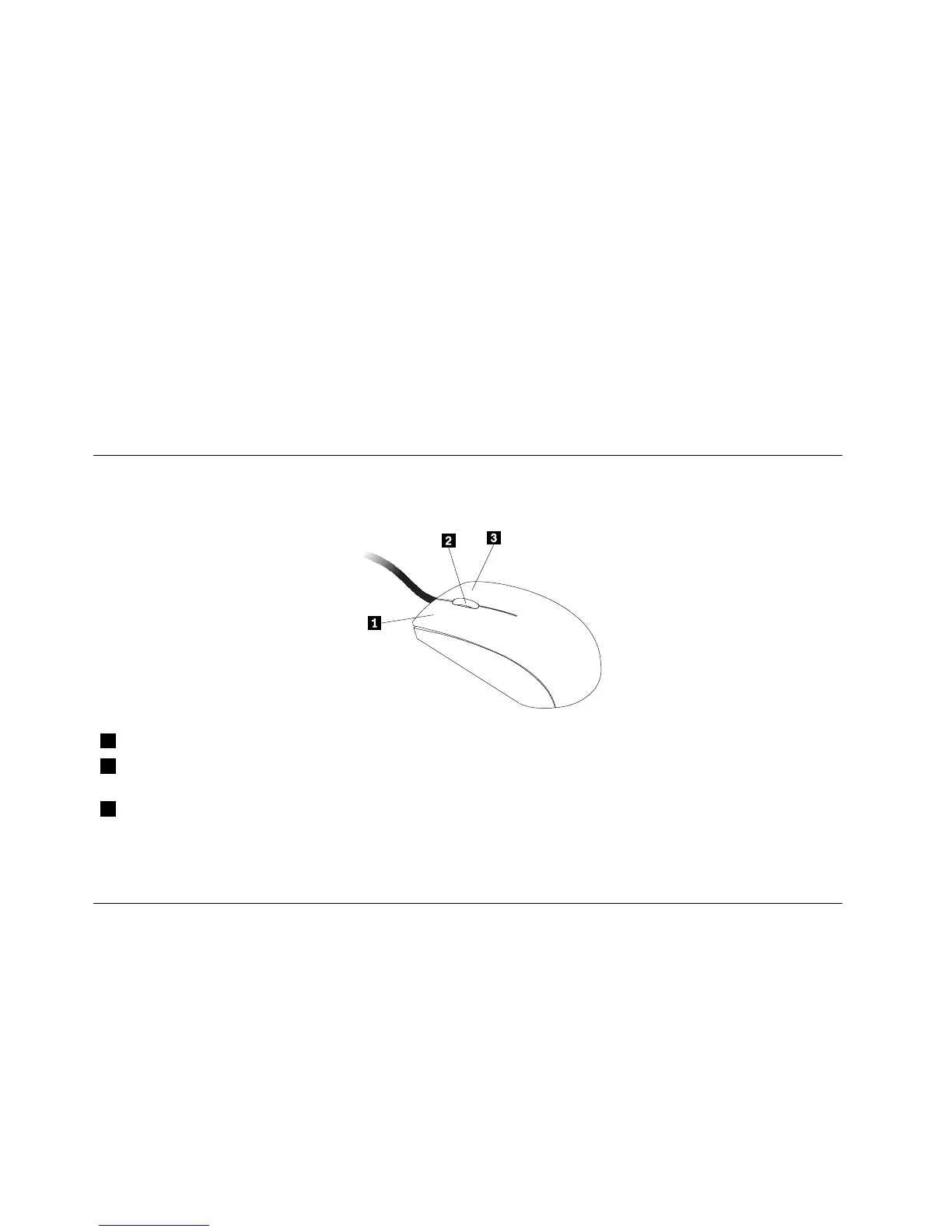
Usingthewheelmouse
Thewheelmousehasthefollowingcontrols:
1PrimarymousebuttonUsethisbuttontoselectorstartaprogramormenuitem.
2Wheel
Usethewheeltocontrolthescrollingactionofthemouse.Thedirectioninwhichyou
rotatethewheelcontrolsthedirectionofthescrollingaction.
3Secondarymousebutton
Usethisbuttontodisplayamenufortheactiveprogram,icon,orobject.
Youcanswitchthefunctionoftheprimaryandsecondarymousebuttonsandchangeotherdefaultbehavior
throughthemousepropertiesfunctionintheWindowsControlPanel.
Adjustingaudio
Soundisanimportantpartofthecomputerexperience.Yourcomputerhasadigitalaudiocontrollerbuilt
intothesystemboard.Somemodelsalsohaveahigh-performanceaudioadapterinstalledinoneofthePCI
cardslots.
Aboutyourcomputeraudio
Ifafactory-installed,high-performanceaudioadapterisinstalledinyourcomputer,thesystem-board
audioconnectorsontherearofthecomputeraretypicallydisabled;usetheconnectorsprovidedonthe
audioadapter.
16ThinkCentreUserGuide





 To Next Page