10.Connectthenewsystemfanassemblycabletothesystemfanconnectoronthesystemboard.See
“Locatingpartsonthesystemboard”onpage11.
11.Reinstalltheheatsinkfanduct.See“Replacingtheheatsinkandfanassembly”onpage47.
12.Reinstalltheharddiskdrive.See“Replacingtheharddiskdrive”onpage41.
Whattodonext:
•Toworkwithanotherpieceofhardware,gototheappropriatesection.
•Tocompletethereplacement,goto“Completingthepartsreplacement”onpage61.
Replacingthekeyboard
Attention:
Donotopenyourcomputerorattemptanyrepairbeforereadingandunderstandingthe“Importantsafetyinformation”
onpagev.
Thissectionprovidesinstructionsonhowtoreplacethekeyboard.
Toreplacethekeyboard,dothefollowing:
1.Removeallmediafromthedrives.Then,turnoffallattacheddevicesandthecomputer.
2.Disconnectallpowercordsfromelectricaloutlets.
3.Disconnecttheoldkeyboardcablefromthecomputer.
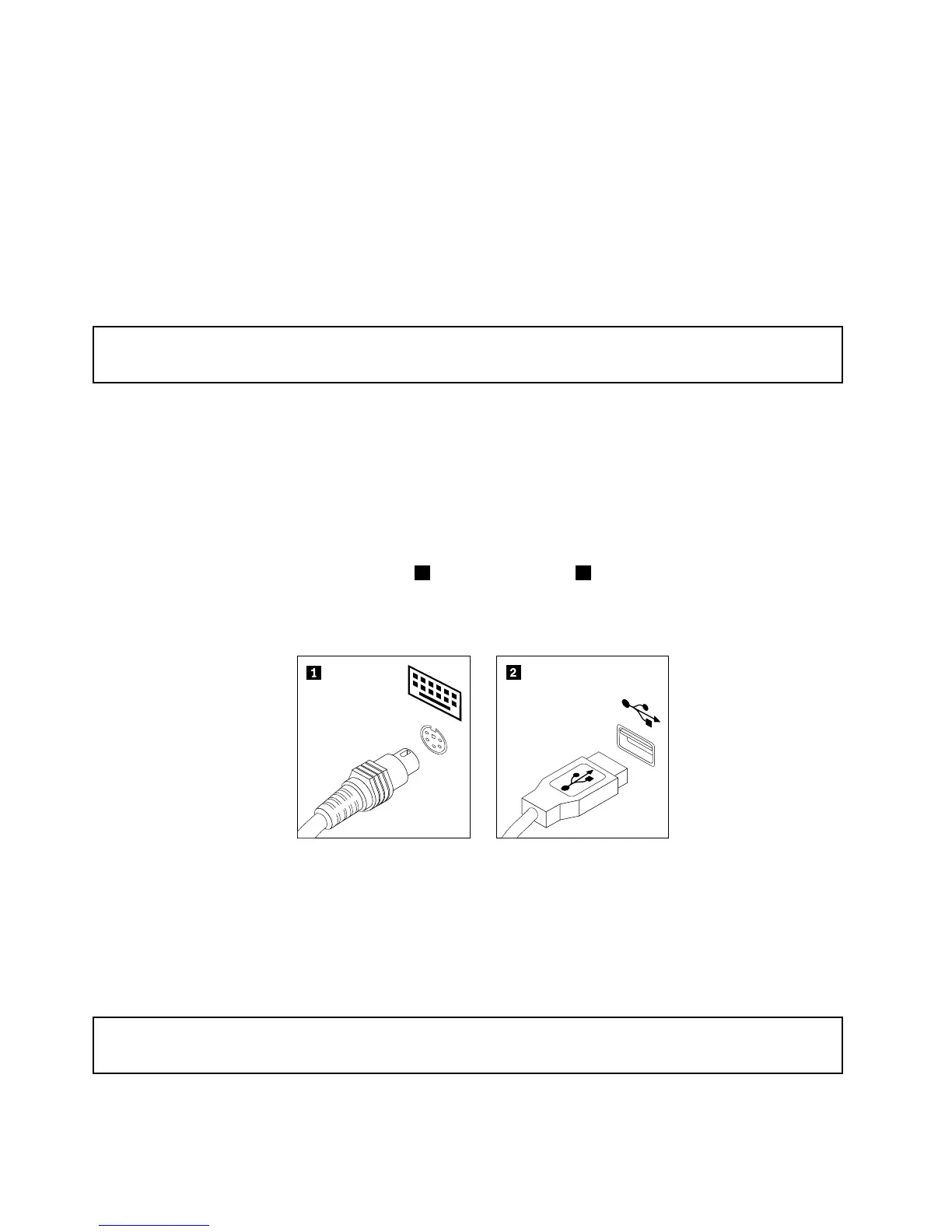
4.Connectanewkeyboardtotheappropriateconnectoronthecomputer.Yourkeyboardmightbe
connectedtoaPS/2keyboardconnector1oraUSBconnector2.Dependingonwhereyouwant
toconnectyourkeyboard,see“Locatingconnectors,controls,andindicatorsonthefrontofyour
computer”onpage8
or“Locatingconnectorsontherearofyourcomputer”onpage9.
Figure45.Keyboardconnectors
Whattodonext:
•Toworkwithanotherpieceofhardware,gototheappropriatesection.
•Tocompletethereplacement,goto“Completingthepartsreplacement”onpage61
.
Replacingthemouse
Attention:
Donotopenyourcomputerorattemptanyrepairbeforereadingandunderstandingthe“Importantsafetyinformation”
onpagev.
Thissectionprovidesinstructionsonhowtoreplacethemouse.
60ThinkCentreUserGuide















 To Next Page