Right-sideview
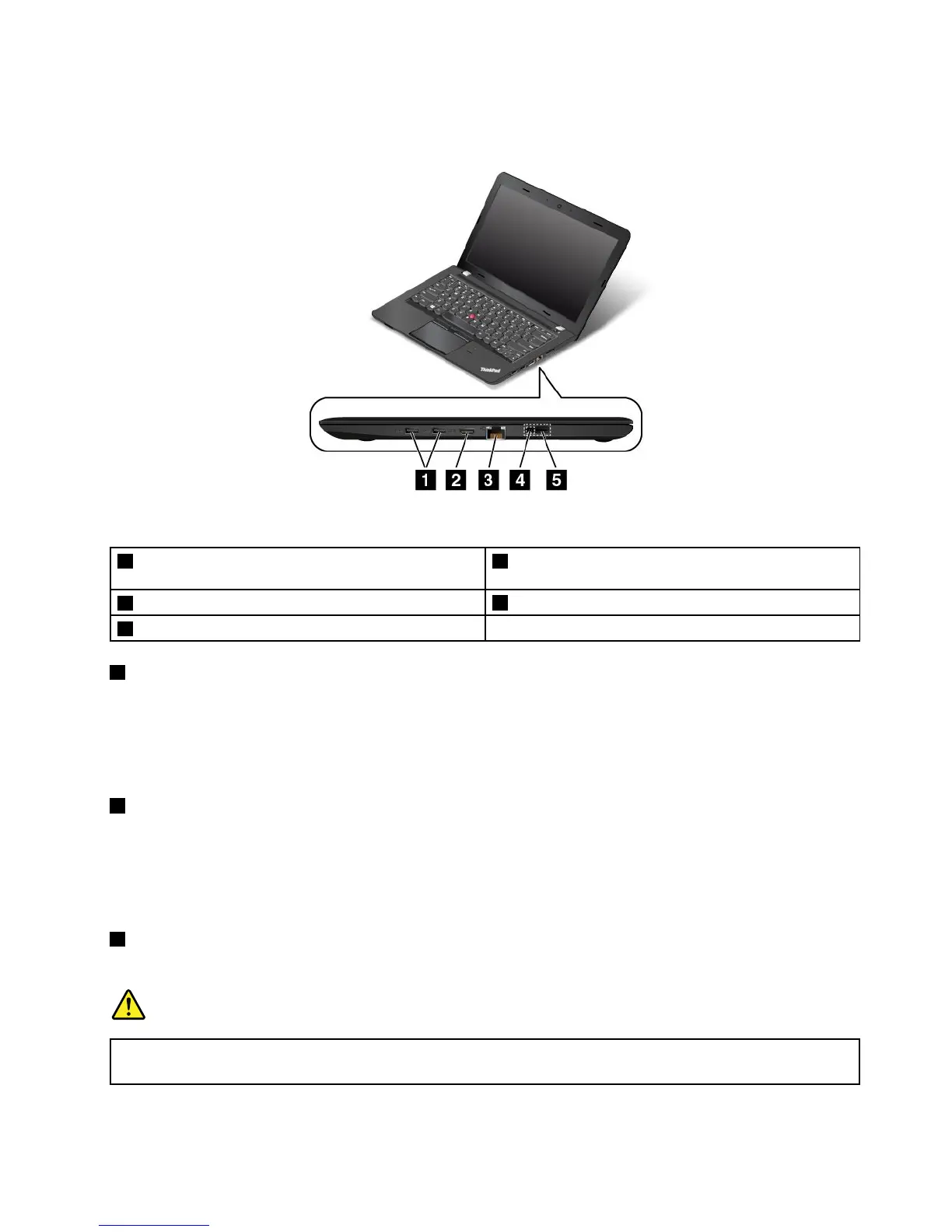
Figure2.ThinkPadE450,E455,andE450cright-sideview
1USB3.0connectors2High-DefinitionMultimediaInterface(HDMI™)
connector
3Ethernetconnector
4acpowerconnector
5LenovoOneLinkconnector
1USB3.0connectors
TheUniversalSerialBus(USB)3.0connectorsareusedforconnectingUSB-compatibledevices,such
asaUSBkeyboardoraUSBmouse.
Note:WhenyouattachaUSBcabletothisUSBconnector,ensurethattheUSBmarkisfacingupward.
Otherwisetheconnectormightgetdamaged.
2HDMIconnector
Usethehigh-definitionmultimediainterface(HDMI)connectortoconnectthecomputertoan
HDMI-compatibleaudiodeviceorvideomonitor,suchasahigh-definitiontelevision(HDTV).
Note:IfyouconnectthecomputertoasupportedThinkPadOneLinkDock,usetheHMDIconnectoron
thedock,nottheoneonthecomputer.
3Ethernetconnector
Connectthecomputertoalocalareanetwork(LAN)withtheEthernetconnector.
DANGER
Toavoidtheriskofelectricalshock,donotconnectthetelephonecabletotheEthernetconnector.
YoucanonlyconnectanEthernetcabletothisconnector.
Chapter1.Productoverview3











 To Next Page