2USB3.0connector:UsedtoconnectdevicesthatarecompatiblewithUSB3.0andUSB2.0.
3AlwaysonUSBconnector:Bydefault,theAlwaysonUSBconnectorenablesyoutochargesome
mobiledigitaldevicesandsmartphonesnomatterwhenyourcomputerisinsleepmode,hibernationmode,
orisoff.Formoreinformation,refertothedocumentationthatcomeswiththedock.
4Comboaudioconnector:Usedtoconnectheadphonesoraheadsetthathasa3.5-mm(0.14-inch),
4-poleplug.
5System-statusindicator:TheindicatorontheilluminatedThinkPadlogofunctionsthesameastheones
onthecomputer.Fordetails,see“Statusindicators”onpage6.
6Powerbutton:Thepowerbuttononthedockfunctionsthesameastheoneonthecomputer.
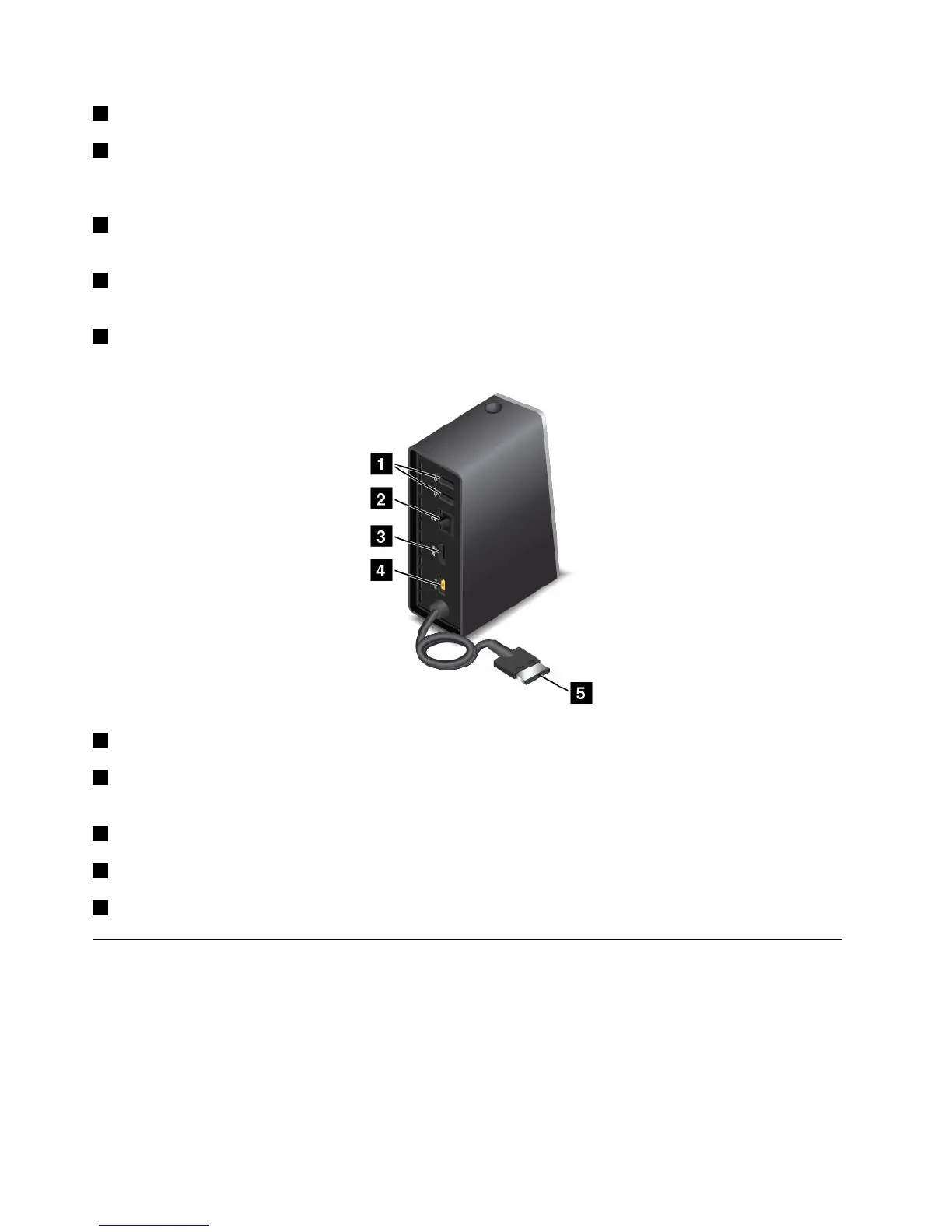
Rearview
1USB2.0connector:UsedtoconnectdevicesthatarecompatiblewithUSB2.0.
2Ethernetconnector:UsedtoconnectthedocktoanEthernetLAN.Theindicatorsonthisconnector
havethesamefunctionastheonesonthecomputer.
3HDMIconnector:UsedtoconnectadigitalaudiodeviceorvideomonitorthatiscompatiblewithHDMI.
4Powerconnector:Usedtoconnecttheacpoweradapter.
5LenovoOneLinkconnector:ConnecttheLenovoOneLinkconnectortothecomputer.
ThinkPadOneLinkProDock
Dependingonthemodel,yourcomputermightsupporttheThinkPadOneLinkProDock(hereafterreferredto
asthedock).Attachyourcomputertothedocktoexpandtheworkingcapability.
Thistopicprovidesbasicinformationaboutthedock.Fordetailedinformationaboutusingthedock,refer
tothedocumentationthatcomeswiththedock.
Note:Dependingonthemodel,yourdockmightlookslightlydifferentfromtheillustrationsinthistopic.
40UserGuide











 To Next Page