Tasks
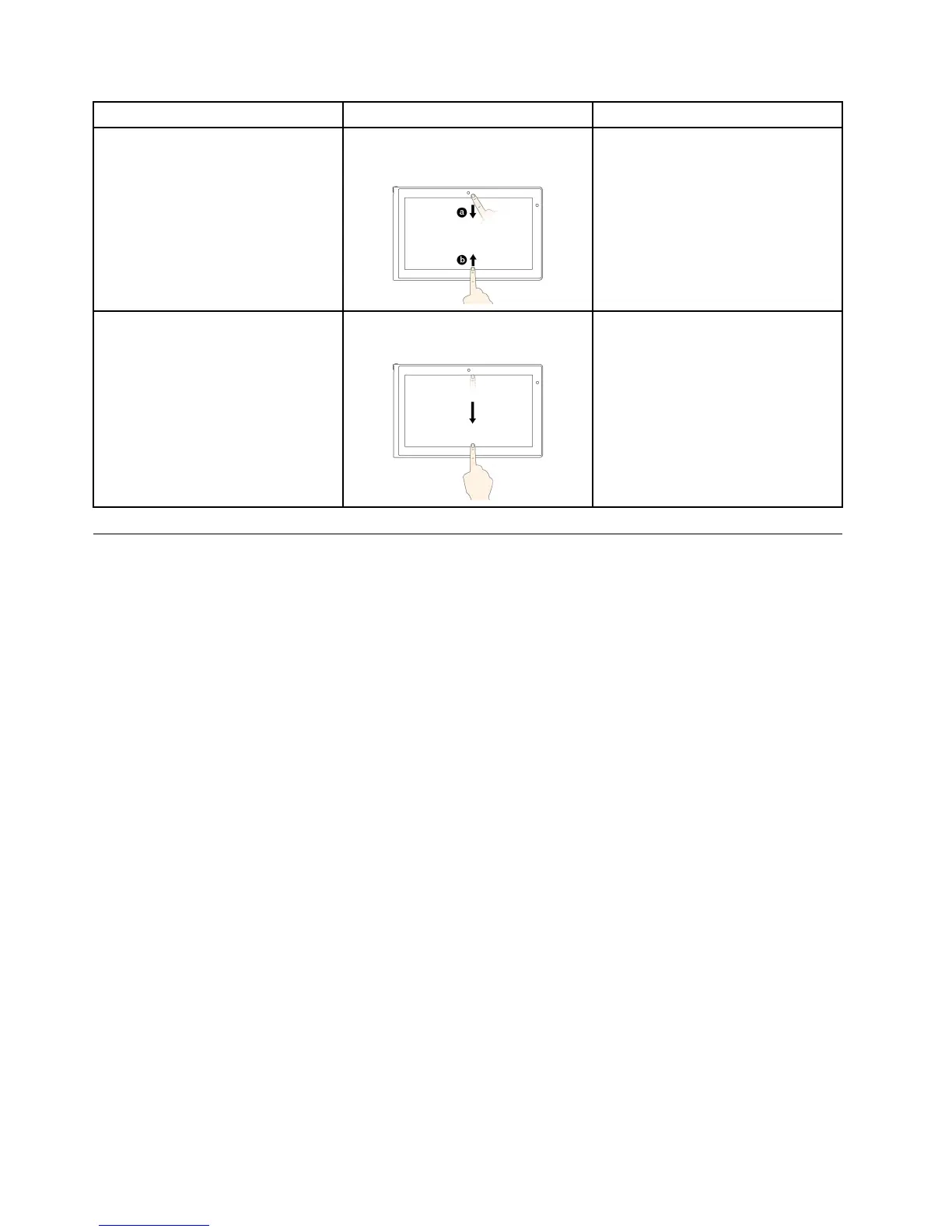
Touchgestures(touchmodelsonly)
Mouseactions
Toviewtheapplicationcommandson
anopenapplication,suchasCopy,
Save,andDelete,dependingonthe
application
Swipeinfromthetoporbottomedge.
Right-clickanopenapplication.
Toclosethecurrentapplication
Swipeinfromthetopedgetothe
bottom.
Movethepointertothetopedgeof
thescreen,clickandholdtheleft
buttononyourmouse,thenmovethe
pointertothebottomofthescreen.
Releasetheleftbuttonwhenyou
reachthebottomofthescreen.
Usingtheonscreenkeyboard
Usetheonscreenkeyboardtotypetext,numbers,symbols,andothercharacters.Whenyourotatethe
tablet,theonscreenkeyboardautomaticallyrotatestothecorrespondingportraitorlandscapeview.
Toopentheonscreenkeyboard,dothefollowing:
•Windows8:
1.Swipeinfromtherightedgeofthescreentodisplaythecharms.
2.TaptheSearchcharm.
3.TapApp.
4.TapOn-ScreenKeyboard.
•Windows8.1:
1.Swipeinfromtherightedgeofthescreentodisplaythecharms.
2.TaptheSearchcharmtosearchforOn-ScreenKeyboard.
3.InputOn-ScreenKeyboard.
Toconfiguretheinputlanguage,dothefollowing:
1.Gotothedesktop,andthenswipeinfromtherightedgeofthescreentodisplaythecharms.
2.TaptheSettingscharm.
3.TapControlPanel➙Clock,LanguageandRegion.
4.TapChangeinputmethods.TheLanguagewindowsopens.
5.Followtheonscreeninstructions.
10UserGuide







 To Next Page