Whattodonext:
•Toworkwithanotherpieceofhardware,gototheappropriatesection.
•Tocompletetheinstallationorreplacement,goto“Completingthepartsreplacement”onpage71.
Replacingtheharddiskdrive
Attention:
Donotopenyourcomputerorattemptanyrepairbeforereadingandunderstandingthe“Importantsafetyinformation”
onpagev.
Thissectionprovidesinstructionsonhowtoreplacetheprimaryharddiskdrive.
Note:Dependingonyourmodeltype,yourcomputermightcomewitha2.5-inchsolidstatedrive.
Toreplacetheprimaryharddiskdrive,dothefollowing:
1.Turnoffthecomputeranddisconnectallpowercordsfromelectricaloutlets.
2.Openthecomputercover.See“Openingthecomputercover”onpage32.
3.Locatetheharddiskdrive.See“Locatingcomponents”onpage11.
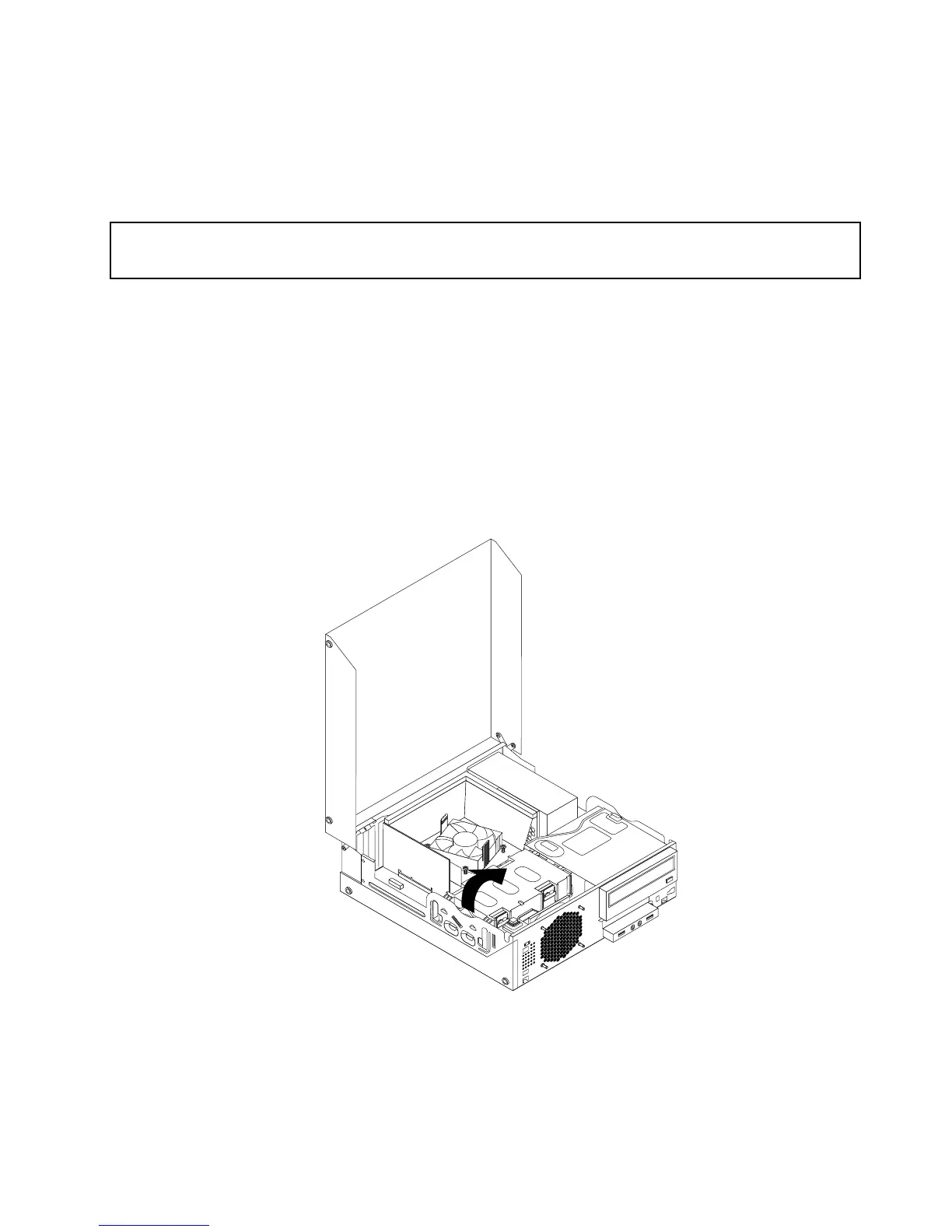
4.Pullonthehandleoftheharddiskdrivebracketasshownandthenlifttheharddiskdrivebracket
upfromtheopticaldrivebay.
Figure27.Removingtheharddiskdrive
5.Disconnectthesignalcableandthepowercablefromtheharddiskdrivetocompletelyremovethehard
diskdrivefromthechassis.
Chapter5.Installingorreplacinghardware47












 To Next Page