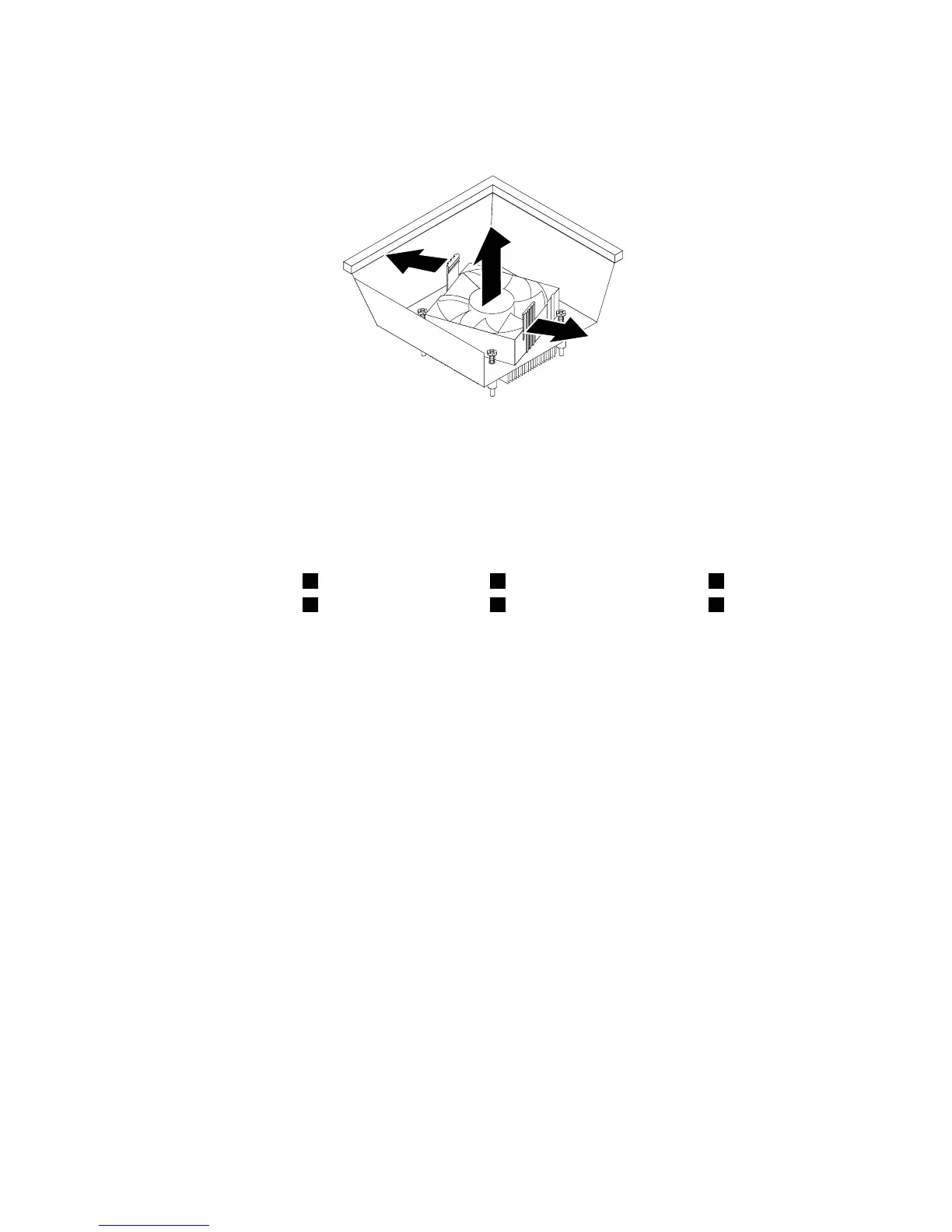
6.Pivotthetwoplasticretainingclipsthatsecuretheheatsinkfanductoutward.Thenremovetheheat
sinkfanductfromthefailingheatsinkandfanassembly.
Figure35.Removingtheheatsinkfanduct
7.Placethenewheatsinkandfanassemblyonthesystemboardsothatthefourscrewsarealigned
withthecorrespondingholesinthesystemboard.Ensurethatyouproperlyplacethenewheatsink
andfanassemblysothatyoucaneasilyconnectthenewheatsinkandfanassemblycabletothe
microprocessorfanconnectoronthesystemboard.
8.Followthissequencetoinstallthefourscrewstosecurethenewheatsinkandfanassembly,asshown
inFigure34“Screwsthatsecuretheheatsinkandfanassembly”onpage53:
a.Partiallytightenscrew1,thenfullytightenscrew2,andthenfullytightenscrew1.
b.Partiallytightenscrew3,thenfullytightenscrew4,andthenfullytightenscrew3.
9.Connecttheheatsinkandfanassemblycabletothemicroprocessorfanconnectoronthesystem
board.See“Locatingpartsonthesystemboard”onpage12.
54ThinkStationUserGuide












 To Next Page