To Next Page

F
fhaneySep 23, 2025
What to do if Leuze electronic Lighting Equipment shows external error?
- PPaul SmithSep 23, 2025
If your Leuze electronic Lighting Equipment shows an external error, check the connection of the cables and the control signals.

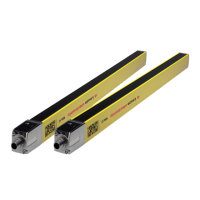
What to do if Leuze electronic Lighting Equipment shows external error?
If your Leuze electronic Lighting Equipment shows an external error, check the connection of the cables and the control signals.
What to do if Leuze electronic Lighting Equipment shows internal error?
If your Leuze electronic Lighting Equipment shows an internal error, and a restart fails, replace the device.
What to do if receiver and transmitter channels are mismatched on Leuze electronic Lighting Equipment?
To resolve the issue where the receiver is set to C1 and the transmitter to C2 on your Leuze electronic Lighting Equipment, set both the transmitter and receiver to the same transmission channel and ensure they are correctly aligned.
Why is the signal weak on my Leuze electronic Lighting Equipment?
If your Leuze electronic Lighting Equipment has a weak signal, it might be due to contamination or poor alignment. Clean the front screens of the device and then check the alignment of the transmitter and receiver.
How to troubleshoot transmitter without supply voltage in Leuze electronic Lighting Equipment?
If the transmitter of your Leuze electronic Lighting Equipment lacks supply voltage, check the power supply unit and the electrical connection. If necessary, replace the power supply unit.
What to do if the control circuit is open in Leuze electronic MLC 500?
If the control circuit is open in operating mode 1, 2, or 3 on your Leuze electronic Lighting Equipment, close the input circuit with the correct polarity and timing.
How to fix a defective transmitter in Leuze electronic MLC 500 Lighting Equipment?
If the transmitter of your Leuze electronic Lighting Equipment is defective, replace it.
What to do if Leuze electronic MLC 500 Lighting Equipment device failed?
If your Leuze electronic Lighting Equipment device has failed, replace it.
How to unlock start/restart interlock on Leuze electronic MLC 500?
If the start/restart interlock is locked on your Leuze electronic Lighting Equipment, and the protective field is free and ready for unlocking, and if there are no people in the danger zone, operate the reset button.
What to do if Leuze electronic MLC 500 Lighting Equipment detects a foreign transmitter?
If your Leuze electronic Lighting Equipment detects a foreign transmitter, remove any foreign transmitters present and increase the distance to any reflective surfaces. If available, actuate the start button.
 General
| Brand | Leuze electronic |
|---|---|
| Model | MLC 500 |
| Category | Lighting Equipment |
| Language | English |
Explains warning symbols, signal words, and other symbols used.
References checklists for machine manufacturer or supplier testing requirements.
Details the correct application and potential improper uses of the safety sensor.
Specifies the qualifications required for personnel handling the safety sensor.
Defines responsibilities of manufacturers and operators for safe operation.
Provides an overview of the MLC family and explains device synchronization.
Details connector types and how to cascade multiple safety light curtains.
Describes LEDs and 7-segment displays for status and fault indication.
Explains the function of the start/restart interlock for safe system operation.
Details the EDM function for monitoring downstream contactors.
Covers changing transmission channels and selecting the operating range.
Describes guarding the point of operation for hand and finger protection.
Explains using safety sensors for access guarding into danger zones.
Details the use of safety light curtains for danger zone guarding.
Covers transmitter/receiver arrangement and calculation of safety distance S.
Details safety distance calculations for orthogonal and parallel approaches.
Addresses minimum distances to reflective surfaces and preventing device interference.
Covers mounting steps, locations, fastening, and accessories like protective screens.
Provides pin assignments for transmitter/receiver and example circuit diagrams.
Details initial power-on, self-test, and basic sensor alignment procedures.
Explains alignment of deflecting mirrors using a laser alignment aid.
Describes the procedure to unlock the start/restart interlock after interruptions.
Covers checks required before initial operation or after modifications.
Outlines periodic testing requirements for competent persons and operators.
Guides users on diagnosing and resolving faults using display and LED information.
Presents key safety-relevant and general system specifications.
Provides physical dimensions, weight, and response time data.
Includes detailed drawings for various mounting accessories.
Explains product part designation structure and lists part numbers.