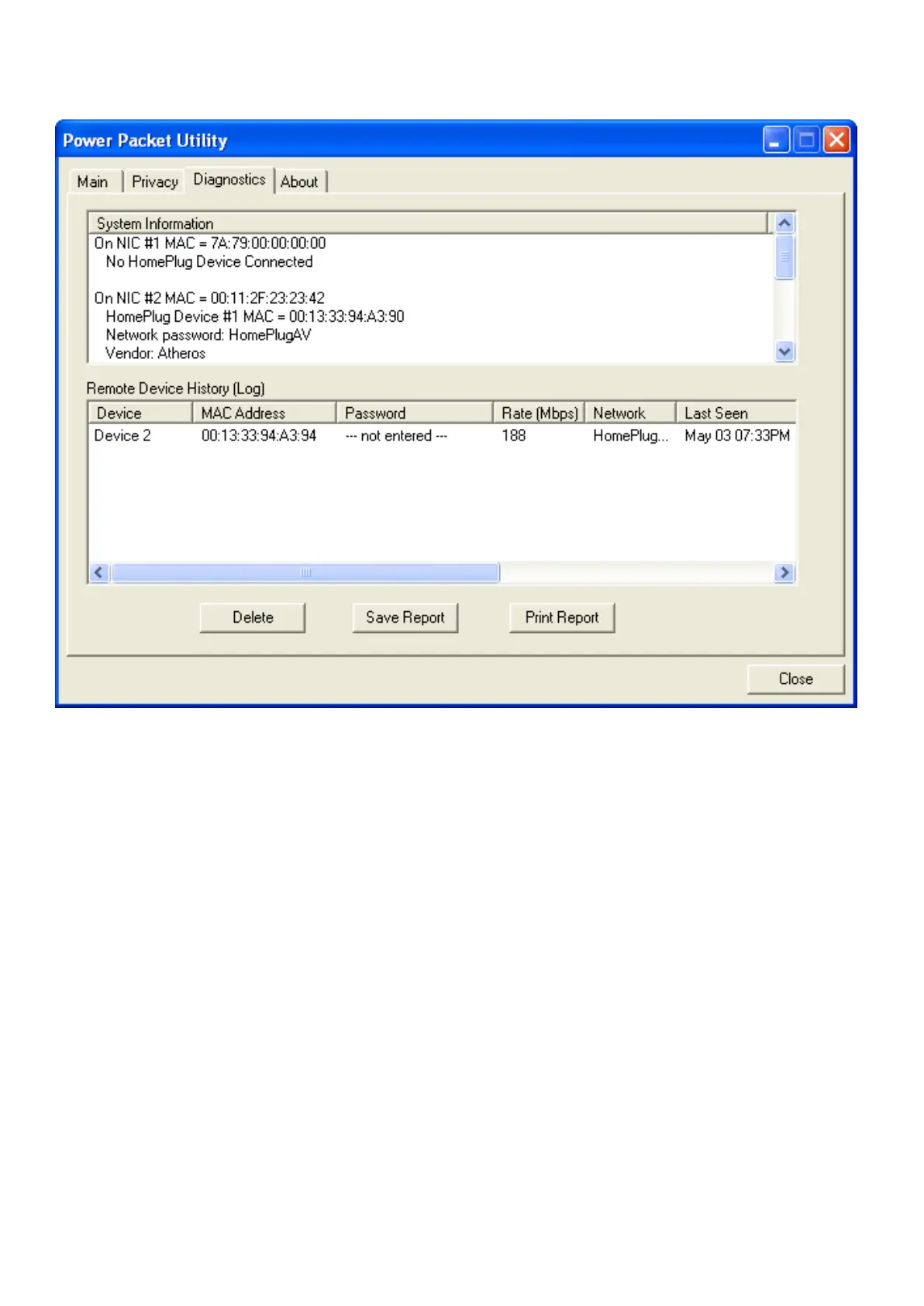
- MAC addresses of all devices connected locally to the host
- Version of the Configuration Utility
- Vendor name
Figure 1-7: Diagnostics Screen
The Lower panel contains a history of all remote devices seen on the computer over a certain
period of time. All devices that were on the powerline network are listed here along with a few other
parameters. Devices that are active on the current logical network will show a transfer rate in the
Rate column; devices on other networks, or devices that may no longer exist are shown with a “?”
in the Rate column. The following remote device information is available from the diagnostics
screen:
- Device Alias Name
- Device MAC Address
- Device Password
- Device Last known rate
- Device Last Known Network name
- HomePlug chipset manufacturer name
- Date device last seen on the network
- MAC Firmware Version.
The diagnostics information displayed may be saved to a text file for later use, or can be printed for
reference for a technical support call. Devices, which are not part of the network anymore, can be
deleted using the delete button. A dialog window pops up with a confirmation message if we try to
delete a device whose password has been entered.














 To Next Page