Setup
Local Area Network (LAN) Settings
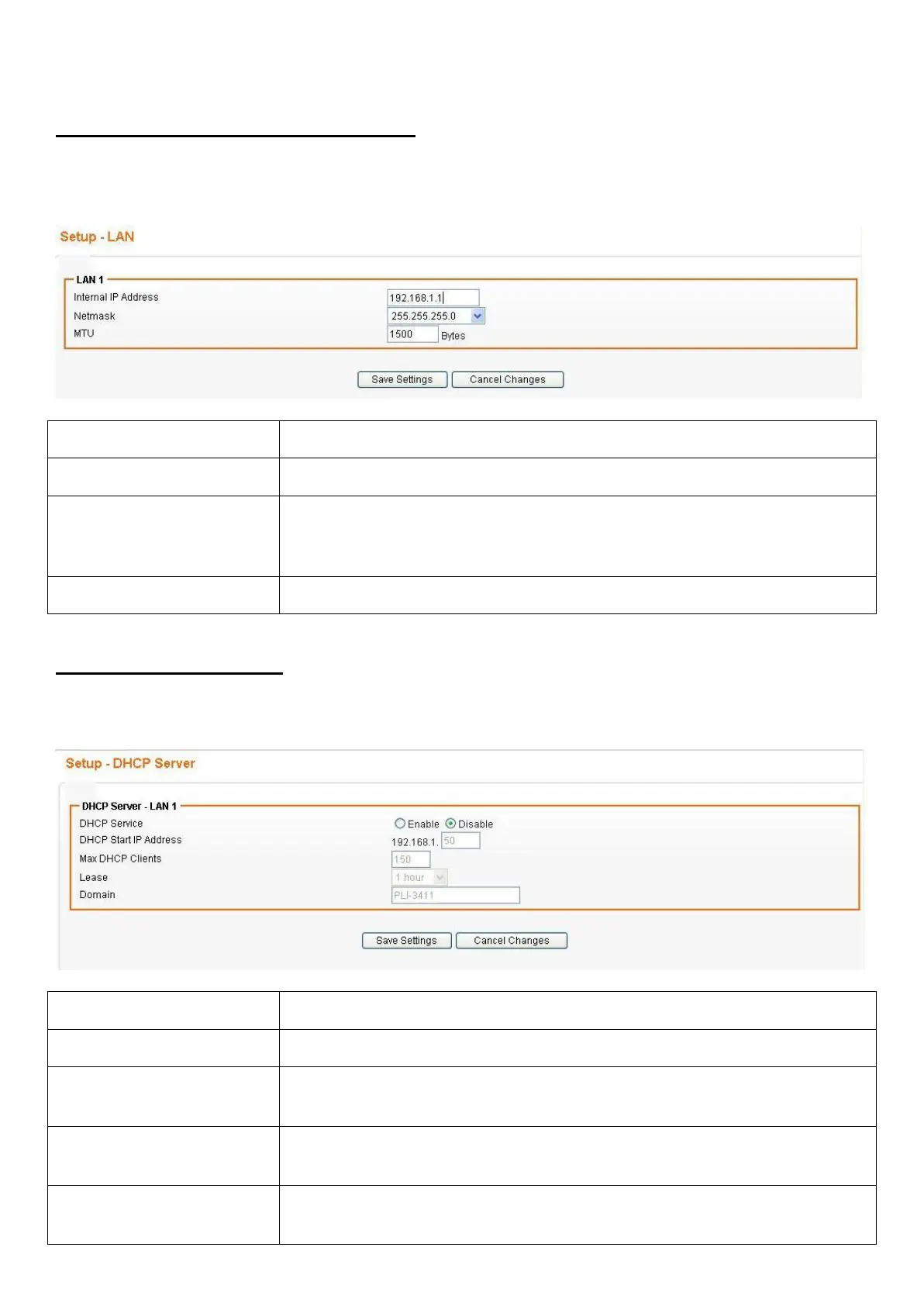
To set up the configuration of LAN interface, private IP of your router LAN port and subnet mask for
your LAN segment. Default IP is 192.168.1.1.
From the Configuration menu, click on LAN. The following page is displayed:
Field Description
Internal IP Address The IP of your Router LAN port (default 192.168.1.1).
Netmask Select Netmask from the drop-down list. Subnet Mask of you LAN
(default 255.255.255.0). All devices on the network must have the
same subnet mask to communicate on the network.
MTU Maximum transmission unit: up to 1500 bytes.
DHCP Server Settings
The device provides DHCP server service in order to offer IP addresses to the computers within a LAN.
From the Configuration menu, click on DHCP Server. The following page is displayed:
Field Description
DHCP Service Select Enable/Disable to enable/disable DHCP Server.
DHCP Starting IP
Address
The DHCP starting IP addresses offered by the DHCP Server.
Max DHCP Clients The maximum number of the IP addresses supported by the DHCP
server
Lease Please choose lease time from the drop-down list. You can choose
1 Hour, 3 Hours, 6 Hours, 1 Day, 3 Days, or 7 Days.














 To Next Page