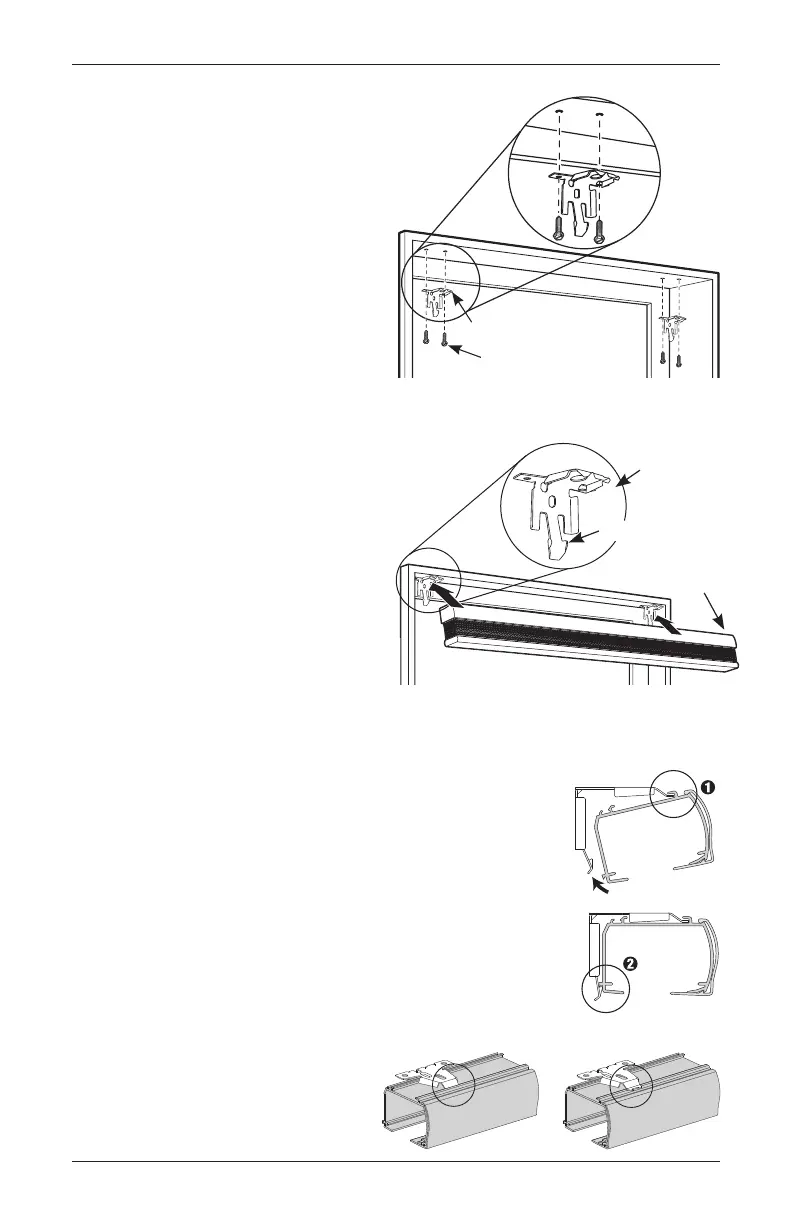
STEP 2: INSTALLING THE BRACKETS
•
Drill the screw holes using a
3
⁄32" drill bit.
• Attach the installation brackets
using the screws provided,
2 screws per bracket.
• Ensure all brackets are square
with each other.
IMPORTANT: Use drywall anchors
when mounting into drywall.
Screw
Bracket
Bracket
Screw
INSIDE MOUNT (IM)
STEP 3: INSTALLING THE
SHADE–MOUNTING THE HEADRAIL
•
Fit the front channel on top of the headrail onto the front
lip of installation brackets.
• Push the headrail up and back until it snaps into place.
• Check to ensure the headrail is securely in the brackets.
— Check that the bottom of the headrail is snapped into
the base of each bracket.
— Check that the front lip of each bracket is in the front
channel of the headrail.
— If any brackets are not installed correctly, release the
shade and reinstall. See “Removing the Shade
(If Necessary)” on page 17.
Front Lip
Spring Tab
Headrail
Snap in
Place
Headrail
Bracket
The front of the bracket
fits under the groove.
Good Bad
INSTALLATION
10 Cellular Shades Motorized Control Lift



 To Next Page