7-3
MIDI Operation
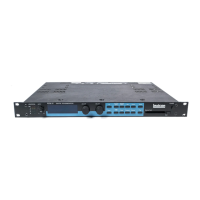
300
DIGITAL EFFECTS SYSTEM
MIDI
48 kHz
44.1 kHz
32 kHz
CONTROL
UP
PAGE
DOWN
7 89
456
123
— 0
ENTER
PAGE
SETUP
SELECT
MACH
STORE
VALUE
SETUP
EDIT
EFFECT
EDIT
MOD
EDIT
BYPASS
A
BYPASS
B
POWER
LEVEL
MIDI Out
MIDI In
MIDI Out
MIDI In
300 with sequencer/computer
and keyboard
The 300 can receive MIDI information on two independent channels: one for
SysEx and Dump messages, and one for Program Change and Dynamic MIDI
®
patches. MIDI Channel assignments are made in Control mode. To select this
function, press CONTROL and use the PAGE UP/DOWN keys to display the
MIDI control page.
Setting MIDI Channels
Midi Mode AUTO CHNL
Map Table: EDIT DUMP
Pressing the button above "CHNL" will cause the following display to appear:
Channels: MachA-(1-16, OMNI)
Sys- (1-16, OMNI) MachB- (1-16, OMNI)
Press either of the left hand buttons in the lower row to select the MIDI Channel
for SysEx system and effect changes. Setup patch channel assignments are
also set here. Press either of the right hand buttons in the Upper row to select
the MIDI Channel for Dynamic MIDI
®
parameter changes for Machine A. Press
either of the righthand buttons in the lower row for Machine B. (All selections
may, of course, be set to the same channel.)


 To Next Page
 Loading...