EasyManua.ls Logo

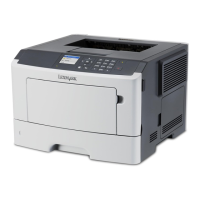
Lexmark MS415dn - User Manual

Lexmark MS415dn
111 pages
Print Icon
To Next Page IconTo Next Page
Loading...
MS310d/dn, MS312dn, MS315dn,
MS410d/dn, MS415dn, MS510dn,
MS610dn/dtn/de/dte, MX310dn,
MX410de, MX510de,
MX511de/dhe, MX610de,
MX611de/dhe
Technical Reference
May 2014 www.lexmark.com

Table of Contents

Questions and Answers

  • E
    Emily JonesAug 31, 2025
    How to solve insufficient memory for flash memory defragment operation on Lexmark MS415dn Printer?
    • K
      Kimberly MasseyAug 31, 2025
      To resolve the 'Insufficient memory for Flash Memory Defragment operation' error on your Lexmark Printer, you can press on the printer control panel to stop the defragmentation and continue printing. You can also delete fonts, macros, and other data in the printer memory by navigating to Settings > Settings > Print Settings > Utilities Menu > Format Flash > Yes on the printer control panel. Alternatively, install additional printer memory.
  • D
    Dana PalmerAug 25, 2025
    What to do if my Lexmark MS415dn says cartridge nearly low?
    • S
      Sarah RussellAug 25, 2025
      To resolve a 'Cartridge nearly low' message on your Lexmark Printer, you can press on the printer control panel to clear the message and continue printing, if necessary.
  • I
    Ian DanielAug 25, 2025
    What to do if my Lexmark MS415dn Printer says cartridge low?
    • G
      Gary HallAug 26, 2025
      To resolve a 'Cartridge low' message on your Lexmark Printer, you may need to order a toner cartridge. If necessary, you can press on the printer control panel to clear the message and continue printing.
  • J
    Joshua Preston Jr.Aug 26, 2025
    How to fix load [paper source] with [custom string] [orientation] error on Lexmark MS415dn Printer?
    • M
      Mason BranchAug 26, 2025
      To fix the 'Load [paper source] with [custom string] [orientation]' error on your Lexmark Printer, load the indicated tray or feeder with the correct size and type of paper. Alternatively, you can press on the printer control panel to clear the message and continue printing. If all else fails, cancel the current job.
  • P
    Paul MartinAug 26, 2025
    How to fix memory full error on Lexmark MS415dn Printer?
    • E
      Eric GonzalezAug 26, 2025
      To resolve the 'Memory full' error on your Lexmark Printer, you can press on the printer control panel to clear the message. Additionally, try decreasing the resolution setting or installing additional printer memory.
  • A
    Anthony RodriguezAug 27, 2025
    How to fix load [paper source] with [custom type name] [orientation] error on Lexmark MS415dn?
    • C
      Chad AndrewsAug 27, 2025
      To resolve the 'Load [paper source] with [custom type name] [orientation]' error on your Lexmark Printer, load the tray or feeder with the correct size and type of paper. You can also press on the printer control panel to clear the message and continue printing, or cancel the current job.
  • V
    vanessa26Aug 27, 2025
    How to fix load [paper source] with [paper size] [orientation] error on Lexmark MS415dn?
    • C
      chadgarciaAug 27, 2025
      To resolve the 'Load [paper source] with [paper size] [orientation]' error on your Lexmark Printer, load the tray or feeder with the correct size of paper. You can also press on the printer control panel to clear the message and continue printing, or cancel the current job.
  • J
    Jessica JenkinsAug 27, 2025
    How to fix load [paper source] with [paper type] [paper size] [orientation] error on Lexmark Printer?
    • P
      pamela26Aug 27, 2025
      To resolve the 'Load [paper source] with [paper type] [paper size] [orientation]' error on your Lexmark Printer, load the tray or feeder with the correct size and type of paper. You can also press on the printer control panel to clear the message and continue printing, or cancel the current job.
  • M
    Melinda NelsonAug 28, 2025
    What to do if Lexmark Printer says reinstall missing or unresponsive cartridge?
    • J
      Joshua FrenchAug 28, 2025
      To address the 'Reinstall missing or unresponsive cartridge' message on your Lexmark Printer, first check if the toner cartridge is missing and install it if it is. If the cartridge is already installed, remove and then reinstall it.
  • Y
    ycraigAug 28, 2025
    What to do if Lexmark MS415dn Printer says reinstall missing or unresponsive imaging unit?
    • M
      Maria LindseyAug 28, 2025
      To address the 'Reinstall missing or unresponsive imaging unit' message on your Lexmark Printer, first check if the imaging unit is missing and install it if it is. If the imaging unit is already installed, remove and then reinstall it.

Lexmark MS415dn Specifications

General IconGeneral
Print TechnologyLaser
Print SpeedUp to 40 ppm
Print Resolution1200 x 1200 dpi
Processor Speed800 MHz
Duplex PrintingYes
Maximum Paper Size8.5 x 14 inches
Operating System CompatibilityWindows, Mac OS, Linux
Memory256 MB
Input Capacity250 sheets
ConnectivityUSB, Ethernet
Dimensions10.3 x 15.7 x 15.0 inches

Videos

How to Remove drum and toner of Lexmark MS415dn

Related product manuals