• The buzzer may be difficult to hear if the surrounding area is noisy, the volume of
the audio system volume is high, the air conditioning system is being used, etc.
• If the temperature in the cabin is extremely high or low, the audio system screen
may not operate correctly.
RCD function
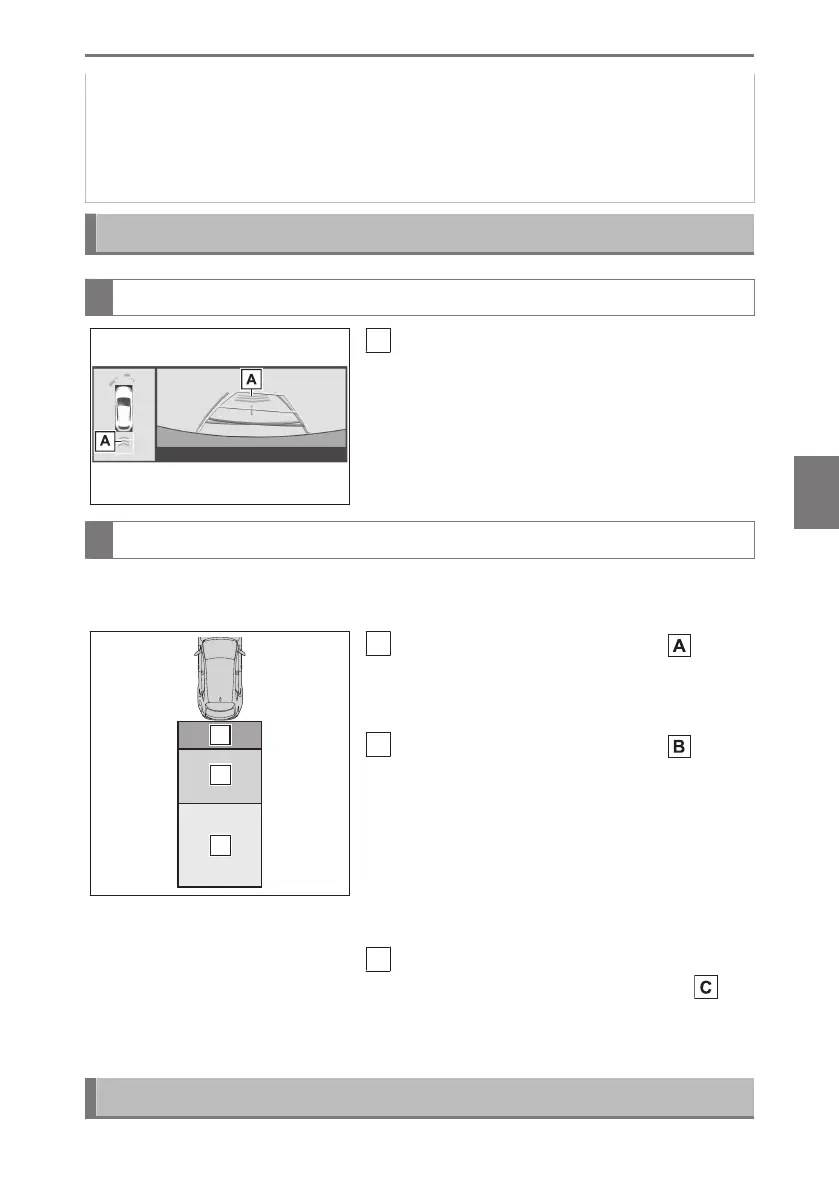
Center Display
A
Pedestrian detection icon
Displayed automatically when a pedestrian
is detected.
(Each time the power switch is turned off
then changed to ON, the RCD function will
be enabled automatically.)
When a pedestrian is detected
If the rear camera detection function detects a pedestrian in the detection area, the
buzzer and pedestrian detection will operate as follows:
A
If a pedestrian is detected in area
Buzzer: Sounds repeatedly
Pedestrian detection icon: Blinks
B
If a pedestrian is detected in area
Buzzer (When the vehicle is stationary):
Sounds 3 times
Buzzer (When the vehicle is backing up,
when a pedestrian approaches the rear of
the vehicle): Sounds repeatedly
Pedestrian detection icon: Blinks
C
If the system determines that your vehicle
may collide with a pedestrian in area
Buzzer: Sounds repeatedly
Pedestrian detection icon: Blinks
Changing the RCD settings
6-2. Using the safe driving support functions
461
6
Driving support system



 To Next Page