EasyManua.ls Logo

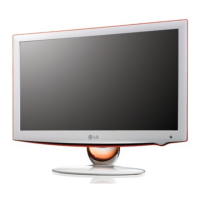
LG 22LU7000 - User Manual

LG 22LU7000
116 pages
Print Icon
To Next Page IconTo Next Page
Loading...
Please read this manual carefully before operating
your TV. Retain it for future reference.
Record model number and serial number of the TV.
Refer to the label on the back cover and quote this
information to your dealer when requiring service.
LCD TV
OWNER’S MANUAL
LCD TV MODELS
19LU70
22LU70
Trade Mark of the DVB Digital Video
Broadcasting Project (1991 to 1996)
I
ID N umber ( s ) :
6207 : 19LU7000
6224 : 22LU7000
ENGLISH
Model :
Serial No. :

Table of Contents

Other manuals for LG 22LU7000

Questions and Answers

  • T
    Timothy AllenAug 17, 2025
    How to fix vertical bar or stripe on LG LCD TV?
    • C
      Charles HendricksAug 17, 2025
      To resolve vertical bars or stripes on the background, horizontal noise, or an incorrect picture position on your LG LCD TV, use the Auto configure function. Alternatively, manually adjust the clock, phase, or H/V position settings.
  • C
    Cindy GrahamAug 20, 2025
    What to do if LG 22LU7000 LCD TV screen colour is unstable?
    • M
      milleremilyAug 20, 2025
      If the screen color on your LG LCD TV appears unstable or displays a single color, first check the signal cable. If the problem persists, try reinstalling the PC video card.
  • D
    dwadeAug 23, 2025
    What to do if DVD function does not work on LG 22LU7000?
    • C
      Christopher HensonAug 23, 2025
      If the DVD function on your LG LCD TV isn't working and playback won't start: * Ensure a disc is loaded. * If a disc is loaded, it may be dirty; clean it. * Note that the unit cannot play CD-ROMs, etc.
  • J
    jessicamartinAug 26, 2025
    How to switch to Home use mode on LG 22LU7000?
    • A
      Antonio ClarkAug 26, 2025
      To switch your LG LCD TV to Home use mode: From the TV Menu, go to OPTION, then choose Mode Setting, and finally select Home use.
  • G
    Glenn McdonaldAug 28, 2025
    How to fix problem in PC mode on LG LCD TV?
    • S
      Stephen DavilaAug 28, 2025
      If you are experiencing issues in PC mode on your LG LCD TV, try adjusting the resolution, horizontal frequency, or vertical frequency. Also, ensure that you have selected the correct input source.
  • P
    Patricia RoseAug 31, 2025
    Why there is no subtitle on my LG LCD TV?
    • M
      Mrs. Jennifer RobertsAug 31, 2025
      Some discs simply do not have subtitles. However, if subtitles are available but not showing, press the SUBTITLE button on your remote for DVDs.
  • D
    Dr. Kimberly Coleman DVMSep 3, 2025
    Why stopping playback doesn't work on LG 22LU7000?
    • L
      Lisa CummingsSep 3, 2025
      Some discs may not support certain functions like stopping playback, search, slow motion play, repeat play, or program play.
  • D
    donna71Sep 5, 2025
    Why is the picture distorted during fast playback on LG LCD TV?
    • N
      Nicole GeorgeSep 5, 2025
      Picture distortion can occasionally occur during fast reverse or forward playback. This is normal.
  • C
    Cassandra GloverSep 8, 2025
    Why audio language cannot be changed on LG 22LU7000?
    • B
      Brian HerreraSep 8, 2025
      If you cannot change the audio soundtrack or subtitle language when playing a DVD on your LG LCD TV, it is likely because multilingual language options were not recorded on the DVD disc.
  • L
    lisafordSep 12, 2025
    Why angle cannot be changed on LG 22LU7000?
    • C
      Caitlin GraySep 12, 2025
      The angle cannot be changed because multi-angles are not recorded on the DVD disc.

LG 22LU7000 Specifications

General IconGeneral
Screen Size22 inches
Resolution1680 x 1050
Display TechnologyLCD
BacklightCCFL
Aspect Ratio16:10
Refresh Rate60 Hz
Response Time5 ms
Contrast Ratio1000:1
Brightness300 cd/m²
Sound Output3W x 2
InputsHDMI, Component, Composite, RF
Viewing Angle170° (H) / 160° (V)

Related product manuals