13
ENG
ENGLISH
REMOTE CONTROL
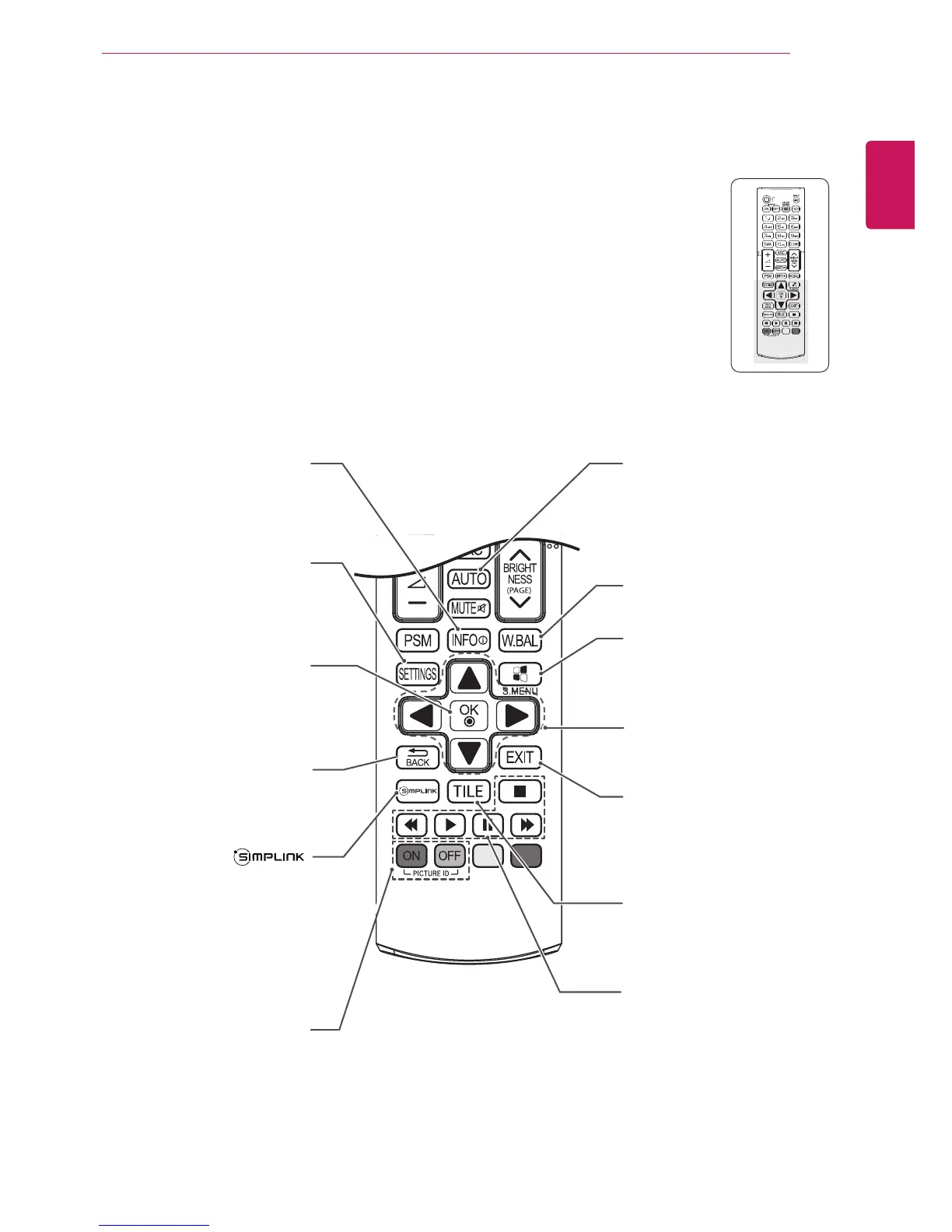
W.BAL
Thisbuttonselectionisnot
applicable.
Navigation Buttons
Scrollsthroughmenusor
options.
S.MENU
(SuperSignMenuKey)
Thisbuttondoesnotapplyto
thismodel.
EXIT
Clearsallon-screendisplays
andreturnstoMonitorset
viewingfromanymenu.
TILE
Thisbuttonselectionisnot
applicable.
INFO
ⓘ
Viewstheinformationofthe
currentlyprogramandthe
screen.
SETTINGS
Accessesthemainmenus
orsavesyourinputandexit
menus.
OK
Selectsmenusoroptionsand
confirmsyourinput.
BACK
Allowstheusertomoveback
onestepinuserinteraction
function.
Allowsyoutocontrolvarious
multimediadevicessimply
byusingtheremotecontrol
throughtheSimpLinkmenu.
(Itmaynotbesupported
dependingonthemodel.)
USB Menu control buttons
Controlsmediaplayback.
ID ON/OFF
WhenthenumberofPicture
IDisequaltoSetIDyoucan
controlthemonitorwhich
youwantinthemultidisplay
condition.
AUTO
Automaticallyadjustspicture
positionandminimizesimage
instability.(RGBinputonly)



 To Next Page