63
ENG
ENGLISH
CONTROLLING THE MULTIPLE PRODUCT
CONTROLLING THE MULTIPLE PRODUCT
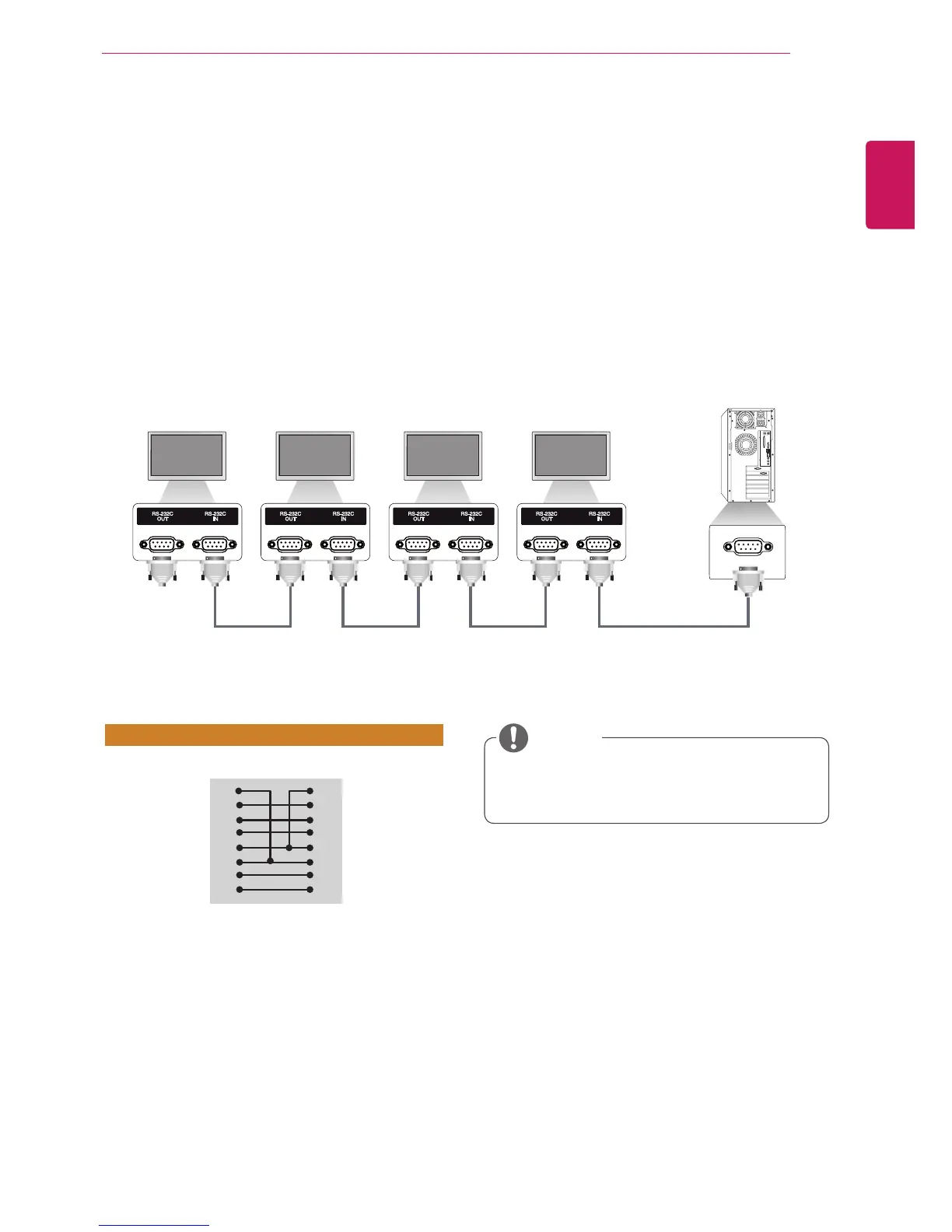
UsethismethodtoconnectseveralproductstoasinglePC.Youcancontrolseveralproductsata
timebyconnectingthemtoasinglePC.
IntheOptionmenu,SetIDmustbebetween1and255withoutbeingduplicated.
Connecting the Cable
ConnecttheRS-232Ccableasshowninthepicture.
TheRS-232CprotocolisusedforcommunicationbetweenthePCandproduct.Youcanturnthe
producton/off,selectaninputsourceoradjusttheOSDmenufromyourPC.
Communication Parameter
BaudRate:9600BPS
DataLength:8bit
ParityBit:None
StopBit:1bit
FlowControl:None
CommunicationCode:ASCIIcode
Useacrossed(reverse)cable
RS-232C Configurations
Whenusing3-wireconnections(non-
standard),anIRdaisychaincannotbeused.
NOTE
8-WireConfigurations(Cross-overRS-232Ccable)
PC Set
D-Sub9D-Sub9
(Female)(Female)
DCD
RXD
TXD
GND
DTR
DSR
RTS
CTS
DCD
TXD
RXD
GND
DSR
DTR
CTS
RTS
1
2
3
5
4
6
7
8
1
3
2
5
6
4
8
7
Monitor1Monitor2Monitor3Monitor4
PC
RS-232CCable(notincluded)



 To Next Page