29
ENG
ENGLISH
ENTERTAINMENT
Video options
1 PressSETTINGStoaccessthePop-Up
menus.
2 PressthenavigationbuttonstoscrolltoSet
Video Play.,Set Video. or Set Audio. and
pressOK.
TheoptionvalueschangedinMovie List
donotaffectPhoto Listor Music List.
Therefore,theyarenotaffectedbyoption
valueschangedinPhoto ListorMusic List.
TheoptionvalueschangedinPhoto List
andMusic Listdoaffecteachother.
Whenreplayingthevideofileafterstopping,
youcanplayfromwhereitstoppedprevi-
ously.
NOTE
Only10,000ofsyncblockscanbesupported
withinthesubtitlefile.
Whenplayingavideo,youcanadjustthe
picturesizebypressingtheARCbutton.
Subtitlesinyourlanguageareonlysup-
portedwhentheOSDmenuisalsointhis
language.
Thecodepageoptionsmaybedisabledde-
pendingonthelanguageofthesubtitlefiles.
Selecttheappropriatecodepageforthe
subtitlefiles.
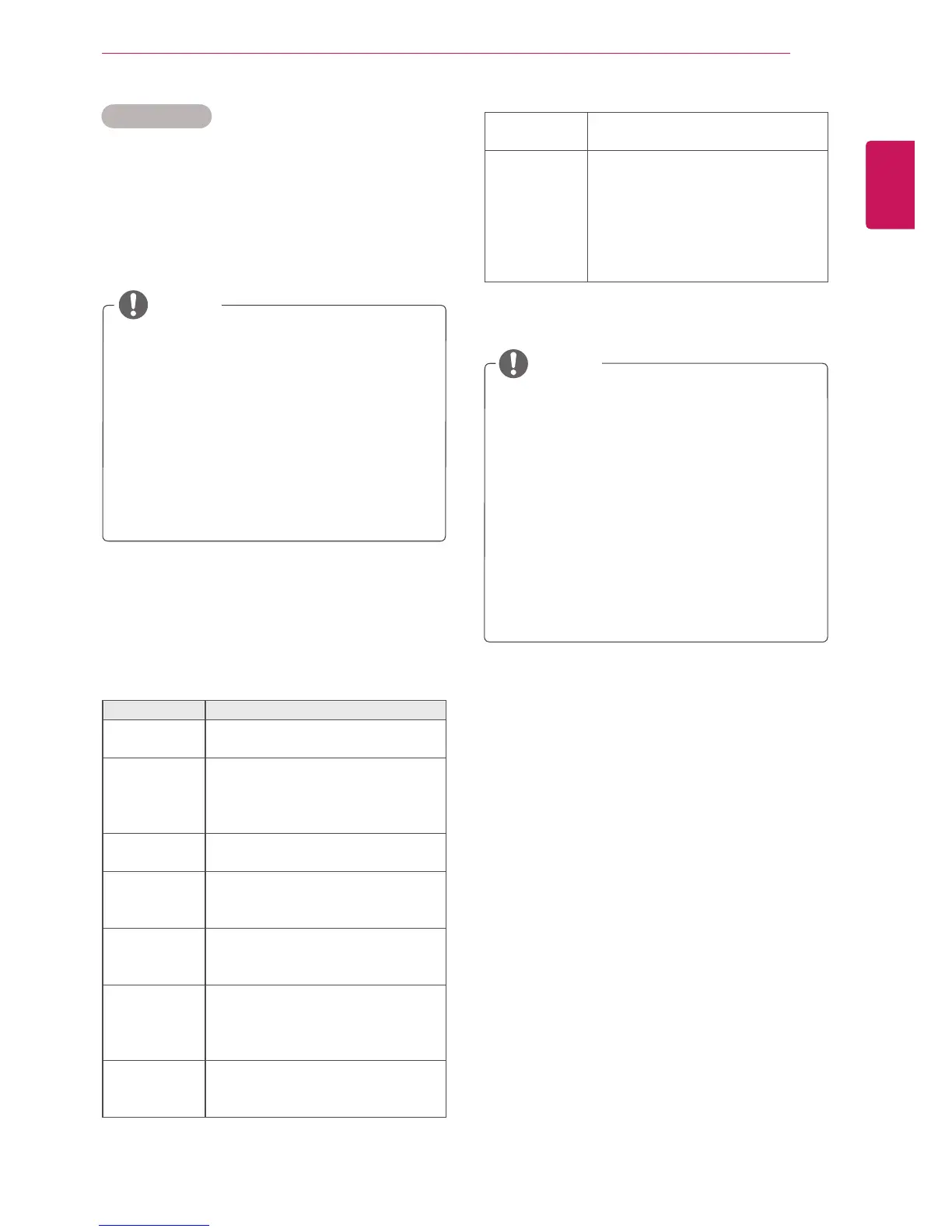
Menu Description
Picture Size Selectsyourdesiredpicture
formatduringmovieplay.
Audio
Language
ChangestheLanguageGroupofthe
audioduringmovieplay.Files
withasingleaudiotrackcannotbe
selected.
Subtitle
Language
Turnon/offthesubtitle.
Language ActivatedforSMIsubtitleand
canselectthelanguagewithinthe
subtitle.
Code Page Canselectthefontforsubtitle.
Whensettodefault,samefontas
generalmenuwillbeused.
Sync Adjuststhetimesynchronisationof
thesubtitlefrom-10secsto+10secs
bystepsof0.5secsduringmovie
play.
Position Changesthepositionofthe
subtitleeitherupordownduring
movieplay.
NOTE
SelectSet Video Play.toaccessthefollowing
menus:
Size SelectsyourdesiredSubtitlesize
duringmovieplay.
Repeat Turnon/offrepeatfunctionof
movieplayback.Whenturnedon,the
filewithinthefolderwillbeplayed
backrepeatedly.Evenwhenthe
repeatedplaybackisturnedoff,itcan
runtheplaybackifthefilenameis
similartothepreviousfile.
FormoredetailsabouttheSet Video.menu,see
theCUSTOMIZE SETTINGSsection.Seepage37.
FormoredetailsabouttheSet Audio.menu,see
theCUSTOMIZE SETTINGSsection.Seepage40.



 To Next Page