31
ENG
ENGLISH
ENTERTAINMENT
Photo options
1 PressSETTINGStoshowtheOptionmenus.
2 PressthenavigationbuttonstoscrolltoSet
Photo View., Set Video. or Set Audio. and
pressOK.
TheoptionvalueschangedinMovie List
donotaffectPhoto Listor Music List.
Therefore,theyarenotaffectedbyoption
valueschangedinPhoto ListorMusic List.
TheoptionvalueschangedinPhoto List
andMusic Listdoaffecteachother.
NOTE
Menu Description
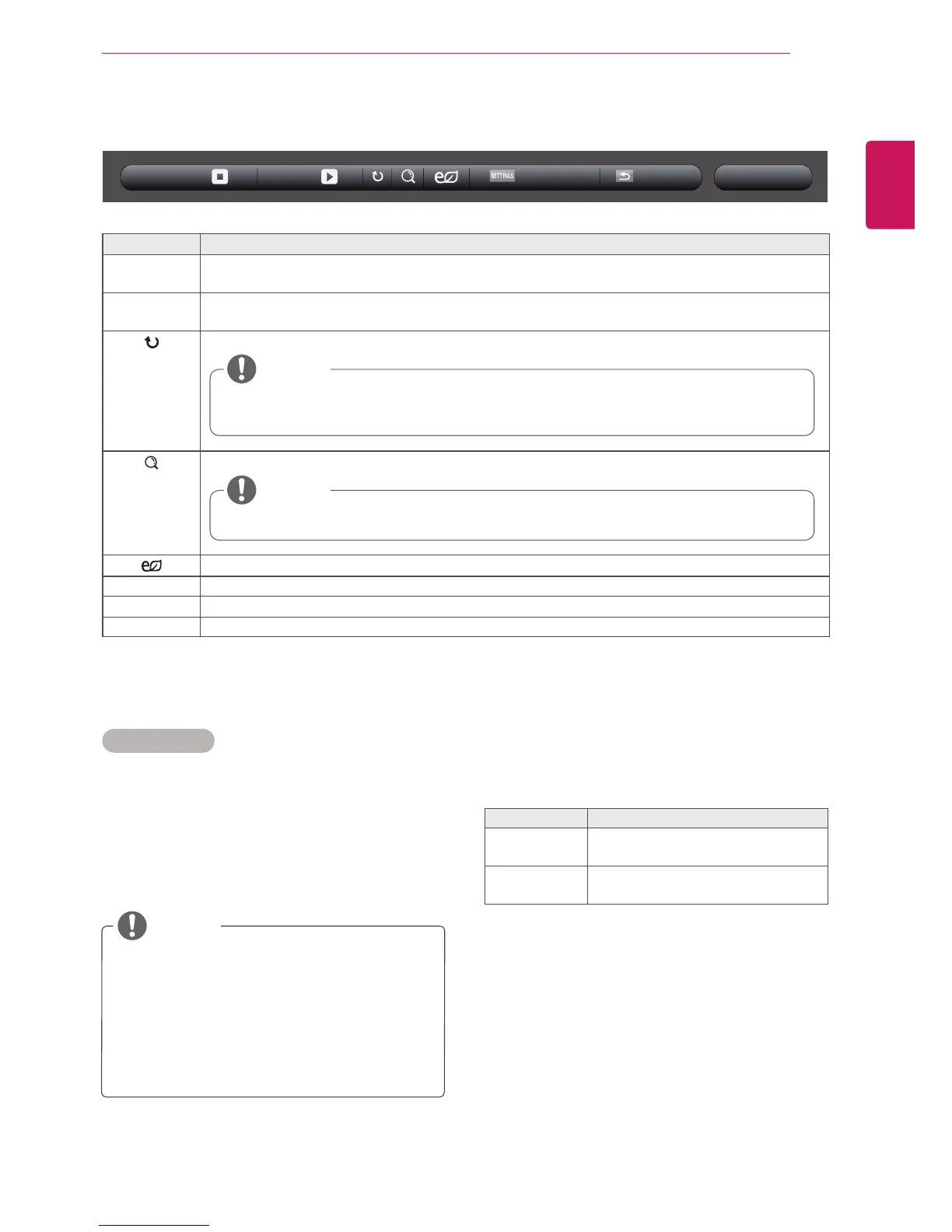
Slideshow Startsorstopsaslideshowwithselectedphotos.Iftherearenoselectedphotos,allphotossavedin
thecurrentfolderdisplayduringaslideshow.Tosetaslideshowspeed,selectOption.
BGM Turnsthebackgroundmusiconoroff.Tosetthebackgroundmusicfolder,selectOption.
YoucanadjustoptionbySETTINGSbuttonontheremotecontrol.
Rotatesphotosclockwise(90°,180°,270°,360°).
Enlargesthephotoby100%,200%or400%.
Adjuststhescreenbrightnesstosaveenergy.
Option Todisplaytheoptions
Hide Hidestheoptionwindow.Todisplaytheoptions,pressOK.
Exit ReturntoPhoto List.
Thesupportedphotosizeislimited.Youcannotrotateaphotoiftheresolutionofthe
rotatedwidthislargerthanthesupportedresolutionsize.
Photoswitharesolutionof960x540orlesscannotbeenlarged.
NOTE
NOTE
6 Whileviewingphotos,youcanaccessthefollowingsettings.
Option
BGMSlideshow
Hide Exit
SelectSetting Photo View. toaccessthefollow-
ingmenus:
FormoredetailsabouttheSet Video.menu,see
theCUSTOMIZE SETTINGSsection.Seepage37.
FormoredetailsabouttheSet Audio.menu,see
theCUSTOMIZE SETTINGSsection.Seepage40.
Menu Description
Slide Speed Selectaslideshowspeed.
(Options:Fast,MediumorSlow.)
BGM Selectsamusicfolderfortheback-
groundmusic.



 To Next Page