23
ENGLISH
• Copying: When the resource is selected, the copy button will appear. Click to copy the currently selected resource.
• Cutting: When the resource is selected, the cutting button will appear. Click to cut the currently selected
resource.
• Deleting: Click to delete the selected resource.
• Pasting: When there is any resource being copied or cut currently, the button is available. Users can paste the
copied/cut resource to the specified location as required. You can execute the pasting operation only when the
default folder is displaying “all” resource locations.
• Renaming: Click to rename the selected resource.
• More: Click to pop out the “send to” button. You can send the selected file to the target folder.
• Click a certain resource, the resource operation menu will pop out at the bottom of the window. You can perform
operations such as deleting, copying, cutting, pasting, and renaming on the current resource.
Ordering menu
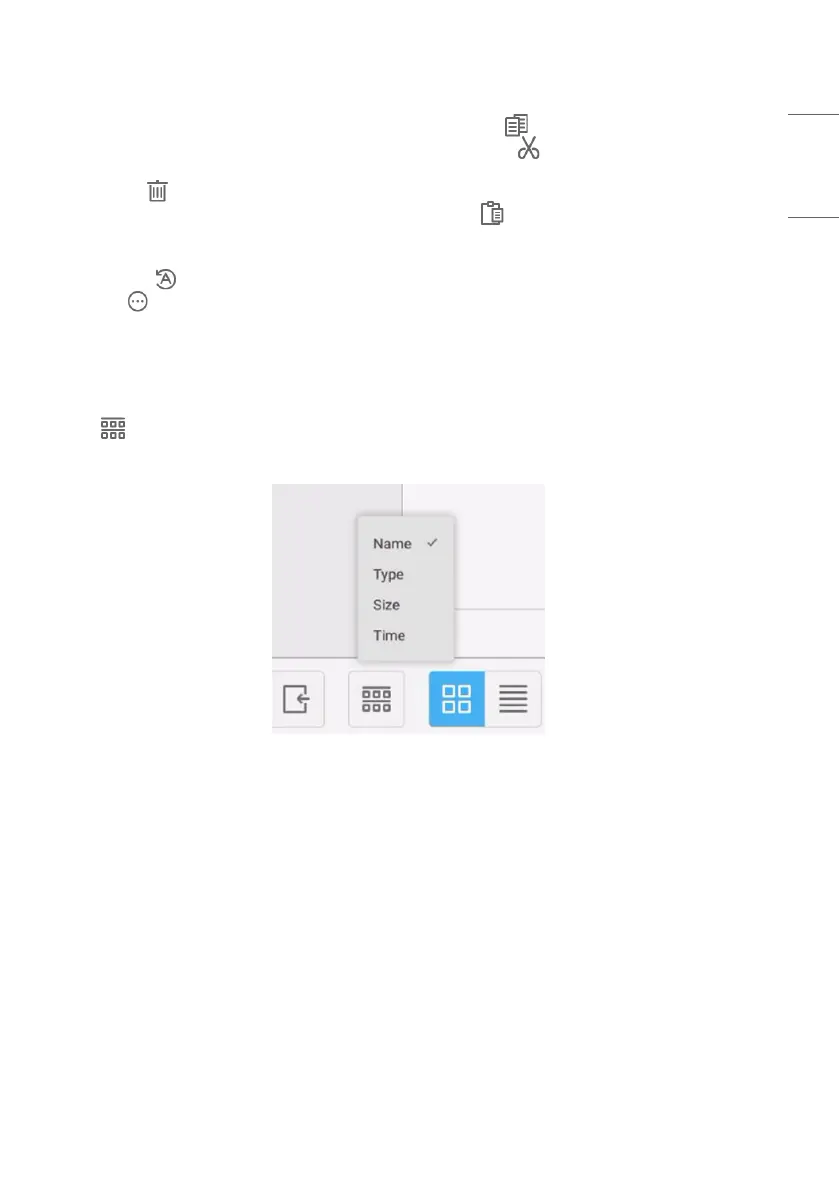
Click the ordering button to pop out the menu as shown in Fig. 4-3-1. You can order the resources, including
ordering according to the name, type, size, and time. Resources are ordered according to name by default.
Fig 4-3-1 Ordering menu
• [Name]: When [Name] is selected, the displayed resources will be ordered according to resource name.
• [Type]: When [Type] is selected, the displayed resources will be ordered according to resource type.
• [Size]: When [Size] is selected, the displayed resources will be ordered according to resource size.
• [Time]: When [Time] is selected, the displayed resources will be ordered according to resource time.



 To Next Page