Connecting16
Connecting
2
Connecting to an
Amplifier
Make one of the following connections, depending
on the capabilities of your existing equipment.
y
HDMI Audio connection
y
2CH Analogue Audio connection
Since many factors aect the type of audio output,
see “Audio Output Specications” for details (page
37).
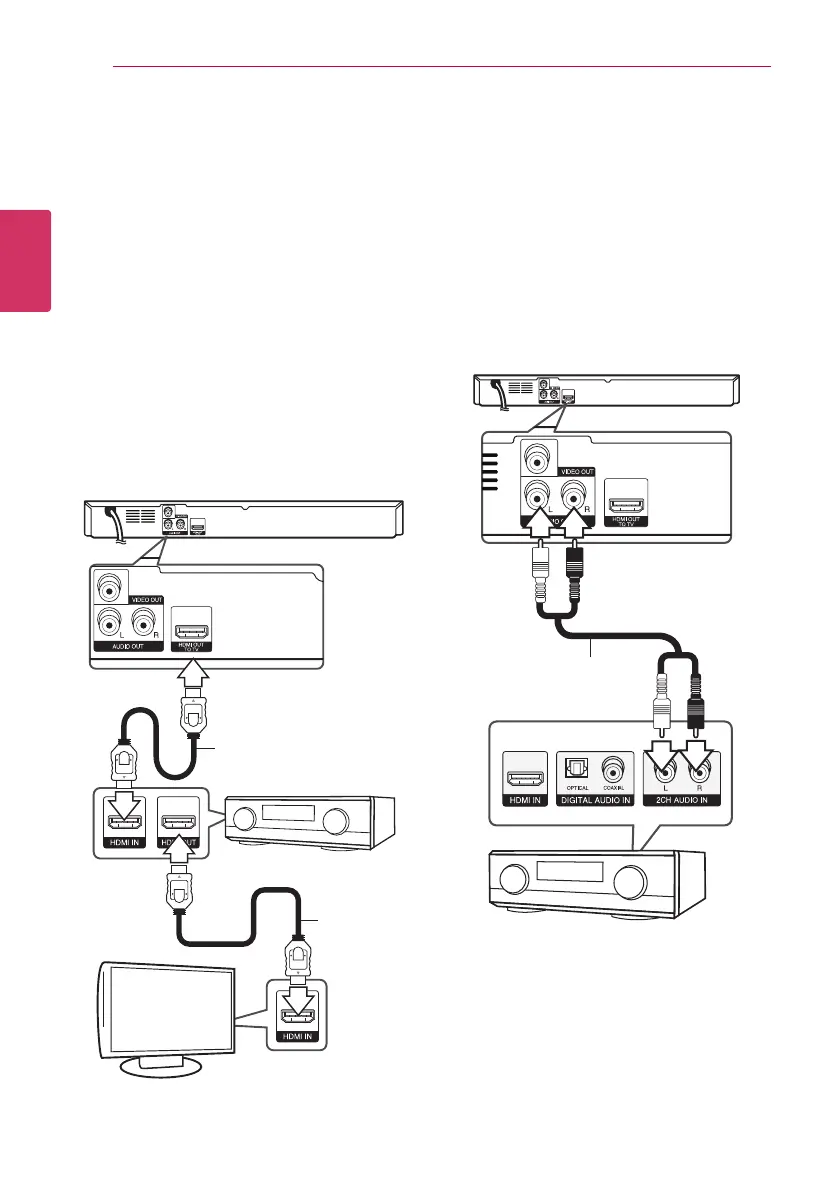
Connecting to an Amplifier via
HDMI Output
Connect the player’s HDMI OUT jack to the
corresponding in jack on your amplier using a
HDMI cable.
HDMI cable
HDMI
cable
TV
Receiver/Amplier
Rear of the unit
Connect the amplier’s HDMI output jack to HDMI
input jack on your TV using a HDMI cable if your
amplier has HDMI output jack.
You will need to activate the player’s digital output.
(See “[AUDIO] Menu” on page 20.)
Connecting to an Amplifier via
2 Channel Audio Output
Connect the Left and Right AUDIO OUT jacks on the
player to the audio left and right in jacks on your
amplier, receiver, or stereo system using audio
cables.
Audio cable
Receiver/Amplier
Rear of the unit


 To Next Page