Connecting 17
Connecting
2
USB device connection
This player can play movie, music and photo les
contained in the USB device.
Playback content in the USB
device
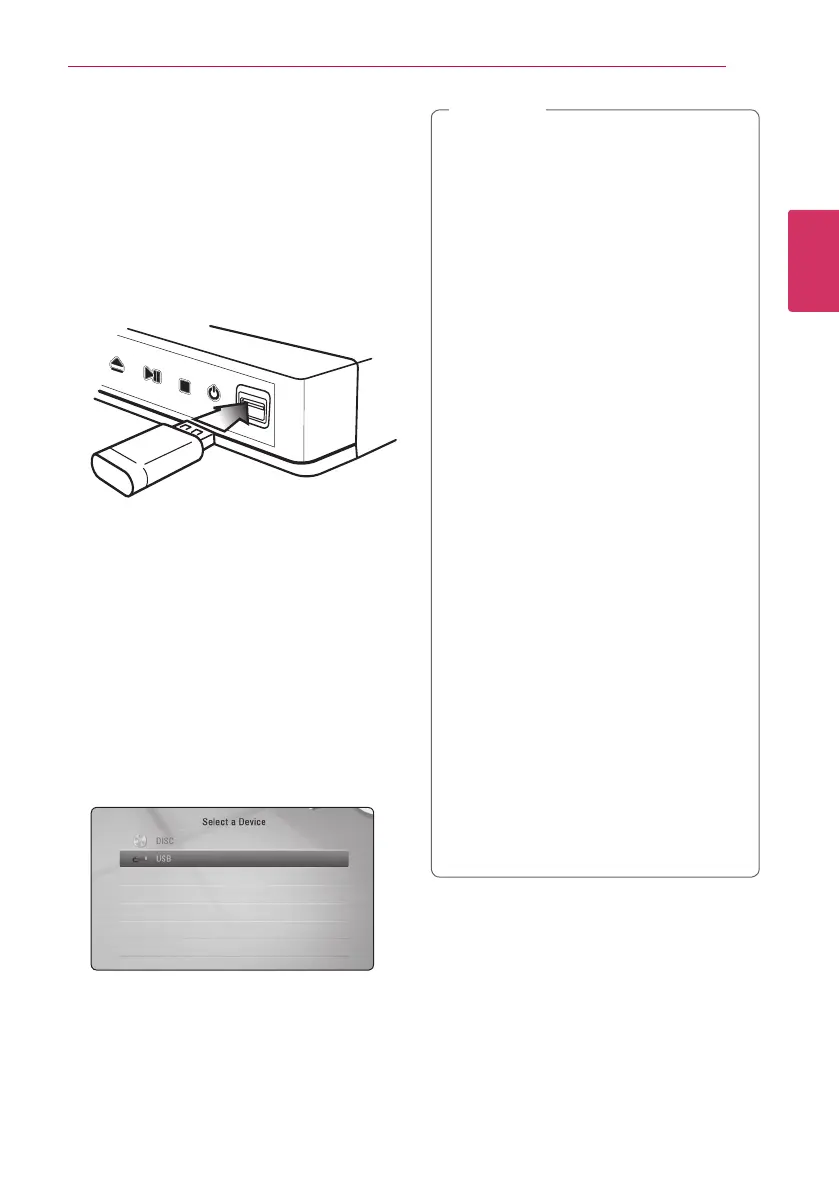
1. Insert a USB device to the USB port until it ts
into place.
When you connect the USB device on the HOME
menu, the player plays a music le contained in the
USB storage device automatically. If the USB storage
device is containing various types of les, a menu
for the le type selection will appear.
File loading may take few minutes depending on
the number of content stored in the USB storage
device. Press ENTER (
b
) while [Cancel] is selected
to stop loading.
2. Press HOME (
n
).
3. Select [Movie], [Photo] or [Music] using
a/d
,
and press ENTER (
b
).
4. Select the [USB] option using
w/s
, and press
ENTER (
b
).
5. Select a le using
w/s/a/d
, and press
PLAY (
d
) or ENTER (
b
) to play the le.
6. Withdraw the USB device carefully.
y
This player supports USB ash drive/external
HDD formatted in FAT16, FAT32 and NTFS
when accessing les (music, photo, movie).
However, for Blu-ray contents, only FAT16
and FAT32 formats are supported. Use the
USB ash drive/external HDD formatted in
either FAT16 or FAT32 when enjoying Blu-ray
contents.
y
The USB device can be used for the local
storage for enjoying Blu-ray contents.
y
This unit can support up to 4 partitions of
the USB device.
y
Do not extract the USB device during
operation (play, etc.).
y
A USB device which requires additional
program installation when you have
connected it to a computer, is not
supported.
y
USB device: USB device that supports
USB1.1 and USB2.0.
y
Movie, music and photo les can be played.
For details of operations on each le, refer to
relevant pages.
y
Regular back up is recommended to
prevent data loss.
y
If you use a USB extension cable, USB HUB
or USB Multi-reader, the USB device may not
be recognized.
y
Some USB device may not work with this
unit.
y
Digital camera and mobile phone are not
supported.
y
USB Port of the unit cannot be connected
to PC. The unit cannot be used as a storage
device.
,
Note


 To Next Page