Connecting14
Connecting
2
What is SIMPLINK?
Some functions of this unit are controlled by the
TV’s remote control when this unit and LG TV’s with
SIMPLINK are connected through HDMI connection.
Controllable functions by LG TV’s remote control;
Play, Pause, Scan, Skip, Stop, Power O, etc.
Refer to the TV owner’s manual for the details of
SIMPLINK function.
LG TV’s with SIMPLINK function has the logo as
shown above.
Depending on the disc type or playing status,
some SIMPLINK operation may dier from your
purpose or not work.
,
Note
Resolution setting
The player provides several output resolutions for
HDMI OUT jack. You can change the resolution
using [Settings] menu.
1. Press HOME (
).
2. Use
a/d
to select the [Settings] and press
Wheel (
). The [Settings] menu appears.
3. Use
w/s
to select [DISPLAY] option then press
d
to move to the second level.
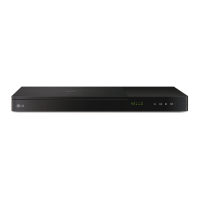
4. Use
w/s
to select the [Resolution] option then
press Wheel (
). to move to the third level.
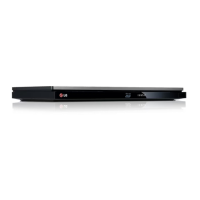
4. Use
w/s
to select the desired resolution then
press Wheel (
) to confirm your selection.


 To Next Page