Operating 31
Operating
4
Home Menu Display
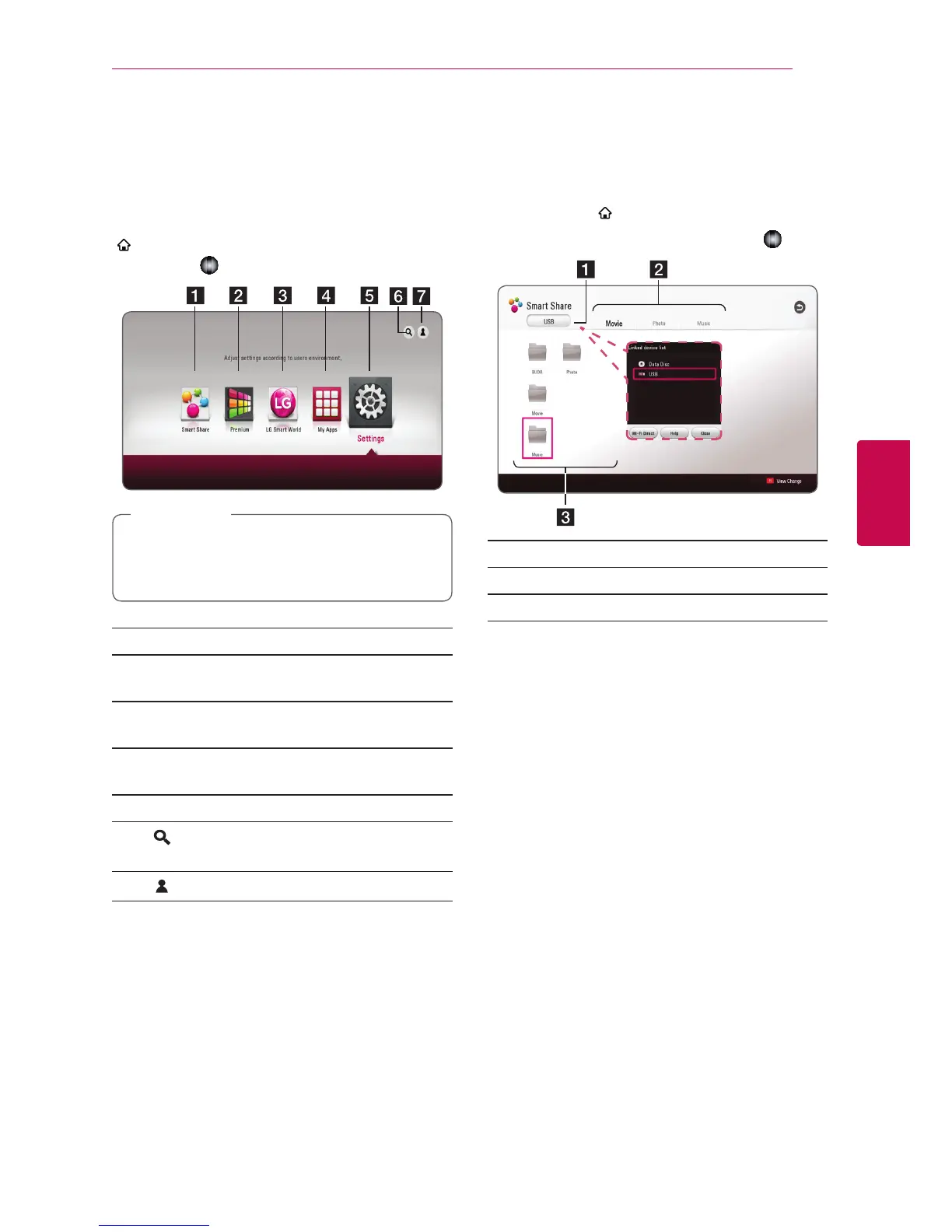
Using [HOME] menu
The home menu appears when you press HOME
(
). Use
w/s/a/d
to select a category and
press
Wheel ( )
.
Depending on the region, the [LG Smart
World], [My Apps] service and [Search]
function may not be available.
,
Note
a
[Smart Share] - Displays Smart Share menu.
b
[Premium] - Displays the Premium home
screen. (page 51)
c
[LG Smart World] - Displays LG Apps titles
provided to the unit. (page 51)
d
[My Apps] - Displays the [My Apps] screen.
(page 53)
e
[Settings] - Adjusts the system settings.
f
[
] - Searches for desired LG Apps and other
content.
g
[
] - Displays login menu.
Using the Smart Share
You can play video, photo and audio content on
the unit by inserting a disc, connecting an USB
device or using home network (DLNA).
1. Press HOME (
) to display the home menu.
2. Select [Smart Share] and press
Wheel ( )
.
a
Displays all linked devices.
b
Displays video, photo or audio content.
c
Displays the le or folder on linked device.


 To Next Page