Connecting Device
17
Connecting to a DVD Player
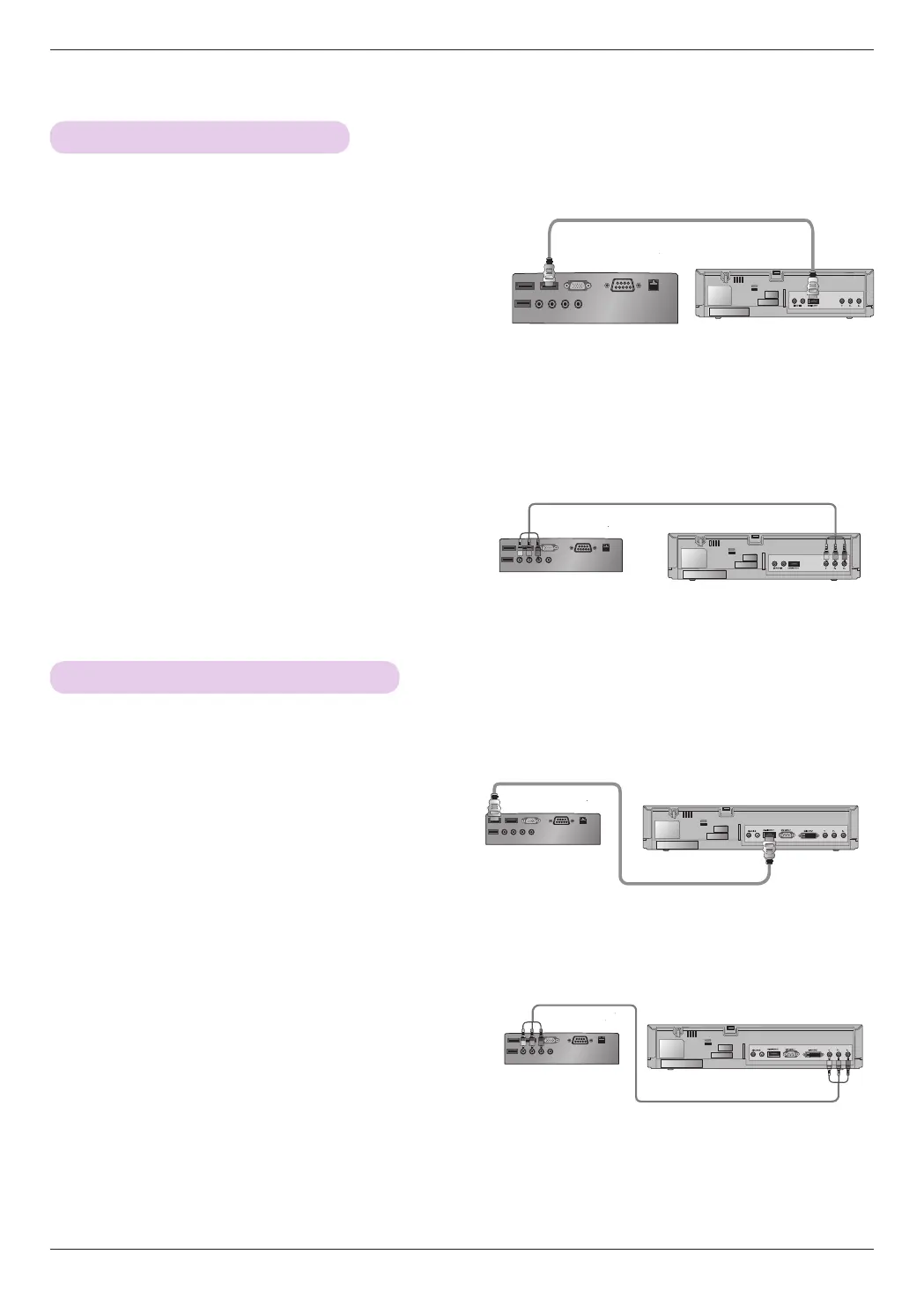
<Connecting to the COMPONENT Port>
Connect the
projector's
COMPONENT IN port to the
DVD player's output port using a component cable
.
*
Match the jack colors to the component cable when connect-
ing.
(Y=Green, PB=Blue, PR =Red)
<Connecting to the HDMI Port>
1. Connect the projector's HDMI IN 1 (or HDMI IN 2) port
to the DVD player's HDMI port using an HDMI cable.
2. Set the DVD player's resolution to one of the following:
480p (576p), 720p, 1080i, or 1080p.
<Connecting to the HDMI Port>
Turn on the projector, then turn on the HDMI device.
* The output jack Y, PB or PR of the DVD player may be marked as Y, Pb, Pr/Y, B-Y, R-Y/Y, Cb, or Cr depending on the model.
<DVD Player>
Component Cable
Component Cable
Connecting to a DTV Set-Top Box
<
Connecting to the HDMI Port
>
1. Connect the projector's HDMI IN 1 (or HDMI IN 2)
port to the DTV set-top box's HDMI port using an
HDMI cable.
2. Set the DTV's resolution to one of the following:
480p (576p), 720p, 1080i, or 1080p.
<Connecting to the HDMI Port>
Turn on the projector, then turn on the HDMI device.
* Please refer to the user manual of the DTV set-top box to connect to the projector, as well as for instructions on how to use the
DTV set-top box.
<
Connecting to the COMPONENT Port
>
Connect the
projector's
COMPONENT IN port to the DTV
set-top box's output port using a component cable
.
*
Match the jack colors to the component cable when connecting.
(Y=Green, PB=Blue, PR =Red)
<DTV Set-Top Box>
<DTV Set-Top Box>
<DVD Player>
HDMI Cable
HDMI Cable



 To Next Page