FM radio reception
50
2 .
When the frequency is searched, the channel
will be fixed and the corresponding frequency
will be automatically received.
- Reception may be weak in some areas.
- As earphones function as antennas, only LG Elec-
tronics' earphones guarantees the reception quality.
To set FM radio channel
Manual channel setting
1.
Press button for two seconds or longer
while listening to the radio.
- In case there is a channel saved, the channel list will
be displayed.
- In case there is a saved channel, the user can man-
ually set the channel through EZ menu.
2 .
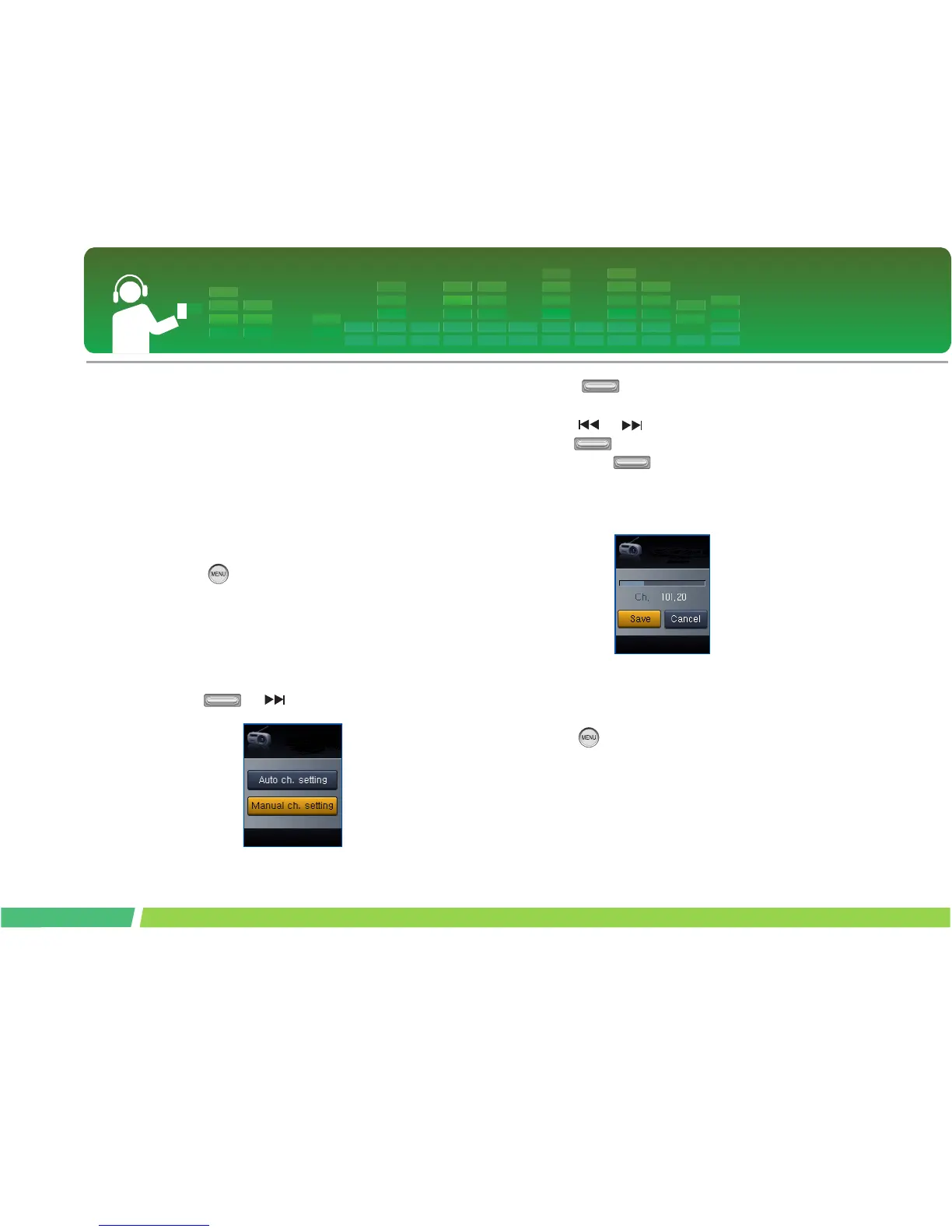
Select [Manual] in the channel setup, and
press or button.
3 .
Adjust button in + or - direction to con-
trol the frequency.
4 .
Press or button to select Save. Then,
press button to save the channel.
- By adjusting button up and down, the user
can change the frequency and save maximum 20
channels.
- The user can delete the channel using EZ menu.
5 .
Select Cancel to end manual channel setup.
Automatica Channel Setting
1.
Press button for two seconds or longer
while listening to the radio.
- In case there is a channel saved, the channel list will
be displayed.
- In case there is a saved channel, the user can auto-
matically set the channel through EZ menu.



 To Next Page