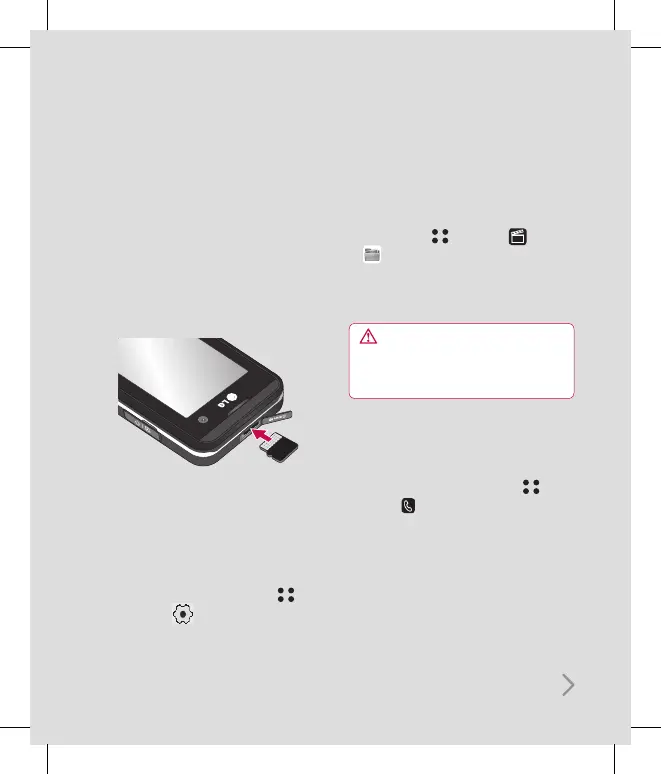
Memory card
Installing a memory card
Expand the memory space available on your
phone using a memory card. The KF700 will
support up to a 4GB memory card.
1 Remove the cover then slide the memory
card into the slot at the top, until it clicks
into place. Make sure that the gold contact
area is facing upwards.
2 Replace the battery and cover as before.
Formatting the memory card
If your memory card is already formatted, you
can begin using it. If your card isn’t formatted
you will need to do so.
1 From the standby screen touch
and select .
2 Choose Phone settings and select Memory
manager and choose External memory.
3 Touch Format and enter the password,
which is set to 0000 as the default. Your
card will be formatted and ready to use.
4 To view the new formatted folders on your
KF700 touch and select . Choose
My stuff. You’ll see five folders:
My images, My sounds, My videos,
My games and apps and others.
WARNING: When you format your memory
card, all the content will be wiped. If you do not
want to lose the data on your memory card,
back it up first.
Transferring your contacts
To transfer your contacts from your SIM to
your phone:
1 From the standby screen touch , and
choose .
2 Select Contacts and choose Settings and
select Copy or Move.
3 Choose Handset to USIM then All together
or One by one.
4 Touch OK to confirm.



 To Next Page